
NLA editor strip movement
Hey Guys,
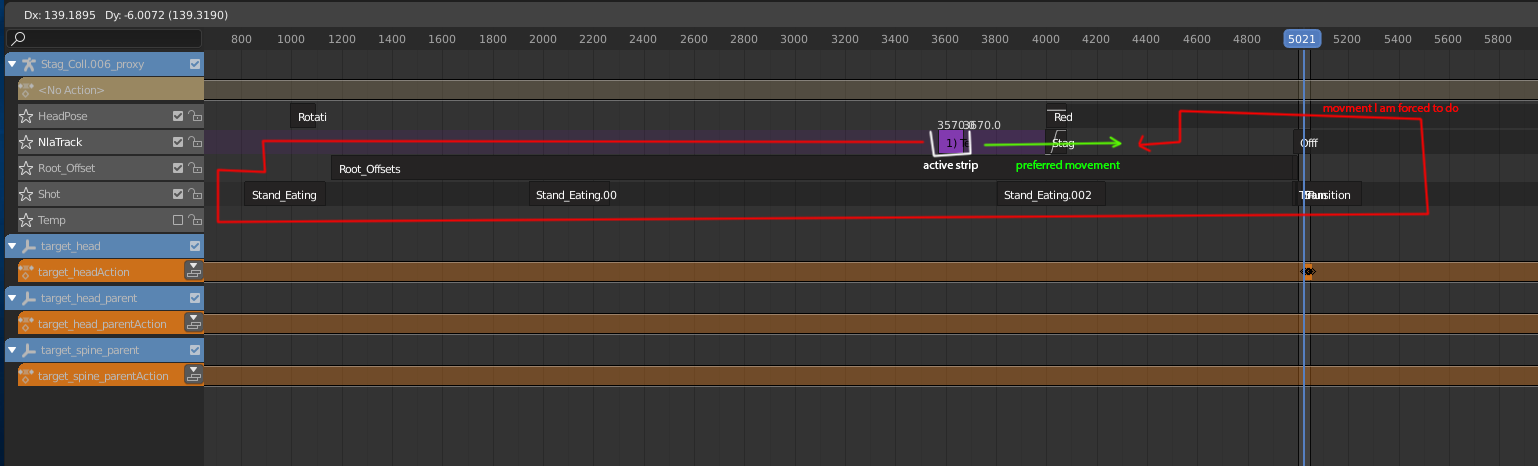
In the Nonlinear Animation Editor you can currently not move a strip beyond an other strip in the same track. For clarity I created a screenshot. I can only move the strip in the purple area and up/down if the track has free space.
It would be great if the strip could just jump over other strips if there is enough space at the current mouse-cursor position.
Please let me know if it is already possible. I switched from Autodesk-Products to blender with 2.8 - so I still got some things learn! If there is already a nice solution I think it would still be good to add the feature with the move-tool.
I am looking forward for feedback! Best, Simon
6 Comments
This has been fixed in 3.6
This is in the NLA roadmap I am working on
Hey 3dcinetv,
thanks for the welcome and your feedback!
I want to move the clip at the position the green and red arrow are pointing ;) In the screenshot it would be arround frame 4300 in the track with the name "NlaTrack".
Matching the timeline does not make any difference. Actually it would have suprised me, since the NLA editor does not seam to care for the timeline.
I did not find any snapping feature for the NLA movment behaviour. Snapping is always active since you can not "overlay" clips in the same track. ("Edit -> Snap" does not really have much to do with the topic)
I uploaded an example file: simonprager.de/temp/NLA_strip-movment_example.blend
Do you see a possibility to move the strip "AwesomeAnim" after "AwesomeAnim.001" without creating a new track and without changing the position of "AwesomeAnim.001"? I only found Edit -> Swap Stips but it changes both positions and is not really intuitive.
I would really appreciate if you had a look at the file I uploaded.
Thanks and all the best, Simon
* @simon.prager * Hi Simon. Thanks for bringing this subject to observation. If you watch the video you can decide in the properties of the clip what clip will be played. I swapped the order of the clips from their properties (watch the video near the end) I didn´t place a directly solved video because I wanted you to see what are the steps to take whenever you encounter things like this anywhere else in Blender. streamable.com/kh1x1 On the second video, I created an extra NLA channel, and I see why you didn´t wanted me to go this route, it´s because: it cannot be erased. This is not normal behavior. You can do BOTH of these things on 2.79 (drag, drop to swap AND delete NLA tracks) so this is something you can report as bugs now. Reference these two videos if you need to. Thanks for pressing on to this, because that´s what makes the NLA powerful: Editing simple tasks with clip actions. streamable.com/n5mck
Hi. Welcome aboard. Check if your current timeline extensions (numbers of frames) match to your NLA view. Second thing I´d check is if you have snapping turned on. You don´t mention on your graphic WHERE you want to place your clip (not drawn in the picture) so I can´t know for sure what is your expected behavior. If you just want to drag your clip constrained to the X axis (left and right): select your NLA clip press G then press "X", drag left or right.
Just found this thread. So mine is kind of a duplicate. blender.community/c/rightclickselect/psbbbc/