
Crease Sets Manager/Editor to store and tweak/update all your creased edges sets
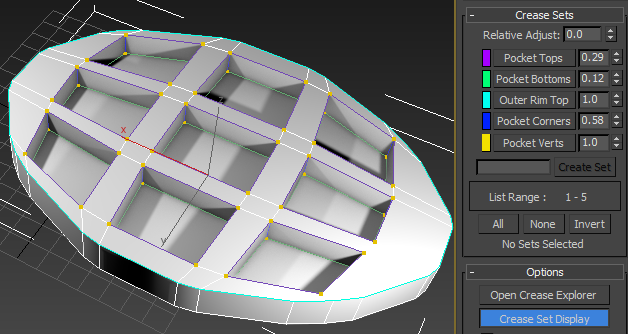
Ability to store and manage your creases immediately makes Open Subdiv Edge crease workflow more viable. A crease manager should include options like :
- Select Elements in Set
- Add Selection to Set
- Subtract Selection from Set
- Update Set from Selection
- Delete Empty Sets
- Assign custom color to each set
A particularly useful application of this is for use with multiple objects. For example, a scene might contain several copies of a car with creases in the same areas in each car. You can use the crease set editor to collect each group of similar creases in all cars into a single set, and thus edit the creasing across the multiple objects simultaneously.
Ive attached the 3ds max one for refference
8 Comments
Rather than this, I would prefer a more generalized solution, such as edge groups .
Hallo... Have anyone find a solution for creases manager edge loop manager like Maya have for blender 2.8. I have a big amount of creases to manage but in blender 2.8 it is pain in the ass to select manual hundrets of loops and note values by writing them with the anotate tool Exist a add on ore is anything in development.. We have no Maya . but since a week we have big trouble to manage the creases values for modeled sub d Models . Help please we need a add on for blender..
P.s. the Maya creases Editor is so simple but amazing with the color options .urgh...blender have nothing to beat maya since 2.8 is out..
Interesting proposal, I would like to suggest vertex groups to support any type of component. Implementing component groups would create the sort of behaviour that you are looking for
blender.community/c/rightclickselect/Tddbbc/
you can sort of get by with vertex groups
* @thinsoldier * do you have any vids on how this work more exactly
* @Sbarcea Stefan * Select edges.
Go to Object Data tab in Properties panel.
Click [+] to make a new vertex group.
Click assign to assign your selected edges to the group.
Click Deselect and Select buttons to make sure it worked.
Double click Group to rename it.
Open side panel in 3d viewport with [N] key.
Click and drag on Mean Crease value.
It barely just be used as selection sets, but there is and will always be one crease "set" in a mesh.
* @thinsoldier * Edge sets will be very helpfull, actually. Not creases, just groups/selection sets/whatever. Vertex groups are good, but have some issues. For example, how to add bevel modifier on 3 of 4 edges of poly? 3DS Max vs Blender (same 3 edges applyed to group) with chamfer/bevel ontop: Each vertex in group -> blender think, that all edges selected as well.