
Enhanced ORIGIN pie menu, working in EDIT MODE
Hello
i've just created a pie menu to choose the origin of the object with the pie menu editor that work both on object and on edit mode the hotkey is shift ctrl alt c of course (and forever)
im a total noob at scripting and i did this within 30min, it was really simple please take a look, i really think that this pie could be a great implementation inside of blender
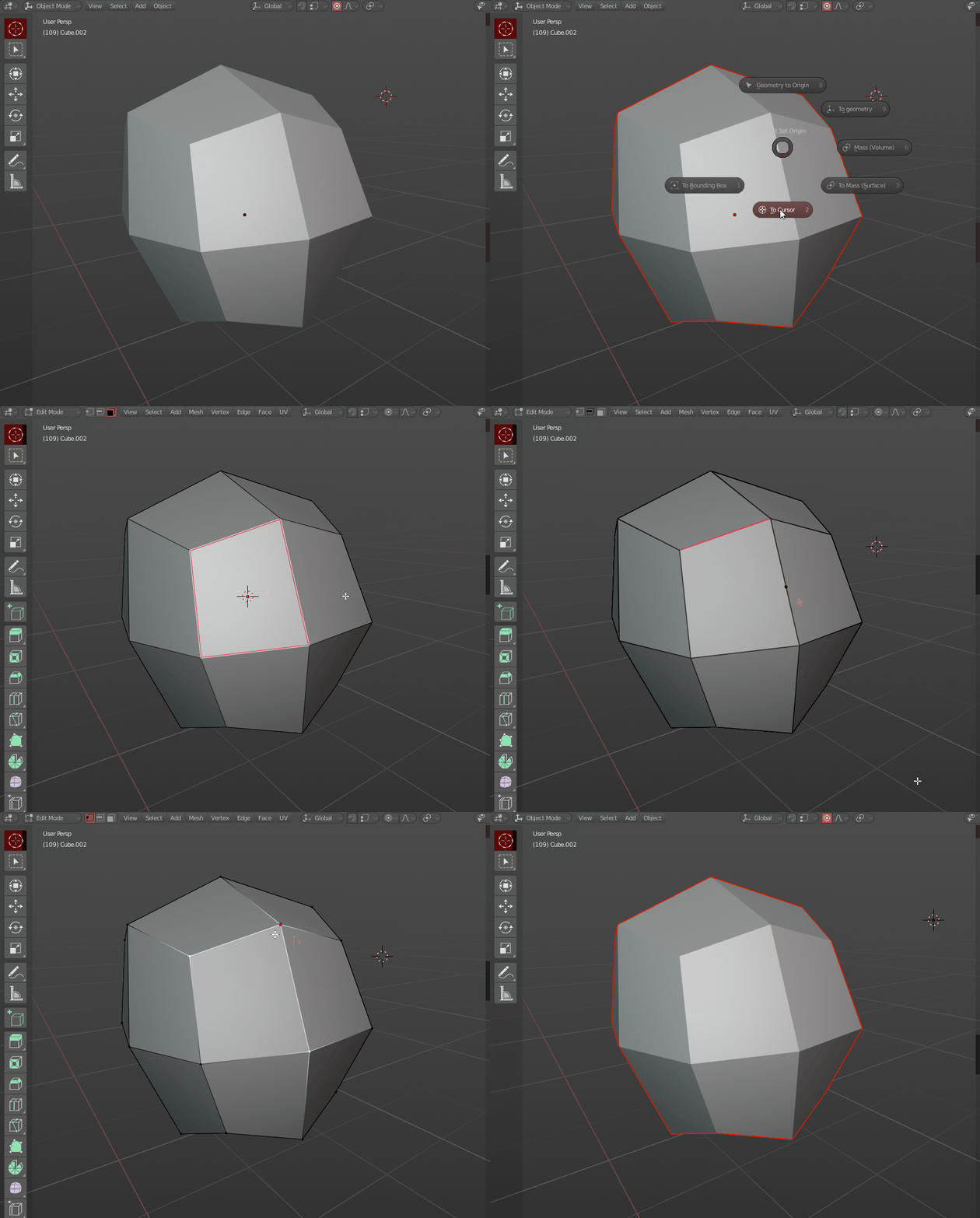
here are a screenshot of the menus
here is the version that is working in edit mode
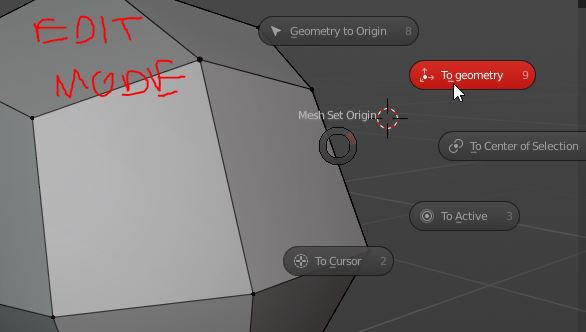
note that i sacrifice the emplacement of the "to mass volume, to mass surface, to bounding box center" option in the edit mode for personnal workflow reasons but it could be done no problem! this example of menu is just to prove a point, choose origin could work inside of edit mode!
here are the 5 codes for the tool that can work in edit mode in order, its really simple i just make the part where you go in and out of edit mode automatically that's it
GEOMETRY TO ORIGIN
import bpy
bpy.ops.object.mode_set(mode='OBJECT') bpy.ops.object.origin_set(type='GEOMETRY_ORIGIN') bpy.ops.object.mode_set(mode='EDIT')
ORIGIN TO CENTER OF GEOMETRY
import bpy
bpy.ops.object.mode_set(mode='OBJECT') bpy.ops.object.origin_set(type='ORIGIN_GEOMETRY') bpy.ops.object.mode_set(mode='EDIT')
ORIGIN TO CENTER OF SELECTION
import bpy
bpy.ops.view3d.snap_cursor_to_selected() bpy.ops.object.mode_set(mode='OBJECT') bpy.ops.object.origin_set(type='ORIGIN_CURSOR') bpy.ops.object.mode_set(mode='EDIT')
***note that it move the 3d cursor at the same time, it need a command that place the 3D cursor at the last place he was just before doing the snap to action, at the end of the code i dont know how to do that
ORIGIN TO ACTIVE
mport bpy
bpy.ops.view3d.snap_cursor_to_active() bpy.ops.object.mode_set(mode='OBJECT') bpy.ops.object.origin_set(type='ORIGIN_CURSOR') bpy.ops.object.mode_set(mode='EDIT')
***note that it move the 3d cursor at the same time, it need a command that place the 3D cursor at the last place he was just before doing the snap to action, at the end of the code i dont know how to do that
ORIGIN TO 3D CURSOR
import bpy
bpy.ops.object.mode_set(mode='OBJECT') bpy.ops.object.origin_set(type='ORIGIN_CURSOR') bpy.ops.object.mode_set(mode='EDIT')
10 Comments
I'd love to see this idea developed further. Blender's origin setting is a little difficult for people moving from other softwares.
Was this ever put into an addon?
If you've already written the add-on, why not just release it and submit it for being in the 'contrib' add-ons?
I agree. But what if the object has a modifier that works depending on the origin? It does not interfere with the work?
The "to bounding box" part needs a bit more to be useful. Centralizing the origin and moving the object to the origin of the scene would still put half of it "below the floor".
If possible, could you try to add a sub menu with expanded options? (my suggestion) blender.community/c/rightclickselect/hycbbc/
But, if you undo it will goes back to object mode with this hack.
@srikanth0126: i just tried, when undoing it make some really strange behavior, not as simply as you described, i cannot understand why: it move the geometry as is the new origin was at the same place of the old origin just before doing the action
@dodododorian: you have to apply location before entering into edit mode.
Good Job. really nice.
love this