
Use Surface Shader as default shader in Viewport Display
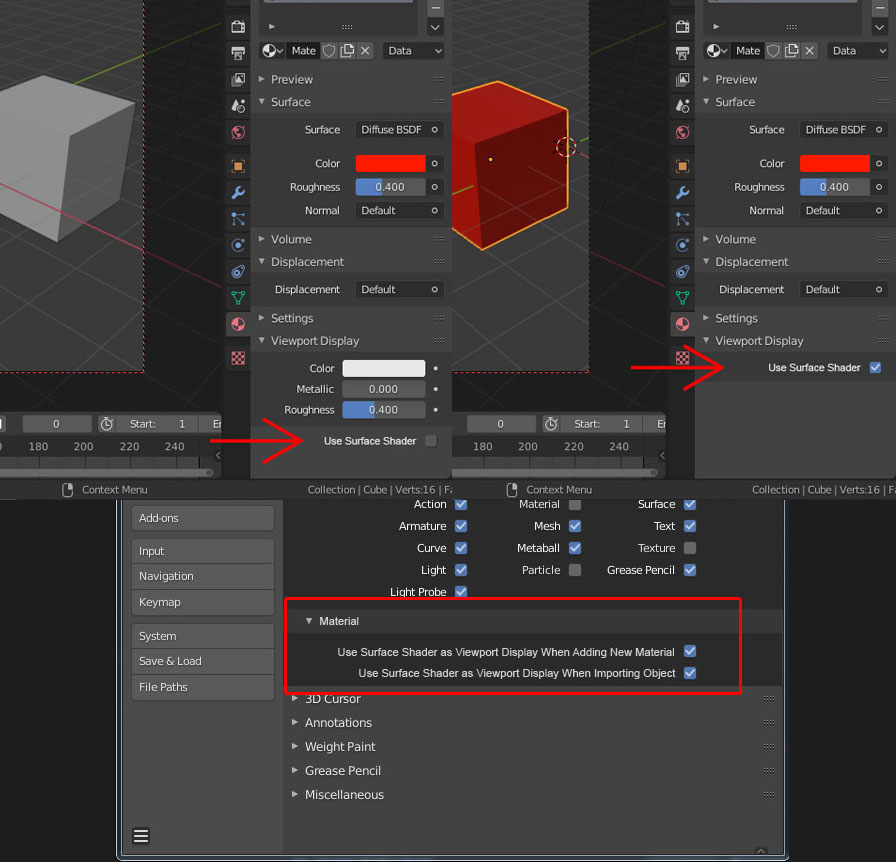
Actually, I don't know the purpose of why they making color material in Viewport display is not default as Surface color. And that is why when I want to change the color of the object in Viewport, I always use color picker to copy the color of Surface color.
So the idea is about, making an option to make the shader Viewport Display the same as Surface Shader. And options in Preferences to make it as default or not.
Is this possible? or maybe Blender already have similar oftion that i dont know.
8 Comments
Isn't this a duplicate of this proposal?
* @Josephbburg * And as in that proposal, it's not clear what should happen when the material is not just a single BSDF with a single colour. Any texture input would break it. A mix shader would break it. Maybe it's possible to derive a single colour automatically in some cases, but it's hard to see how it would be done in general.
* @Josephbburg * thank's, i didn't see that. Do I have to delete my proposal or mark it as a duplicate
* @toasto * If it's a duplicate, mark it as a dupe and upvote the other one. The duplicate thing helps devs get a correct idea of what people want. If three proposals for the exact same feature get 60 votes each, the feature itself might have anywhere between 60-180 votes, depending on how many are the same people that just want it bad enough to vote three times, or different people.
I'm not in charge or anything like that-- you don't "have to" do anything, but ask Jason van Gumster if you want any "official" info, since he's the moderator.
I try to help out because the guy does a lot of the work himself, here and on Blenderartists and elsewhere. It's easier for everyone if we keep RCS as clean as possible.
* @Scaredyfish * -- to me it looks like they're trying to solve the same problem, and since the color value is stored in the BSDF regardless of whether there's an input or not, it's still doable. It's probably even trivially possible to just use the average color of whatever texture is plugged in (Maya does something like this in its material nodes) and apply the mixing math as if it were a solid color. Thus each BSDF with an albedo component will be mixed by mix shader, added by add shader, etc. and materials without albedo will be black, white, the emission color, full alpha, etc. as appropriate. Principled could do a mix of base albedo and SSS albedo.
* @Scaredyfish * I think it's not have to be the exact color. The idea is just kind of "auto color picker". So maybe if there's any possible to pick the closest color of the material output.
It should be on by default. Then, you can override it if needed.
With the random colours, having the need to decouple material viewport colour from object with material applied is almost redundant, but I do see a need. it would be nice to quick grab/lock one from the other and when needed decouple.