
Polish by face sets
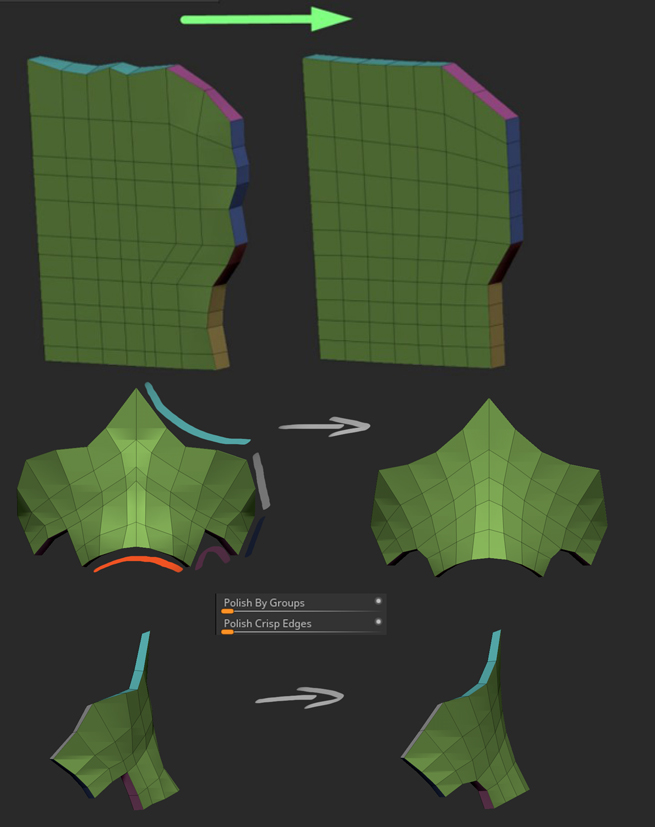
Hey everyone! One of my favorite features of poly modeling in zbrush is polish by polygroups, that can quickly help me achieving smooth shapes, so i was wondering is there a way to make it happen in blender using face sets? I tried mesh filter, smooth/relax brushes but nothing gave me the same result, any ideas?
18 Comments
You can kind of do this in two steps:
Click on the draw face sets brush. Turn its strength down (say, to 0.3) then hold shift and draw on the boundaries.
Go to smooth and enable the "face set" and "face set boundary" in either the Brush Setting's Advanced tab (to set it locally) or in Options.
* @joeedh * i tried to do the smooth faceset paint brush and it kinds of crushed to the back side, destroying the thickness loop, is it works the same with you, or there is some option to prevent this?
* @den haze * did you try to delete the 2nd side and push again the 1st, then Fill spaces if are empty?
* @ManBlender * yep, it doesn't preserve the thickness and just collapsing where the two facesets meets
* @den haze * You should watch whole course to understand some trick around refernces for vertex, edge, faces, and pivots. youtu.be/JMBMHSca_j0
* @ManBlender * thanks, i know how do it manually, the topic was dedicated to automatic approach from similar function in zbrush, it's really handy when you in blocking stage and constantly moving things up, this function helps to maintain the clean shape after every tweak without spending time on aligning everything by hand.
* @den haze * I very often discovering that this what not exist in Blender exist in some add-ons : )
blenderartists.org/t/real-zbrush-hpolish-and-trim-brush-addon/1116392/8
Does seem very usefull!
Marking this as 'In Development'. This was already implemented in a WIP form as Boundary Creasing and Pinning. This can be picked up again as it worked quite well.
polish by groups in zbrush is amazing. I constantly keep wanting blender to be able to do this. It already has polygroups! (face sets). So close!
Oh found it on google
Would you mind going into more detail? I can't tell what's going on from the image.
* @joeedh * hi! i added another example, basically i modeled some shape, after that i set a polygroups (zbrush) or facesets (blender) which represent how the shape will be smoothed, after that i used a deformer that do the job - automatically smoothed the shape based on polygroups/facesets i had set.
It's not comfy in blender, but some of actions and functions around is possible: youtu.be/vsgi2hNVkM4
* @ManBlender * The worst with angles (pink faces) coz need to rotate to axes orientation whole object I think. Or new feature is need as rotate global orgin. Add "Set Origin" menu to the right click menu of Collection Instances.
* @ManBlender * hi! thanks for responding, i added another visual example, the thing is, zbrush can do it automatically and on more complex shapes, that will be very tedious to do manually every time when you tweak it
* @den haze * I see the new image and understod the problem. Well, there is some diference betwen modeling and prototyping. ZB is more modeling and supporting this well on Blender you should think more around with modifiers and curves then modifications/edits are more easy. Just think more like CAD, eg. old marevoulus designer/poser. This looks like "dress" or some "body armor" and as cloth should be designed in this style from base. Exist "Garment Tool" around cloth. But if this not of cloth type, then must work more advanced with aligns and distance betwen vertex points. Right it's hard to operate with this. The other idea it to work after 1st good shape as layer with the 2nd as mirror.
* @ManBlender * it can be any piece of mesh type, it just smooths overall form based on the facesets/polygroups, blender already implements a similar feature like a smooth mode of facesets paint brush and facesets itself, so everything is there, it just doesn't work the best right now.