
Option to use kelvin temperature as colors in Eevee's lamps
I understand that there are some limitations when it comes to lamps in Eevee and so I don't know how possible it is to accommodate this suggestion if at all, but I thought I'd suggest it anyways.
Since we can't use nodes with Eevee's lamps, we can't use use a blackbody node which I believe could be essential for effective lighting. So every time I want to light a scene in Eevee, I find myself looking for the hex values of kelvin temperature colors online, then inputting the hex into the color section of the lamps back in Blender. It is very inconvenient to light a scene this way as it requires a lot of back and forth and trial and error which usually takes up a lot of time.
I believe that if there was a simple converter option, like a combobox or something asking if I want to use blackbody values to get the color for the lamps, it would be massively beneficial for anyone looking to dynamically light up a scene.
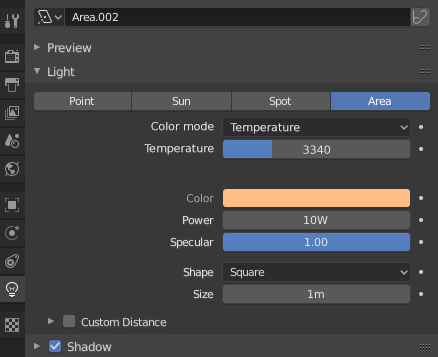
Below is a mockup I made in photoshop and it's functionality.
Side note: credit where credit is due, this is pretty much an interpretation of a feature Arnold has which I find extremely useful.
-
Add a color mode that switches between Temperature and Color (Color being what we have by default)
-
If Color mode is set to Temperature, a temperature slider appears where you can input or drag between blackbody values.
The Color section becomes grayed out so that the only way to manually switch colors will be through the slider. Instead, the Color section could now be served as a preview to the RGB representation of said selected blackbody value you have inputted above.
Thanks for hearing me out and I would love to hear your opinions!
EDIT: I've recently finished making a small addon that does just that. If anyone is interested, feel free to give it a shot!
Marking as done.
12 Comments
As of 4.5, #134303 introduces lights with native temperature color mode, where the rgb color input then acts as a tint over the color temperature (leave it pure white to have no effect) :
Twitter link is 404. Where do i find the addon?
You can use this free "Eevee blackbody" addon: github.com/artempoletsky/blender_eevee_blackbody As the description states: "The temperature to color algorythm is taken from Blender sources, so results should be like in cycles." It's works just like the Blackbody node from Blender Cycles. The option to use temperature appears in the Properties of selected light: i.imgur.com/S2NrbcM.png
Sweet, thanks for link
I posted a similar request here, not just for lights but for all color picking: blender.community/c/rightclickselect/Rtcbbc/
* @Stephen Bailey * hint, you can make it a link by using this format: [optional text] (link) just no space between the bracket and parenthesis.
* @Stephen Bailey * I see your post but I don't agree that it is similar.
Thanks for this man.
What is BlackBody? youtube.com/watch
I think the best way to solve this is to implement nodes on lamps in EEVEE. Hopefully it's coming soon!
And after thinking about it a bit, it makes sense in context of the PBR-focused approach of EEVEE. Maybe in the future, we could get a "Principled Lamp" or something... I don't really use the principled shaders much but I think the consistency would be powerful and approachable. Just as long as it's always possible to create the shader with my own node groups, too.
* @Josephbburg * One of the reasons I proposed this the way I did, is because there are some limitations involving nodes. I think this is a good way to circumvent having to support an entire feature, and just have a very useful tool.