
Graph Editor Mousover Highlight and Selection mode
TL:DR, would a system of highlighting curves and displaying information on mousover/opening a grid on click help animators with fine adjustments or better work with very complex rigs?
When I animate things, say, a human rig, it's common that I end up with a couple dozen bones to control, and sometimes even more keyframed things, like drivers, shape keys, and similar, and quite often. It very quickly devolves into a plate of animator's spaghetti:
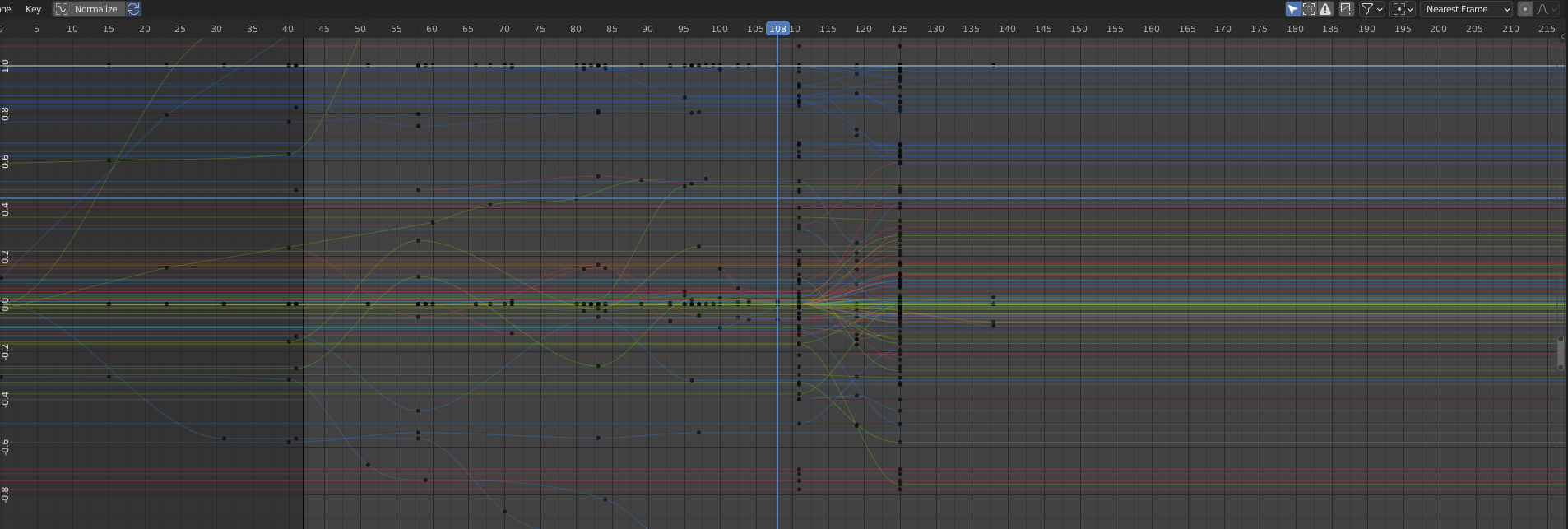
and most animators I know consider that normal! there's no issue with it- BUT- if you were to normalize this, and zoom in, a number of these would overlap, be hard to track, and singling out separate bones can come with some issues for the more precise movements, and you occasionally want to shift an entire animation (say, the x and y location of a wall a character hits after tripping, or just the timing his hands stop, because the wall's shape is no longer the same as the original animation)
regardless, small changes often take as long as entire poses, and even when you do take the time to browse and single out one object, there are up to like 12 different things that can show up on the curve editor, let alone the 12-50 bones a human rig might end up with. if you don't always single out the single bone you're animating.
so- I propose this:
simply put, it's one of those little editor buttons- It enables a mode which replaces the "select all before frame" or "select all after frame" (really? something as basic as ctrl click has such a niche function?) with a selector that allows you to read and select exactly what you intend to, instead of sifting through the 2-200 keyframes that tend to share a spot.
I really do think the curve editor needs some kind of paradigm shift to be more useful, but I'm not sure what that is, and it's not in the scope of this proposal. these other proposals would work well with it.
blender.community/c/rightclickselect/1sdbbc/ blender.community/c/rightclickselect/rhdbbc/
3 Comments
(sorry guy whose vote got wiped. I tried to troubleshoot the video not processing, it's been a day and a half and it still won't show...)
AFAIK preselectiong highlighting will not be done, see Blender's AntiFeatures list .
I personally avoid having too many curves displayed once in the first place, because it hits the performance too much anyway.
Otherwise, I'd rather prefer to use the channel list to select the curves I want to display or highlight.
it seems to me that is a comment on the 3D viewport, and while there should be feature parity, that's why I thought it should be a button- something that you activate- like edge angles and lengths in the 3D viewport. It doesn't initially line up with blender's modus operandi, but in a viewport with no functional way to distinguish between which you will select, and no other view(unlike in the 3d viewport where you can simply move the view to adjust which is most selectable) it makes sense to do that, and can be helpful if it's an option.
I had originally envisioned it to be different, however- same button placement and setup, but on mouseover, a little tag would appear over the mouse, with the name of the attribute the curve controls. after all, at the moment there are a number of curves on a single object which will share a color, and even if you memorize the color, you can't know it if it's z rotation, w rotation, z location, or z scale until you open the attributes in the graph editor and start selecting, for example.