
Layers in Texture Painter
Hi! I'm a new Blender user, so forgive me if this is duplicative or uninformed in some way, but I find the Texture Painter incredibly difficult to work with right now (in Blender version 2.82a) due its lack of separate 2D layers.
Any 2D image editing program worth its salt features layers for a very good reason: layers allow the user to work on separate aspects of an image in a non-destructive fashion. Adding this feature to Blender's Texture Painter would make it far easier to edit textures and to produce multiple variants of the same texture (something that is very important for game developers).
I understand that there is a way to effectively implement this sort of functionality via nodes (see e.g. youtube.com/watch ), but this is an incredibly slow and complex workaround. As a new user, I've found it very difficult to get this working.
I don't know what Blender's internal workings are like, but a solution that sounds reasonable to me: store each texture as a hierarchical stack of discrete alpha-enabled layers in the Texture Painter, then--when it's time to render or export--automatically merge them down and use the merged texture for those operations.
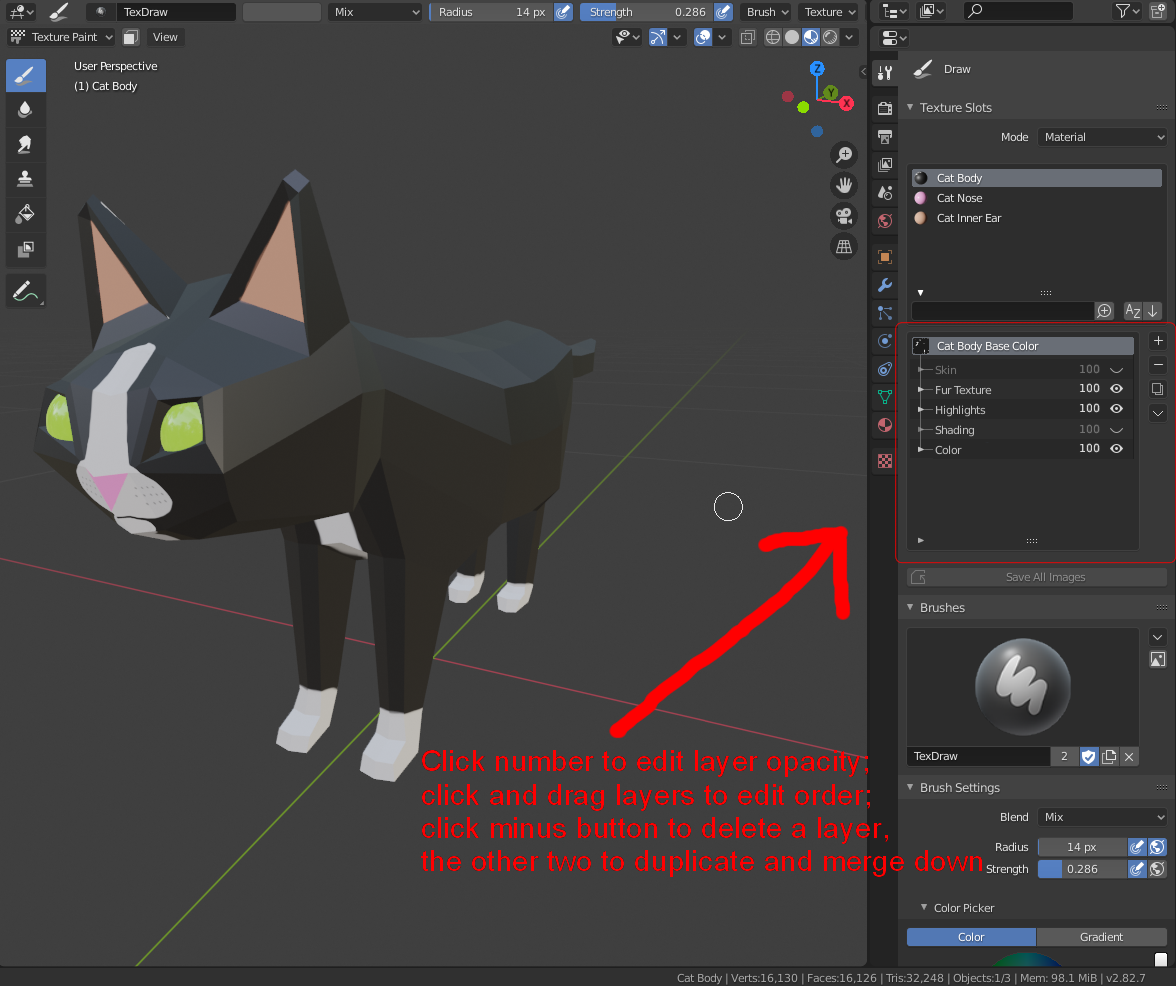
EDIT: on the off chance that this makes the feature come to fruition faster, I have created and attached a rough UI proposal based upon Blender's existing UI scheme.
7 Comments
1 Check this addon 2 Kind of duplicate
* @IIIFGIII * Gotcha. Textures and materials are different though, right? I'm specifically thinking of a way to make Texture Painter more useful.
* @cstern * Mb... But in general we all want to see some Substance Painter but Blender Painter. Layered texture paint feature implementation is not so separate from layered material paint feature. It like two sides of same coin. To blend materials you need some mask and this some mask can be in same time some layered thing ( as in SP ) painted or procedural, or any else...
You can also check Armor Paint which has good integration with Blender.... In deep development but even now it looks interesting.
* @IIIFGIII * Armor Paint looks neat! I'm not certain I want to drop money on a dedicated outside program, though. My needs are fairly modest for the moment--for the moment, all I really want is for Texture Painter to be a little more flexible and forgiving in how it lets me work.
* @Craig Jones * Yeah, I don't doubt that nodes would work. But the node system is really not friendly to new users--insofar as the principal objective of the 2.8 UI overhaul was to attract people who were put off by Blender's UI issues in the past, I think it's be best to keep making accessibility improvements where possible!
But even if you're a wiz at nodes, from an artist workflow perspective, my instinct is that being able to quickly shift between layers without leaving the texture painter workspace over and over would very likely still be an enormous help.
I think it is already in development.
* @soerensc * That would be great! I hadn't seen it mentioned in any of the version 2.90 news stuff.