
Ignore back faces during selection...
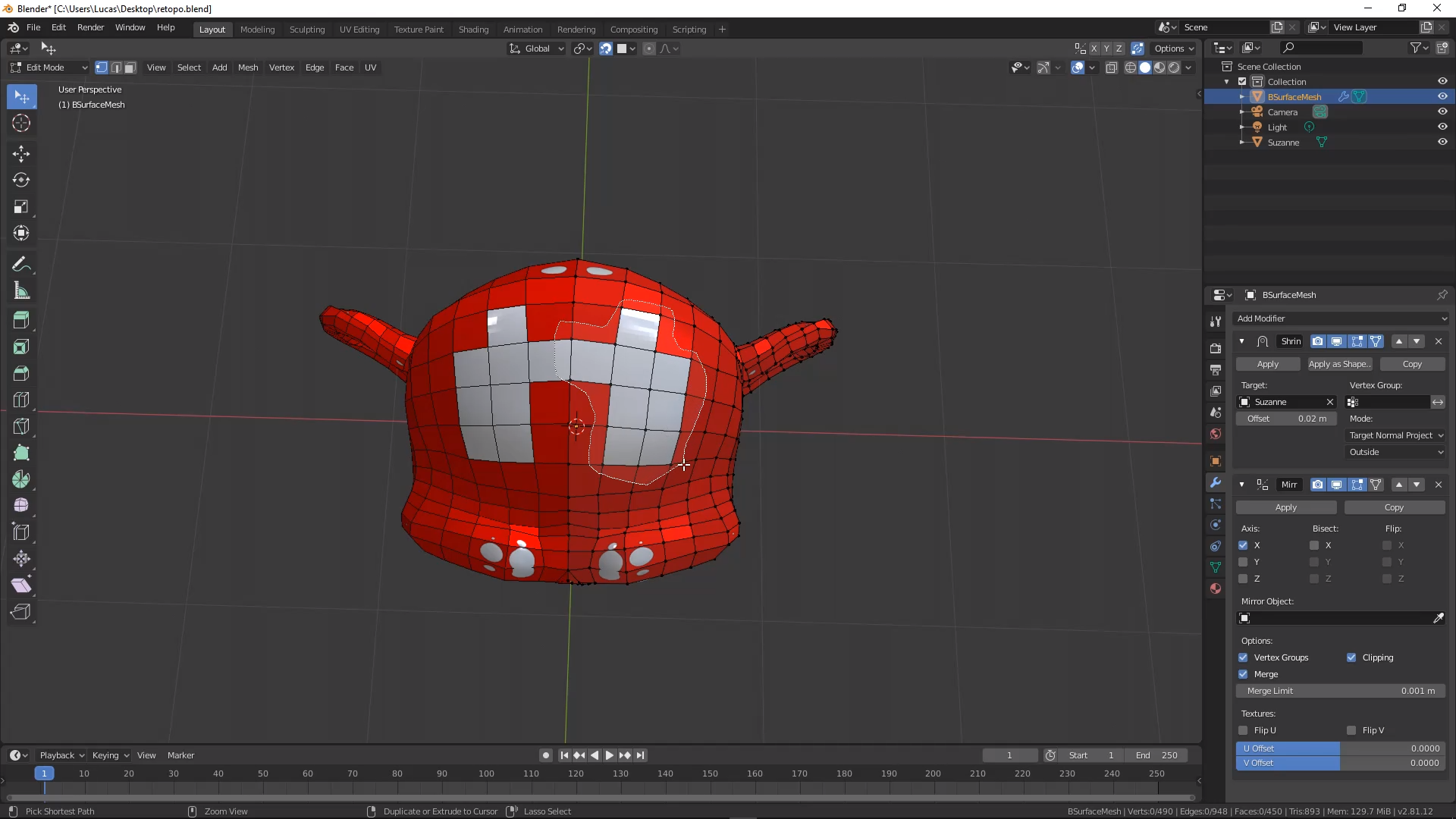
Can we get at least a brush that can select front facing elements please? streamable.com/k41vj
https://streamable.com/s/k41vj/fhszfo https://streamable.com/s/pqscd/fqkqvkhttps://dev-files.blender.org/file/data/kh623voyemhlcc3vf5q5/PHID-FILE-szl5f5kg4kqlb3ybsdmc/2019-08-23_19-08-48%281%29.mp4
17 Comments
At first I was confused by this post, but it makes sense once you read through the comments. If I had to word it differently, you would want an option to select only faces with their normals facing outwards?
* @etufo2 * Yes brushes in sculpt mode have an option that says front faces only, I want an option to do the same for all selection tools
You're going to need to be a bit more specific. In its default configuration, what you're showing in Blender is not typical behavior.
huh, what brush do you use, mine never selects through the object
* @Sam * Did you try it? it is ridiculous I know....I'm using the lasso select but any selection tool will go through the hole and select the other side.
* @xorrito * yeah I tried it, again and again :D never works. I would like to have that option tbh. I would say you might need a fresh instal just to try it out
* @Sam * I tried on 2.78 2.79, 2.80 and 2.81. Blender doesn't ignore backfaces during selection
* @xorrito * wait, I think I see what you are doing there. You are deleting only faces and thats why it selects the faces behind, because there are NO faces in the front. so why did you delete those faces in the first place???? yeah now it makes sense that it selects the backfaces. So whats the point of deleting the front faces and then wanting to select nothing? as you have no faces where there were faces before??? I mean I get it you want an option to not select the backfaces, but you didnt have to delete the faces in the front like that in the first place
* @Sam * When doing retopology is very common to extrude vertices and make polygons without faces, then after that you select all vertices and fill the empty polygons by pressing F. Since blender cant ignore backfaces is very difficult to select the vertices that are in front. Clicking 1 by 1 gets old fast. You'll understand once you do some retopology.
* @xorrito * OK. So this is not an issue of ignoring back faces. It's an issue of using geometry from other objects to occlude your selection. That's different from what you're describing in your proposal.
* @Jason van Gumster * Pablo Dobarro was making progress on polybuild tool but had problems with snapping because it would snap to back facing vertices. It has nothing to do with other objects occluding. if I don't want to select back facing vertices or snap to them by accident I should be able to like in max and any other software.
dev-files.blender.org/file/data/kh623voyemhlcc3vf5q5/PHID-FILE-szl5f5kg4kqlb3ybsdmc/2019-08-23_19-08-48%281%29.mp4
Found this proposal from 2 years ago blender.community/c/rightclickselect/hwbbbc/
Weird.. I can clearly see it is not working for you. But, for me, selection tools only select through the object when I am in X-Ray mode. Otherwise I cannot select through objects like you have shown.
• Try loading factory preferences. Or even delete you preferences from here <C:\Users\ USER\ \AppData\Roaming\Blender Foundation>
• Try disabling addons.
As far as I can tell, this is a feature that already works perfectly fine for most people. So what needs to be done is: find out what is different about your setup.
Maybe you should submit a bug report with information about your system.
* @LilacDogoo * Did you try deleting a face first and then making a selection like I have done?
* @xorrito * Ahh... I see what you mean now.
I will up-vote this proposal now.
Though I don't think I've ever needed this feature, it does sound useful.
I'd probably find uses for it, if it was there.
It doesn't matter which selection tool i use, all of them, lasso, rectangle or circle all of them select back faces. I want selection tools to ignore back faces and vertices. Notice how I deleted only faces to make a hole. Backface culling doesn't help either.