
Prompt dialog when pasting/importing objects with duplicate material names
Currently, when appending or copy-pasting objects from another Blender file (File B into File A), if a material name already exists in the destination file (e.g., RED-Plastic), Blender automatically creates a duplicate material named RED-Plastic.001.
In large scenes or production pipelines, this leads to unnecessary material duplication, cluttering the file and requiring manual cleanup.
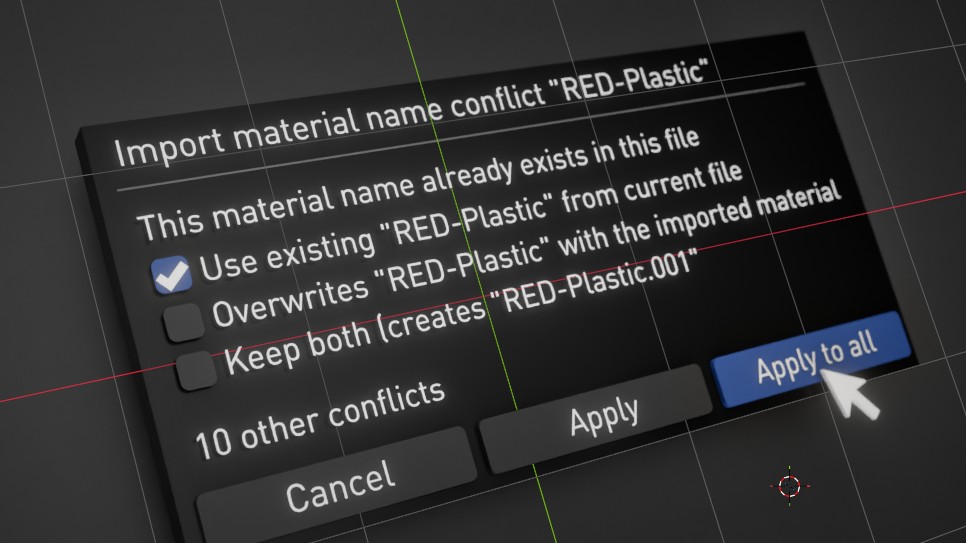
I propose adding a popup dialog (or options in the Operator Panel) when a duplicate material name is detected during an import or paste operation, offering four choices:
Keep Both (Default): Retains the current behavior by appending .001 to the imported material.
Use Existing (Keep File A): Reassigns the imported object's material slots to the existing material in the scene.
Replace (Use File B): Overwrites the existing scene material with the imported material properties.
Cancel: Aborts the paste/import action.
Why this is useful: This feature would save significant time on scene cleanup, maintain clean material libraries, and prevent accidental duplication when working across multiple assets or project files.
1 Comment
yes please!
This echoes to my rcs proposal here : blender.community/c/rightclickselect/wZqR/
Because it doesn't do it on materials only, but on image textures as well. Blender will just duplicate the same texture in your file if you paste an object that uses it already. Meaning at render time, you evaluate the texture twice. And I believe this happens for most data blocks.
In Geometry Nodes, it's actually the opposite !! If you paste a node group from a file to another, the node group data block will recognise it's a duplicate, and will instantly match the one you have in your file, even if you tweaked it a little bit, which can become a massive issue because you might also want to duplicate the data-block in some cases.
Simply having a pop-up window to ask if you want to duplicate the data-block, or share the same one with all duplicates is definitely the way to go. Perhaps, for users that don't like pop-ups windows and enjoy the way blender handles the duplication when copy-pasting, this could be user defined preference. Somewhere in the Preferences, you could for example choose between "Duplicate Data-Block", "Share data-block", "Smart" or "Always ask".
Upvoting