
Stop prompting to save an empty scene
On the very hilarious
CGMemes FB page
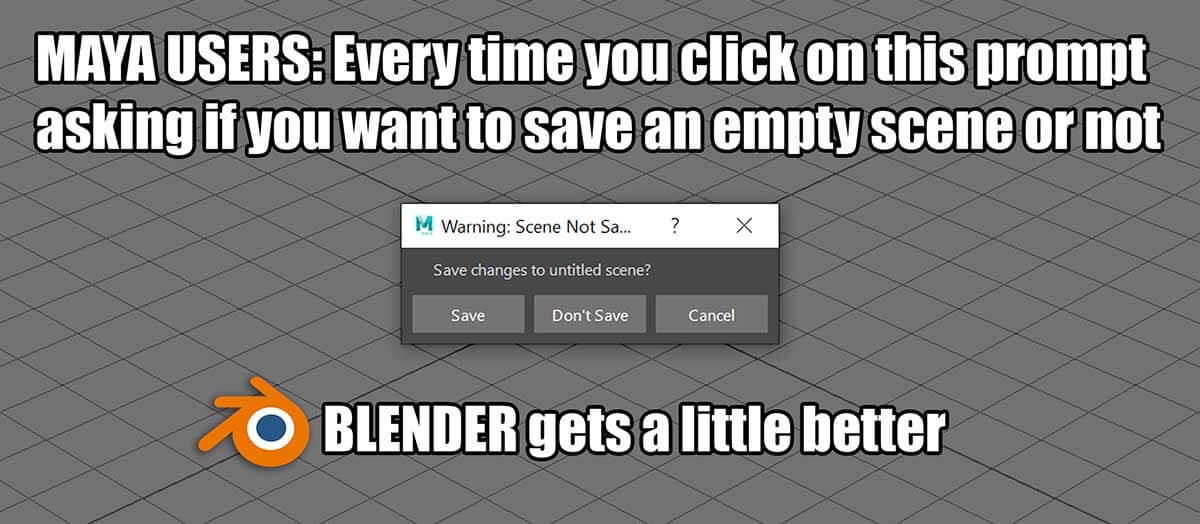
I created this devilishly witty meme:
 I thought this would be like Chinese water torture to Maya users knowing that every time they click on that useless prompt they would know that Blender just got a little bit stronger ...until it was pointed out to me that Blender also prompts you to save on an empty scene!
I was devastated.
Granted, this is how Blender goes about it:
- Open Blender
- Move the view around
- Change the UI about
- Open a different scene
* Doesn't * ask you to save an empty scene. Well done, Blender. I love you.
But... it does ask when you:
- Open Blender
- Deselect or delete the default cube
- Open a different scene
- * THEN * Blender asks you to save literally an empty scene.
I have abused the Maya developers throughout the many many years I have suffered while working with that dog of a software, and mocked them about how in 2014 I asked them to get rid of this useless prompt on their official feature request site, only to find someone had already asked this 2 years earlier. Even though the site where I asked this has since been removed others are still making the same request from the Maya developers, and in fact, the title of this post is copied verbatim from one of their posts: forums.autodesk.com/t5/maya-ideas/stop-prompting-to-save-an-empty-scene/idi-p/7960509
So this is a wonderful test to the efficiency of Blender's rapid evolution, with their young enthusiastic global network of brilliant coders VERSUS the frightened reclusive old-timey coding dinosaurs of Maya. The clock just started with this feature request right here:
Blender developers, could you please make it so that there is no prompt to save an empty scene in Blender?
Let's see how responsive the Blender community is by comparison, haha!
But let's really see the difference between our David and their Goliath by asking both of them the exact same feature request .
Time starts... now.
22 Comments
Here is my solution: blender.community/c/rightclickselect/1Zfbbc/

* @ Lsscpp * Hi, this is an interesting proposal, however I'm more talking about a "tripwire scenario" for validating a save prompt. I'll briefly explain:
If I start Blender and delete the default cube, I've done nothing to trip the alarm for a save prompt. Now if I adjust the width of a UI window... still nothing. And now if I select the material tab in the Attribute Editor. .... Still nothing. Spin the viewport around. Nothing. No save prompt (because no meaningful work has been done so far). But if I make the smallest movement to the camera, alarm bells ring out, sirens go off, lights flash, and if I try to make a quick exit from Blender now it will confront me with my greatest nemesis: The save prompt.
Hey! Hey buddy, I saw what you did there. You adjusted that camera a bit. Did you mean to do that? Cause I've been watching you dick around the place now deleting the default cube and running around the UI like you think it's all just a game to you, so I let it go, but because you touched that camera - even if it was just a little bit - I'm going to assume that things just got real between you and I. Do you wanna save this scene or what? Hey, buddy! I'm talking to you! Click on my prompt or I'm not going to let you get out of here.
* @IIIFGIII * Oh, I understand why Blender does this, but I'm waiting for someone brilliant to come along to say that it CAN be done. :)
* @matbrady1 * But, again technically, it need to make Blender to ignore changes in some of scene data and not qualify it as " changes " to not give you this prompt at least after selecting/deselecting. Sound like pain in the ass...
And then after ignoring this data changes comes something else " annoying". Cmon man, your work are not about opening new scene, selecting box and closing scene all day long... Is it really so terible thing to write so much and so BIG? I think Blender still has lot of rough things with higher priority you can suggest to improve if you have enought time.
* @IIIFGIII * I think you're looking at this all wrong. It might be a junior programmer's dream opportunity to do something like this, while minor, it is still challenging and with a higher profile to its success than many other things junior programmers might get to do. This isn't advanced, but it's a fun challenge. Please stop commenting about why and how this can't be done and make room for people who have ideas about how it CAN be done. Thank you.
* @matbrady1 * If Blender was completely inextensible and add-ons didn't exist, hypothetically this could be done. However, an arbitrary add-on can easily change the understanding of what an "empty" scene is, therefore this already is out the window. Not to mention the simple fact that this should never be done. Either the program asks for confirmation about discarding changes, consistently, or you can never trust it to not ruin your work. We've already had our share of quit-without-prompt with Blender.
* @Stanislav Blinov * I'm asking for Blender to be smart enough to know what an empty scene is or not. Perhaps I should be asking: What is an empty scene?
(Now it's a philosophical discussion)
I believe an empty scene is a 3D environment with either nothing in it, or an unaltered default cube.
Over to you. :)
* @matbrady1 * You seem to be missing something here despite many people trying to tell you the same thing. Just because you can't see something doesn't mean it doesn't exist.
When you look up in the sky on a clear day is it empty? Is the air itself empty? No, you've got oxygen, hydrogen, tree pollen, bug shit, coronavirus, all kinds of crap floating around that is beneath your notice but is still pretty important.
It's like that with a scene- there is a lot of stuff in the scene data that changes when you do anything , and pretending like it doesn't exist so you can get some internet points by dunking on your maya bros with a spicy meme is just a waste of everyone's time.
* @matbrady1 * Start up Blender, delete the cube, the camera, the point light. Then switch the outliner to show 'Blender File' and take a look. Then realize that any user can change their startup file so it has different things in it. Then realize that any add-on can change the contents of any open file at any moment.
* @testure * Dunking on Maya is just a bonus.
It looks like it is a philosophical discussion now because I already understand that data is being gathered by a users movements (or as you analogise: the tree pollen, oxygen, hydrogen, etc). I'm aware that Blender collects the user data and that this, to Blender, doesn't make it an "empty" scene. I'm not missing this point. What I'm trying to convince you and others of is that to a human an empty scene means something different, despite Blender's collected user-data. Do you get it? An empty scene is a 3D environment with either nothing in it, or an unaltered default cube. To a human.
For Blender to ask if you want to save a (human-defined) empty scene seems redundant, minor- yes, but redundant all the same AND a wonderful way to compare and contrast Blender's community-led evolution to Maya's community-averse stubbornness.
This is actually harmless.
And if viewed positively, fun.
I'm confused why so many people are getting their back up. Especially when there's already some programmer out there that has read this and seen it as the healthy challenge that it is, and is now thinking of ways to approach it.
I hope my explanation has cleared this up. Again, this is harmless. Try to see it from a different perspective.
Cheers
* @Stanislav Blinov * I am already aware of this. Please read my previous comment to @testure Thanks.
* @Stanislav Blinov * So, to use someone else's words to my favour, you do realise Blender already does this, right? Meaning, Blender already * doesn't * ask you to save an empty scene. It does this in two ways:
1 - When I open Blender and then open a new scene. It doesn't ask me to save.
(Even with the arbitrary add-ons that you mentioned, Blender is smart enough to skip the redundant step of asking me to save).
2 - When I open Blender and change the UI margins, or the angle of the viewport's camera, or the tab of the Attributes Editor.
(Blender is gathering user-info on what I'm doing, and yet it disregards its collected data - something you say should NEVER be done, is something it already does do - and proceeds to skip the redundant step of asking me to save).
All I'm saying is go the extra step.
Currently when I deselect the default cube, it's enough warrant a save. I don't think this is correct.
Also, when I delete any of the default components and don't add anything new in, i.e. there are no components in the scene, Blender will also ask me to save. Which I definitely don't think is correct (because it is literally an empty scene. Literally!)
Now, you might be like @testure and say, ah, but empty isn't really empty, and that's where I provide a counter-argument to this (below).
* @matbrady1 * 1 - Incorrect. You're not prompted to save because you haven't made any changes, not because the scene is "empty". As for the add-ons, you simply aren't running any that mess with your scene's internals.
2 - Incorrect again. What should never be done is losing work without prompt - that is what I said. Moving the windows around is not work. Arguably, moving the view around should be though, but that's a topic for a different discussion (view saving and control is really appalling in Blender).
Altering selection state is a meaningful change and should not be ignored. You may not realize this, but someone who's working with complex selections all the time would.
Deleting something is a meaningful change and should not be ignored.
What you seem to completely fail to understand is that your "empty" scene is not necessarily my "empty" scene, and my "empty" scene is not necessarily John Doe's "empty" scene. And that is by design.
* @matbrady1 *
willful ignorance has a tendency to do that.
* @Stanislav Blinov * I know you're upset, but if you take away the emotions, it's a rather good conversation. Here's why: You said, "What should never be done is losing work without a prompt". That's actually a brilliant way to frame the argument because you then have to ask: What's "work"?
If you have a (human-defined) empty scene, then doesn't that mean that there is no "work" to save?
In what way would you ever have an empty scene with no adjustments made to anything be considered "work"?
I am going to be bold and say there is no scenario where an empty scene with no changes is considered work. There, I said it. :) I would challenge you to give me a scenario that it is defined as work.
Also, I agree, that there might be some add-ons that I'm not using that might interfere with Blender recognising an "empty scene".
I'm of the opinion that, so be it, if an add-on interferes with an internal process and makes Blender think that you've got work to save in an empty scene, then clicking a useless prompt is simply a small, but unfortunate down-side of using that specific add-on. No big deal. You win that point. Congratulations! Do a victory lap. However... the more we go down this rabbit hole the more I'm convinced that I've got a solid argument:
empty scene != work
∴ no save prompt
Lastly, you said, "Deleting something is a meaningful change and should not be ignored". For a start, nothing is ignored. Everything is recorded. But what constitutes as meaningful? Everything? Is deleting the default cube meaningful? Is deleting the default light and camera is meaningful? How?
I think adjusting the angle of the default camera is meaningful. Adjusting the strength of the default light is meaningful. So try this:
Think of it as a tripwire.
If I start Blender and delete the default cube, I've done nothing to trip the alarm for a save prompt. Now if I adjust the width of a UI window... still nothing. And now if I select the material tab in the Attribute Editor. .... Still nothing. Spin the viewport around. Nothing. No save prompt (because no meaningful work has been done so far). But if I make the smallest movement to the camera, alarm bells ring out, sirens go off, lights flash, and if I try to make a quick exit from Blender now it will confront me with my greatest nemesis: The save prompt.
Hey! Hey buddy, I saw what you did there. You adjusted that camera a bit. Did you mean to do that? Cause I've been watching you dick around the place now deleting the default cube and running around the UI like you think it's all just a game to you, so I let it go, but because you touched that camera - even if it was just a little bit - I'm going to assume that things just got real between you and I. Do you wanna save this scene or what? Hey, buddy! I'm talking to you! Click on my prompt or I'm not going to let you get out of here.
* @testure * I think you're being rude now. (And over a save prompt, no less. Wow). But... I'll let that slide, so long as you answer me this:
How do you know that it's me that is being "wilfully ignorant" and not you? Genuine question. It's like asking how can a crazy person know if they're crazy or not? In other words, how can you be sure that you're not being wilfully ignorant yourself? Do you know what I mean? What if there's some wilful ignorance on your side? How would you know? I don't think it's that easy to answer, but I want you to try to answer it anyway. :)
* @matbrady1 * If you delete the default cube, the program won't let you abandon this edit without a prompt. Now you're just confusing yourself.
You load a file, you delete everything, and you call it "empty scene with no changes"... I don't think this even merits any further discussion.
* @Stanislav Blinov * You said: "If you delete the default cube, the program won't let you abandon this edit without a prompt." - I already know this. That's what I'm asking to change. That's the whole point of what we're talking about. I'm not confused about that.
You said: "I don't think this even merits any further discussion." It might if you had read my entire response. I said: think of it as a trip wire. Meaning: Think of a way to approach the minor programming challenge of getting rid of any redundant save prompts as defining what constitutes meaningful work as like being behind a trip wire. You did read that part right? The bit at the end there. ...?
* @matbrady1 * Yep, definitely doesn't merit any further discussion.
I think... people have come to this proposal without giving it a fair chance.
I'll take some of the blame for that because it started with an Anti-Maya meme, and as hilarious as that was, it put people on the defensive.
I'll also take responsibility for the fact that it took me a few back and forth (healthy) arguments before I was able to articulate a solution properly.
I got there in the end, with the tripwire analogy, but by that time people have switched off.
I wonder if there's anyone here that's still reading this? Hello?
* @matbrady1 * In your example I start with the default scene, containing a cube, lamp, and camera. If I delete the cube, leaving the lamp and camera, you want Blender to decide that this is "empty" and not prompt to save.
Fine. Now I open up a file containing 100 mesh objects, a dozen lamps, and three cameras. With your above rules you are saying that if I delete 99 of the mesh objects it will prompt me to save, but if I delete all 100 mesh objects it will not? That is odd. What if I delete 99 objects, two of my lamps, and a camera? All 100 mesh objects and one of the lamps?
What if my file contains nothing but cameras? What if it contains nothing but materials or textures (with fake user set of course)? No prompting if I change anything at all?