
Sort and delete render layers from outliner
The outliner has seen a lot of love and great improvements over the last years but for Render layers it is still very inflexible.
Major Problem: As soon as a render Layer is created it is stuck at its position and cannot be rearranged. This example is constructed and as such not as bad but with more than 10 layers to connect in the compositor it is really vital to be able to rearrange layers belonging together
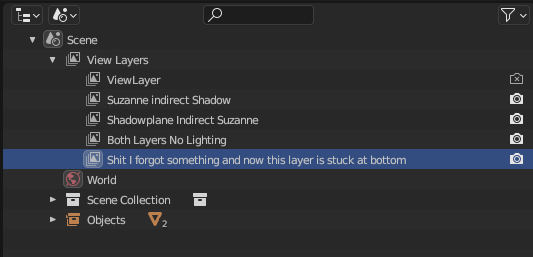
More an annoyance but also weird - layers can also not be deleted from the outliner. Just one by one via the dropdown.
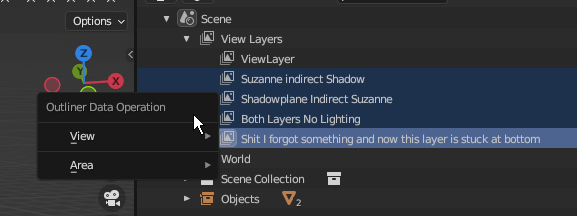
Proposal: If possible the Outliner should get the functionality to rearrange and mass delete selected Render layers from the outliner.
2 Comments
I've got the same problem that I cannot rearrange the layers.
There used to be a script for that (7 years ago) in an older version of blender. But it doesn't work anymore (4.0). I'm no coder, but maybe someone can check/update the code: github.com/RayMairlot/Move-Render-Layers
I have around 70 layers at the moment, probably will grow to 200. I'm making instructions how to assemble a machine. Each layer adds parts (bolts, wires, plates, profiles, ...). They are named 'production_step_001' and counting up. When changing a step I sometimes need to rename it with another number, but then its messed up. It would be handy you can sort them alphabetically or manually rearrange them
Sorry to reply to an 8 month old post but: Just out of curiosity ... how do you keep your renderer from running out of memory? I found that Blender has a pretty severe logic problem in this case where each pass has to be kept in memory before saving anything out. We ran into many problems on our renderfarm because of this.
On the Dev forum I was shot down and my topic deleted because of "feature requesting". So I already opened another RCS: blender.community/c/rightclickselect/19W3/
We've worked around by using keyframes for each assembly step instead of renderlayers. It's fast and works pretty well with incremental stepping (sliding things out of view and back in), but also has its downsides. If there was an actual solution to this I'd be really curious to hear about it.