
Shift +click for Selecting multiple Collections and the objects inside through the outliner
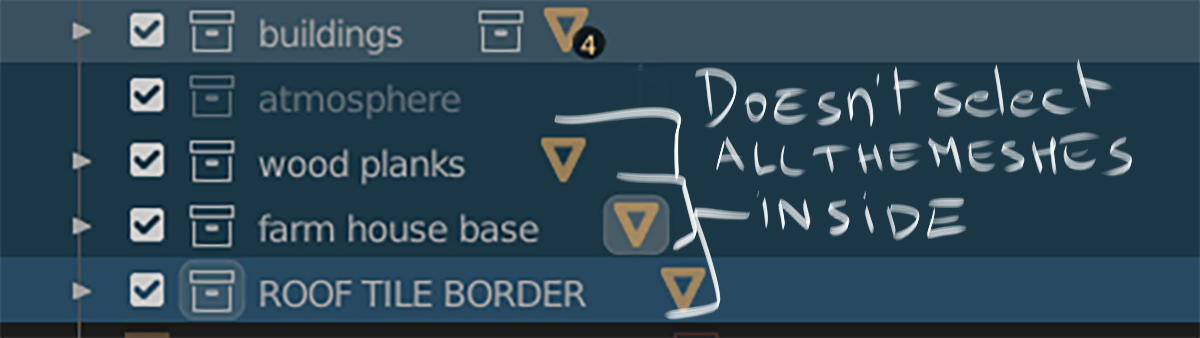
Maybe i'm wrong or i don't know how to do it , but it seems that when we have multiple collections folded ( with many meshes inside each collections ) we have to unfold each collections to select the objects inside or right click ,"select object" and it select everything inside the collection , but it doesn't work if you shift click to select multiple collections folded ,and right click "select object " ,it just selects the objects of the first collection selected ,when you have only very few objects inside a collection , it's not that big of a deal , but when you have many meshes , it's a pain so it would be nice if by just clicking on the collection's name or the triangle it would select everything and with multiple selection ( i know you can move all your collections inside a main collection ,and right click on that one to select everything ) but shift click should do the job ,because you don't want to do that all the time
10 Comments
There is an GSoC outliner project on DevTalk, maybe this is already fix or work on. You can go check the thread and give feedback since there is still 1 month to go for the student.
Cheers :)
* @Francis Jasmin * oh cool ,good to know , :)
* @kaerobattossai * this will almost certainly be a part of this : developer.blender.org/T77770
I like the idea, but don't like the shortcut. What about hovering the mouse over a collection and pressing "L" to select everything inside? It's kind of intuitive because it'd work similar to the "select linked" command in modeling.
* @BlenderSplendor * why not both then :) i mean shift click is commonly use in every app ,in the outliner it's shift click to select multiple objects ,in the viewport same ..but honestly whatever that works is welcome :)
* @kaerobattossai * Shift clicking is a taken shortcut. You'll need to think of a different one.
* @BlenderSplendor * ctrl+shift +click then
* @kaerobattossai * Works for me! FYI, I just figured this out. Right click on a collection, right click on "select objects", select "assign shortcut", and type in a shortcut. I used "L", so now pressing that shortcut selects everything inside the selected collection.
* @BlenderSplendor * but you can not select different collections or hirarchies, then " select objects" or "select hierarchy" , it will select only one collection or hierarchy..
* @13515613 * True, it would be cool to select the objects of multiple collections. You currently have to do each one manually because only the active collection can have its hierarchy selected.