
Outliner dbl-Click icon to select hierarchy.
(As far as I'm aware) Double clicking on the icon of any item does nothing at the moment. I suspect it would feel intuitive to have a double click selecting the children.
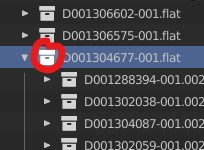
(As far as I'm aware) Double clicking on the icon of any item does nothing at the moment. I suspect it would feel intuitive to have a double click selecting the children.
10 Comments
A task was created for this: ⚓ T99275 Outliner: Double click on icon to select contents/hierachy
I talked with devs about this. It's a relatively small task that anyone could pick up. The idea would be to execute the operator "Select Objects" when dbl clicking on a collection icon, and "Select Hierarchy" when dbl clicking on an object icon. The idea could even be expanded by holding
CtrlorShiftto add or remove items from the selection.Another task that could come from this is to make the mentioned operators primarily select/deselect the outliner items and then select the objects. That would be safer and more useful. Currently these operators are selecting all outliner items, anywhere in the scene, even when they are not in the collection you clicked on.
It's highly encouraging to read such a thoroughly thought-through response. Thank you Julien - you really did hit upon a number of additional points there that would be an outstanding QoL bonus.
Yes! I wish Blender exploited the distinction between icon and name more. Other software allow for example to click and drag on names to do a selection box, while click and drag on icons moves the selection in the outliner.
This is currently also possible by click and dragging on the empty space to the left or right of the outliner items. This is an intentional choice to make dragging items easier too.
Happy to finally be able to close this one.
projects.blender.org/blender/blender/commit/796577d76e
Why does it have to be double click?
A single click on the icon would be enough to select everything that contains the Collection, and to deselect click on the empty space. Unless there is some inconvenience it is more intuitive and has no hidden hacks or shortcuts.
Single click is used for selecting/making active an object or collection. Which you may want to do without selecting the entire hierarchy.
Luckily the current patch implementation allows you to change this shortcut if you want it to be single-click.
There is now a patch and available builds to test this!
The option to only expand selected collection and once the user click on another collection then blender should automatically collapse all other collection, maybe it can be optional. it saves from expanding outliner to show more object and this function is now part of all softwares.