
high performance impact warning
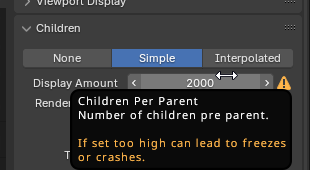
options that have a high impact on performance, like the subdivision count on the modifier, or the particle child count, or any other things that can lead to freezes or crashes
too many times ive set some value to 100 and instantly crashed blender because i wasnt sure what the value does
7 Comments
While the idea sounds reasonable on the surface, in practice, it's not as simple as it seems. There are two main issues with trying to warn users about "high-impact" settings:
Adding the warnings to the settings
Someone would have to manually go through every property in Blender, determine whether it could cause performance problems, and then add warnings accordingly.
Performance impact is highly situational
What causes a slowdown, freeze, or crash depends on many factors: your hardware, your scene setup, and even which features you have enabled. A setting that runs fine in one context might be disastrous in another. For example:
1000 cubes X 2000 childrensetup might work smoothly for some people.100 cubes X 2000 childrensetup that is fine for most people, but add fancy shaders like volumetrics and diffraction glass, and rendering becomes a nightmare even on high-end GPUs.So where do we draw the line? Anything could be a problem under the right (or wrong) conditions.
We definitely can't add warnings everywhere without cluttering the GUI.
In the end, experience and learning to adjust settings in moderation is the best approach. Blender already provides reasonable defaults, and users can always experiment carefully before cranking values up too high.
for the problem that someone has to go through the properties and check if they will crash or not, this can be implemented first for the common properties. there aren't a lot of properties that make blender crash by the way .
My first point would be false if the second point was also false. Unfortunately, they are both true.
User has a single cube, and uses 7 levels of subdivision: no problem.
User has object with 3 million triangles, adds 7 levels: now a problem.
The problem isn't simply using 7 as the value.
But how do you want blender to calculate - without actually doing the math, which slows it down - that there will be a problem? And based on what - cpu power? Total system RAM? Total current face count in the scene? Etc.
As mentioned, this is something that the user needs to assist the software with. IE, experience and knowing the tools.
Also simple cautions. If you don't know what a property does:
you may not know weather a 7 sub level is high enough to crash but you know a 2000 is so instead of checking weather that sub level will crash the users system , there could be a limit of where higher than that blender would show you a prompt weather that change was intentional , because this will annoy some people it may be complemented with a checkbox saying don't show again, but for sub level thats like 5000 or something giving them a chance to verify there change is a good idea i don't see a problem for it
You seem to confuse particles children and subdivision levels? The latter is hard locked at 11, so you can't even get that high unless you add multiple subdivision modifiers. For the former, see the second point in my first comment .