
Add the default keyboard shortcut to access top menu bar in blender.
There should be a default shortcut in blender to access the top menu bar by keyboard then we can access/switch to the different menus by using keyboard arrow keys. Till now, we cannot switch by keyboard among the top menus for instance if I am file menu and want to switch to different menu by keyboard then it is not possible in blender. This feature also need to be implemented in blender.
- Access top menu bar by keyboard.
- Enabling to change the top bars by keyboard.
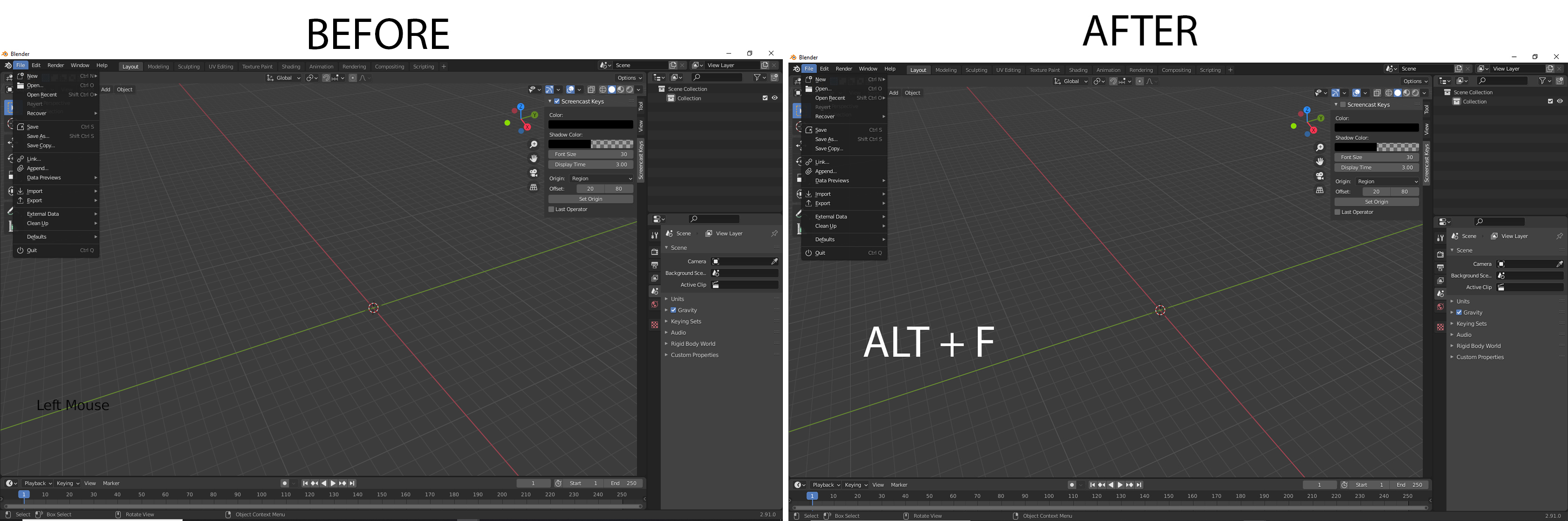
16 Comments
I'm not on windows at the moment but I assumed the default windows behaviour of just pressing alt to put focus on the main menu was present in Blender. If so, the only thing Blender would need to add is the underline on each letter of the main menu that can be used to open that menu.
* @thinsoldier * well that not the case in blender. In most programs by pressing Alt key it put focus on the top menu but not in the blender. It is better to add any shortcut to access the top menus bar by keyboard and used keyboard arrow keys to access different menus instead of hovering mouse over the top menu bar every time.
* @thinsoldier * I have edit my original post. Check it
Some of the necessary hotkeys are already taken though, just something to consider.
* @Armored Wolf * So how would I know that this hotkeys has been taken in to consideration or not?
* @Haziqisthebest * well, it's blender so pretty much every hotkey is already taken by another function, but you can check them out in Preferences>keymap editor (not the most fun to use).
Your idea makes a lot of sense for accessability, just saying that using the hotkeys you want by default will mess up other things, but it's definitely a nice option to have.
* @Armored Wolf * True. But Blender developer can make the use of this hotkey in object mode. I might be wrong, but I don't think there is any hotkey of Alt + F, Alt + E, Alt + R, Alt + W or Alt + H is in use in object mode. These shortcut can be used for accessing file menu, Edit Menu, Render Menu, Window Menu, help Menu respectively.
* @Haziqisthebest * Alt+R and Alt+H are taken (Reset rotation and unhide)
* @ Lsscpp * My bad I do not know those. So that means my proposal going to be rejected ?
* @Haziqisthebest * I like your idea. Maybe just rephrase the proposal and focus more on allowing people to hotkey those menus to whatever they want, instead of forcing default hotkeys.
That being said, developers don't just implement stuff because someone proposed it, so it might be a while.
* @Armored Wolf * But this option is already available to set the hotkey of the menus. Below is the image:
imgur.com/Af1zGMe
Normally how much time does it take to implement any feature or accept any feature overall ?
* @Haziqisthebest * oh, if the option to hotkey those menus already exists your proposal will never be accepted. Everyone wants different hotkeys and the developers can't cater to everyone.
One of the efforts of the Blender 2.80 series was to remove several default hotkeys so that people can set up whatever they need to whatever the like, so yeah, this won't happen.
* @Armored Wolf * I am afraid so, this proposal is going to be rejected. Nevertheless, I have to use the default shortcuts of blender for now. Anyway can you do me a favour. As you might know blender curve tool are hard compare to other areas of blender. It can certainly be improved. There's a proposal in which curve boolean functions can be improved. Below is the link kindly upvote it, so it gets implemented in newer versions of blender.
blender.community/c/rightclickselect/7Pfbbc/
Cheers mate thanks for the small talk :thumbsup:
* @Armored Wolf * I have edit my original post. Check it
Depending on what you're looking for F4 might work for you.
Edit - Preferences - Keymap - type "menu" in
File context Menu is F4 In version 3.2.2 I believe
Jus the update I have edit my post as there are some shortcut which are already usable in blender therefore they can't be implemented in blender. I am unable to remove image I am pressing remove but nothing happening don't know why.