
Duplicate parent with child (other way)
Right now to Duplicate parent with child must spent procedure:
- Click object as parent
- Shift + G, select child (selecting objects child)
- Shift + object parent to select parent again
- Shift + D or Alt + D
This procedure is not optimal.
By my opinion
Shift + D
or
Alt + D
on parent should duplicate with parent without this procedure. Why? Coz we can easy duplicate child by simple selection, and natural is child parented to object minds some "solid" relted object.
How to duplicate object parent without child?
By my opinion
Ctr + Shift + D
or
Ctr + Alt + D
If user want clasicc old method then in option can be that "Not duplicate child when duplicate object with parent status".
Finaly after post @Darknoodles
The add additional
extend
with
children
for keymap
ctr+d and
shift+d
looks optimal solution.
blender.community/c/rightclickselect/P7PA/
17 Comments
You don't have to reselect parent everytime. When you use select children, there is the "Extend" checkbox in the F9 menu. If you use it, it keeps the parent selected, and every next time you use "select children" the parent will remain selected. You just have to select all you parent, use this and duplicate. You just do one extra action for the whole selection. So i guess you can deal selection your 99 parents and make an extra click for the checkbox :p.
Sorry but making the way you want the default behavior is really risky as you may sometimes select an object without noticing it which may own a bunch of children and may add huge performance hit. You can also define it to be the default behavior in the options, in the keymap section.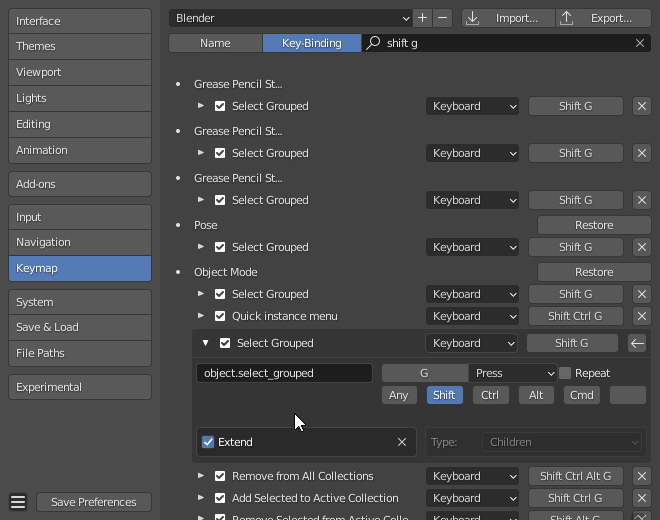
Ok, that solving some time around procedure with re-select, but still not so optimal and can be more.. I did not know abut this option around keymap operations.
But maybe this extend should exist for duplicated as
shift + dandalt +dto broaden possibilities. Then extend can be for children not only forshift + gbut+d..ande here we go.. in home around needs.Thx for explanation around.
Shift+g, children with multiple parents selected only selects the children of the active object. It should select all. This is the simplest short term fix that would help with selecting many heirarchies and duplicating them.
I feel your pain. I struggled with this too.
Try this one devtalk.blender.org/t/outliner-gsoc-follow-up-feedback/15948/80 you can bind hotkey to a "Duplicate Hierarchy" and use in 3d view instead of outliner.
I edited post with under line with suggestion as optimal solution how can be done this feature. It can be as default maybe or as option to changes (extend).
Select parent. In the outliner click "select hierarqy", then you can duplicate them fast
ROFL.. you are funny regarding last other post.. I think you all have just 5 object on blender viewport and outliner. First of this all, you must find this object in outliner.. (do F2, check name, put to search, find collection, close search, find this collection, select object on outliner, "select hierarqy").. Right? : )
Select your parent object. In the outliner click point. Now that you found your parent in the outliner, just click right click mouse on it, choose "select hierarchy. Its this fast
I really think you have to start using the outliner more ;)
No way. I can guarantee that that's not as fast as it can be. I've been in production situations where I had to organize the scene by parenting tons object to empties, and it was a pain, it would take hours! I ended up exporting all in Maya and just using ctrl+g to group objects and ctrl+d to duplicate the groups. It took minutes, not hours, including export and import time. I agree with @ManBlender, the default behavior should be "duplicate the whole hierarchy".
About the option to dupilcate only the parent, another alternative to the possible shortcuts that ManBlender mentioned, could be a prompt with two options: Hierarchy, Only Parent. I think it could be in line with Blender standars, since even for deleting objects, blender still uses a prompt popup (with just one option to confirm). I still prefer the shortucts though.
I think this principle should be applied for deleting operations, hiding fromo viewport and hiding for render: Deleting and Hiding the parent should delete/hide the whole hierarchy by default. A modifier (like alt/shift or ctrl) could be used to perform the operation only on the parent.
"Select your parent object. In the outliner click point. Now that you found your parent in the outliner, just click right click mouse on it, choose "select hierarchy. Its this fast"
Still not te fastest way, sometimes you want to populate your scene by just focusing on the viewport, without using the outliner. Plus, how do you select like 100 hierarchies at a time? As far as i know, you can only do that for one hierarchy.
Good luck if, for example, you have to move 100 parents with children on another collection.
Yes, i was sad that you cant select parent and children in the viewport at the same time, but using the outliner and adding "select hierarquy" to quick favourits, its fast. Altought yes, i recommend adding a select parent and children in the viewport, that would be a good request
Select your collection, "select hierarquy", now you have 100 hierarquys selected
I still think that having a way to just duplicate the whole hierarchy like a group, directly in the viewport is needed (and in the outliner as well) . Quick favourites are still not optimal because they get crowded easlily.
Imagine that you want to quickly populate a scene by duplicating objects in the viewport, but you don't have objects, but hierarchies (generally called groups in other softwares like illustrator, affinity designer, maya ecc).
It's just intuitive that if you organize objects in hierachy, if you duplicate it, you want to duplicate the whole hierarchy with a shortcut, still even faster than quick favourites.
more practical example: your hierarchy (group) is a "Car" made of dozens of objects and sub-hierarchies , and you want to block out a rough layout of a crowded road. You put the view in top ortho and start to ctrl+d and transform like crazy.
Simply because blender has workarounds to do some operations, it doesn't mean that they can't be optimized, and the shortcut as the OP proposed, is in fact a HUGE improvement, that you see in situation when you do the same thing manually dozens of times.
"Select your collection, "select hierarquy", now you have 100 hierarquys selected"
Nope, you are assuming that i have just the hierarchies that I want to select in the collection. I could have dozens of other objects and hieararchies in the same collections that I don't want to select.
I completly agree with you and him, we should have a button to select both parent and child, not just the child or the parent. But the thing is that he could formulated better the question, since he choosed and described the slowest existent method to select Parent and child. I just tought it would be better to tell him the fastest method currently avaliable that is using the outliner and viewport
Great, anyway the requested feature is one of others that could really imporove parenting (hiearchical grouping) workflow, as I mentioned deleting and hiding hierarchy, and also hierarchy locking/closing meaning that if you "close" or "lock" the hierarchy you can just click on any of the children in the viewport and just select the parent instead, in practice, you treat the hierarchy as a whole in the viewport. see this (and my comment in particular) for more: blender.community/c/rightclickselect/Rcbbbc/