
PBR: Layer based system
This is part of a bigger proposal: Main page
Layer based system
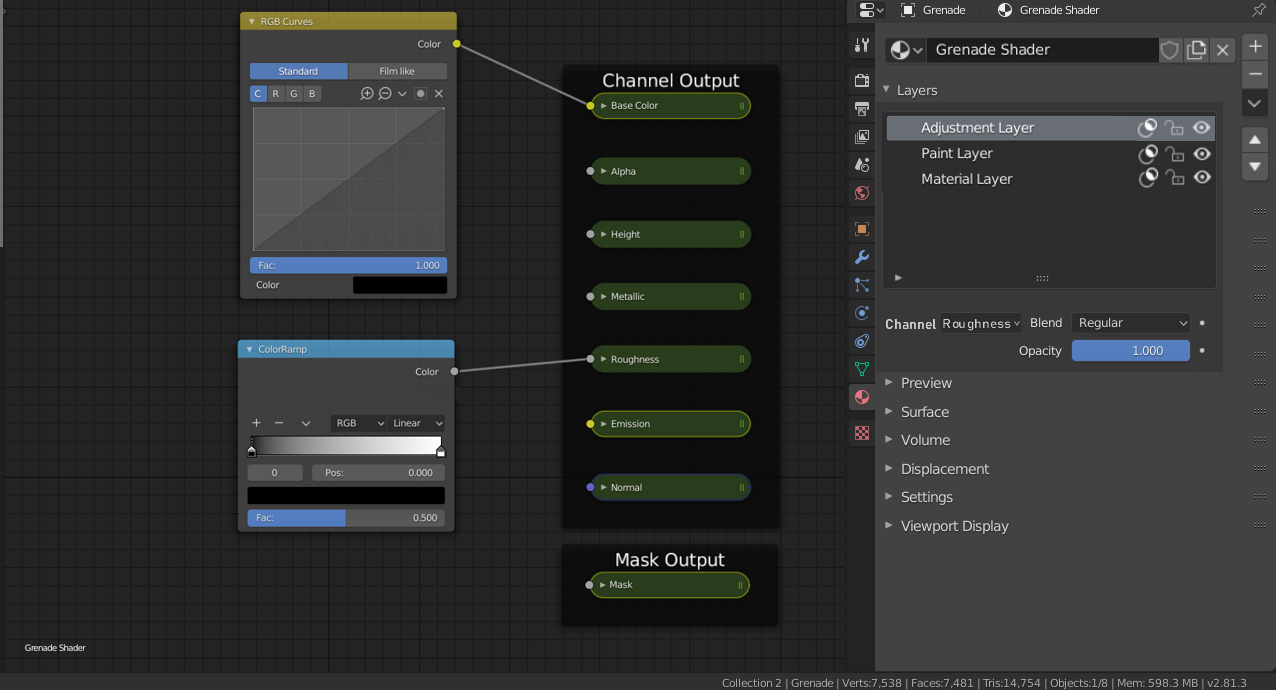
Turn the material editor into a layer based system similar to Grease Pencil Layers. There are 3 types of layers that can be added:
-Material Layer:
Adds a base material with all the channels that are used in the texture set

-Paint layer:
Adds an empty paintable layer, this will allow to paint on any channel(s) on top of the underlying layers. Paint layers are similar to image textures, except they are stored inside the .Blend file and have a resolution specified in the Texture Set Settings.

Paint layers can also be used as a black/white mask
-Adjustment Layer: Adds an empty layer similar to the paint layer but allows for easy adjustments using nodes found in the ‘Color’ category of the Add menu.

Paint layers and Adjustment layers can also be added inside Material layers.
All layers have the following common properties:
-Visibility toggle
-Mask toggle
-Locking Toggle
Per channel properties:
-Opacity slider
-Blend mode

3 Comments
That final adjustment layer could SO useful. Being able to edit brightness, contrast, hue and saturation on the whole shader would be great.
Hello. Very interesting proposal. As a pipeline developer I want to know some of your perspective in this. Very much curious:
Firstly am I understanding it correctly:
Then
This answers will help me to understand your project better as it's a bit grey for now. Thanks.
This would also be excellent in the compositor, so we could assemble a list of nodes or node groups and think in layers of process instead of graphs. (like after effects etc)