
Align the viewport grid to the Face used for custom Transform Orientation
navigating with alt (orto snapping ) should respect the transform orientation set by a a custom face! or any other orientaton.
FCKN POWERFULL STUFF!
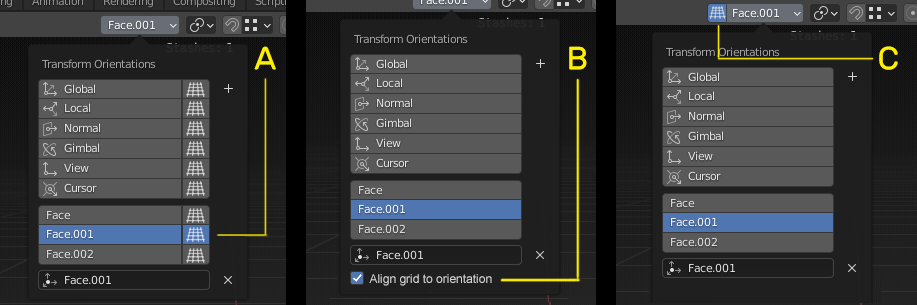
Did some UI design variations... I think the version C is the BEST!
8 Comments
I think B is easiest to understand, but C is most accessible. Maybe C with a nice tooltip?
Aligning grid to orientation would be cool.
C is god as far as user has access to button without dropdown menu. But IMO best would be A + C. A looks like ability to enable align for some transform orientations optionally.
From my building modeling work experience - mostly I need constant align for some few of my custom TO's (aligned to walls/fasades), but align view to some Gimbal/Normal TO's is rarely needed (most of time even unwanted).
So I prefer to have constantly enabled view align for some Global, Custom 01, Custom 02, Custom X TO ( via such " optional " enabling in dropdown ) and sometimes override those " optionals " by global align enabling when to work with some Normal/Gimbal/Local TO's and align view too.
What I really missed is,,, that I wasn't able to snap the Orthographic view when worked on an angled object with custom face transformation origin, ie something protrudes out of the surface.... though using, local transformations helps, but it's not the same when u wanna add something, draw something utilizing the grid... basically u cannot use the advantage of the grid... that's my problem: drawing perpendicular and parallel lines, in custom orientations. or any pattern that uses the grid as a guide. :(
* @sulyok.zs * You can use " Align View to Active " and " View " TO. It just need to optimize a bit keymap for smooth/fast usage. On GIF - I use custom pie for Align View to Active and remaped from numpad to Ctrl, Alt, Shift combinations + mouse wheel up/down Rotate View (on numpad it pretty useless).
* @IIIFGIII * Nice trick for cutting,,, though... this is quite limited compared to the original idea, that your whole blender toolsets operates according to the new transform orientation.
* @sulyok.zs * Of course it limited. I just shared my own experience ( mb if help someone). But is some cases it not " limited " but fast and easy - create for each face TO and align view to it will be cumbersome.
* @IIIFGIII * Loved it though <3
Similar post blender.community/c/rightclickselect/t3gbbc/