
Add Wireframe overlay toggle to the shading pie menu
The wireframe overlay is one of the most commonly used viewport options - far more often than the actual wireframe view. It would be nice to have quick and consistent access to it.
Mockup:
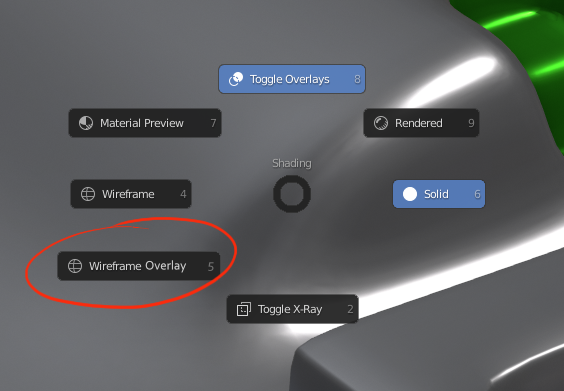
The wireframe overlay is one of the most commonly used viewport options - far more often than the actual wireframe view. It would be nice to have quick and consistent access to it.
Mockup:
9 Comments
But this doesn't belong to the viewport's shading, so it doesn't belong to the viewport shading pie menu.
IMHO a dedicated overlays pie menu would be even better, with more options available on the fly.
* @-L0Lock- * Eh, I think you're putting the cart before the horse. It's more important that this is easily accessible that whether it fits into some imaginary system of classification. I don't ultimately care what menu this gets added to, I just want it easy to toggle, and it doesn't get much easier than tapping Z and a mouse flick.
I think the best solution for what you are after is to allow pie menu to have user customization. For example, being able to add any item with a custom action to a pie menu. This would serve the interests of all users.
I've proposed an idea that gives pie menu access to all or most actions one can take in Blender here:
Pie Menu With Widgets
User Customized Pied Menus combined with a Pie Menu With Widgets would give you another solution to what you are after.
Very good idea. I really miss that convinient option from 3DsMax. Going to overlay dropdown every time is annoying. I don't care that wire overlay is technically not part of the viewport shading. If it's related to geometry - that is shading for me enough.
i have solved this problem By giving it a keymap shift+ctrl+alt+W. Works best. (But it would happen object wise. Not overall.)
I added Wireframe Overlay toggle on Quick Favorites menu. It works great.
* @sslovenec * dont u think quick favourite is a mess?.. I ve added different features there and can't tell its very comfortable.. may be some "pie menu look" will do the job? but at time dont..
* @impacman * Well if you overload it with a ton of shortcuts sure it can become cluttered. But I'm sure glad it's there. If you add same amount of items in the pie menu, it would also be a mess, just a circular one :)
* @sslovenec * maybe maybe..) anyway i prefer quick favourites like in Fusion 360 with icons.. and u bit wrong about pie menus - take a look into maya, it uses "layered" system ...