← All ideas28 Mar 2019aabranyDoneUser InterfaceaabranyAlex-DAwkCandleCometCoBDangryDraiseIIIFGIIIIllia-TykhvynskyiJosephbburgKartridgeKoraxKordalingL3ΛMØNLauloqueLexi4NavWombatOskarRemakeShimoonSir_WaffleVikVupliDertsafranxarthurbourquinbnzscarpgiane.dsdaniellapalmedestrosvetdfcuellardrundeadbunnyernstsson.johanevan0lodgefrancis.obrienfynnskigeistgrialexeyguitarmadman666havocthehobbitjozehicksjulienvanelianknightknightkolovedleontiev.artlucianomarek1max.pulieromeiznertnanomanpronokipaikeolegkrasnovpelminatorrobromanvolgushev4565rs2128runesamuli.pahaojasebbosebbo267sineoskibasrikanth0126ssmithtaholmes160tc8vertexpainterviduttamwegwerfadressenummer88xdanielzagig
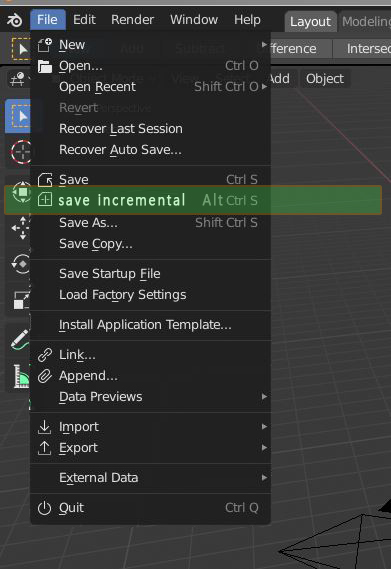
nice idea, a way to save an extra operation ... instead of entering save mode level and press "+" key and then enter
1
A
Alex-D
*
@nokipaike
* Oh yeah. Very useful thing. Especially if it's assigned to [Ctrl]-[Alt]-S (or equivalent). Once you're used to using it you never want to miss it.
I did this with the same shortcut that you can add from the F3 menu searching incremental save and right clicking
github.com/1C0D/Incremental-Save
a
afranx
we hope they add it soon! is a standards command found in many software such as Cinema4d
s
shrekisnotdrek
They oughta add this one. It's lovely in maya and it'd be a great addition to blender.
N
NavWombat
That would be nice, you can set scroll as a hotkey to add version numbers while saving as,
j
jason
Of course, Blender has incremental saves already built in (that's the .blend1, .blend2, etc. files... they're reverse ordered incremental saves). You can tune how many of them you have by default from User Preferences.
L
Lauloque
And there is a more "usual" incremental save in Blender, in the form of the little "+" icon in the save menu:
Or Save File PIE from the "PIE mennu" addon:
a
aabranyAuthor
*
@-L0Lock-
* for blender community to grow there is a need for more usual way to do things.
d
daniellapalme
*
@-L0Lock-
* Yes, but I definately feel that hitting save as, then hitting the plus button is something that can be reduced. And not everyone uses pie menus
A
Alex-D
*
@-L0Lock-
*
Yes there is. And With [Ctrl-Shift-S], then [Plus] on the numpad and then [enter] you can also save incrementally.
It's a rather minor addon (might be suitable for a papercut, even) but as a shortcut it speeds up workflow and probably isn't too difficult to implement for someone with programming skills.
1
L
Lauloque
Yes, I haven't said this proposal has no sense. :P
v
vronahau
*
@motionblur.of.doom
* That worked for me. Thanks. Huge Life saver

16 Comments
I'll up-vote that! A bit tedious to go into save as then hit the + button.
developer.blender.org/D16687
nice idea, a way to save an extra operation ... instead of entering save mode level and press "+" key and then enter
* @nokipaike * Oh yeah. Very useful thing. Especially if it's assigned to [Ctrl]-[Alt]-S (or equivalent). Once you're used to using it you never want to miss it.
Done in 4.0:
Reference/Release Notes/4.0/User Interface - Blender Developer Wiki
I did this with the same shortcut that you can add from the F3 menu searching incremental save and right clicking github.com/1C0D/Incremental-Save
we hope they add it soon! is a standards command found in many software such as Cinema4d
They oughta add this one. It's lovely in maya and it'd be a great addition to blender.
That would be nice, you can set scroll as a hotkey to add version numbers while saving as,
Of course, Blender has incremental saves already built in (that's the .blend1, .blend2, etc. files... they're reverse ordered incremental saves). You can tune how many of them you have by default from User Preferences.
And there is a more "usual" incremental save in Blender, in the form of the little "+" icon in the save menu:
Or Save File PIE from the "PIE mennu" addon:
* @-L0Lock- * for blender community to grow there is a need for more usual way to do things.
* @-L0Lock- * Yes, but I definately feel that hitting save as, then hitting the plus button is something that can be reduced. And not everyone uses pie menus
* @-L0Lock- * Yes there is. And With [Ctrl-Shift-S], then [Plus] on the numpad and then [enter] you can also save incrementally. It's a rather minor addon (might be suitable for a papercut, even) but as a shortcut it speeds up workflow and probably isn't too difficult to implement for someone with programming skills.
Yes, I haven't said this proposal has no sense. :P
* @motionblur.of.doom * That worked for me. Thanks. Huge Life saver