
Display face orientation only for backward faces: now in 2.82!
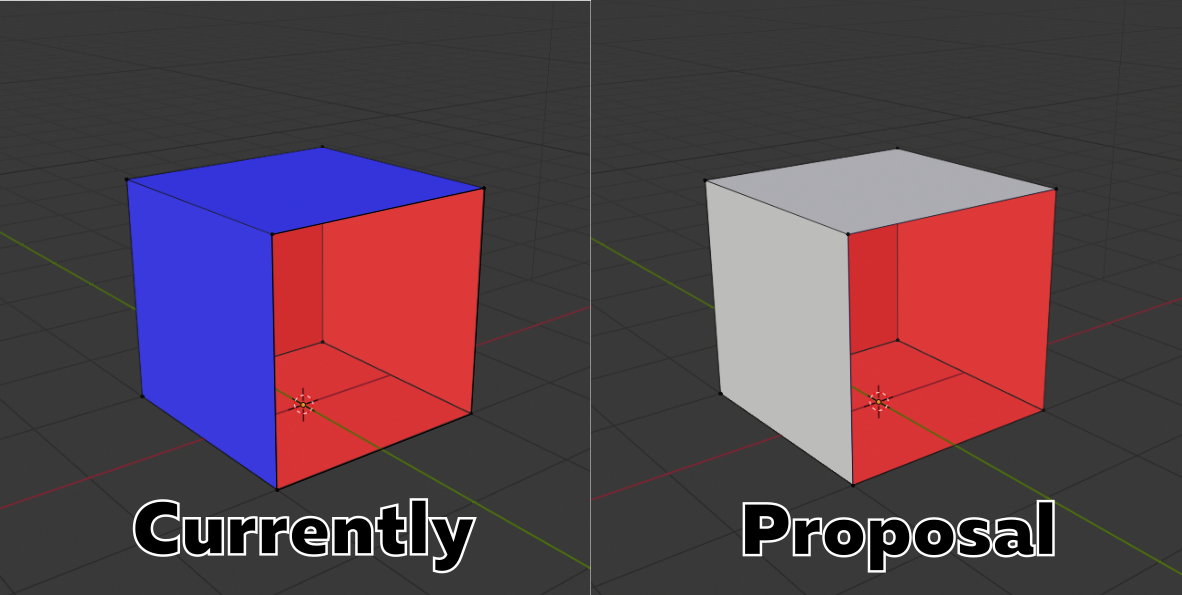
Currently the "face orientation" mode renders forward faces blue and backward faces red:

My proposal: If correct faces are not highlighted, and render NORMALLY according to the mode (i.e. shaded, or matcap, or textured, or lookdev, or whatever), and backfaces in a highlight color (RED) it'll just be a normal way of working, modeling. If a face normal accidentally gets flipped, or a hole accidentally gets cut in a mesh, it'll immediately show up in red. Instead of only seeing the red backfaces we should toggles this other blue/red mode which is not suitable for working in.

Here are some ways this could happen:
-
the current "face orientation" checkbox could be relabeled "highlight backfaces", and could be changed to only affect backfaces... (and have a configurable backface highlight color)
-
the "backface highlight" color which already exists, but is super subtle (it was darker in 2.79), could be made theme/overlay configurable, so he could set it to RED.
-
the current "face orientation" checkbox lives the same, but additional color selectors added to have ability to change frontface and backface color and alpha (idea by Pawel Piotrowski):

18 Comments
Woudn't be better if there was options instead of hard-coded setting?
blender.community/c/rightclickselect/Xqcbbc/
* @Pawel Piotrowski * totally agree. But color settings can be in the main theme section. I am not sure, that somebody tune em often.
* @ Vyacheslav * Can't find it in the theme settings, I think it's hard coded as of now.
Currently the "face orientation" mode renders forward faces blue and backward faces red.
He is asking for a way to renders forward faces NORMALLY according to the mode (i.e. shaded, or matcap, or textured, or lookdev, or whatever), and backfaces in a highlight color (defaulting to RED, but changeable)... obviously this is only compatible with modes where forward faces occlude back faces.
He's asking for this, because then the backface highlight could be left on all the time, so it'll just be his normal way of working, and if a face normal accidentally gets flipped, or a hole accidentally gets cut in a mesh, it'll immediately show up in red. Instead of him only seeing the red backfaces when he toggles this other blue/red mode which is not suitable for working in.
Here are some ways this could happen:
the current "face orientation" checkbox could be relabeled "highlight backfaces", and could be changed to only affect backfaces... (and have a configurable backface highlight color)
the "backface highlight" color which already exists, but is super subtle (it was darker in 2.79), could be made theme/overlay configurable, so he could set it to RED.
a new "highlight backfaces" checkbox could be provided, which would only highlight backfaces RED, and leave forward faces alone.
P.S. IMO it is awkward that the current "face orientation" is a checkbox, when it completely overrides the shading mode. It feels like it should be a shading mode itself. Though I think it is better as a checkbox that only affects backfaces, as in #1.
* @David Jeske * Thanks for detaled explanation, I forget, that this something new and not everybody familiar to this function. If you don't mind i will take your explanation in the post
I think it would be great to have these options in the Theme Editor! I've added it to Theme Development - Paper Cuts
I would prefer an ability to change both colors and alphas, so you can show both sides or only inner color overlay as you wish.
Now my eyes bleeding with such intensive colors and i can`t work with this overlay, so I am switching it on and off.
after just spending 30 minutes fixing normals in another blend file with bad normals... i've decided this should not only be a feature, but it should be the DEFAULT view....
I love your idea to make the front-face and backface highlight be a highlight color blend... then we can all choose something that works for us... I'm a bit busy right now, but if no blender dev gets to this in the next couple months, I'll be sure I submit a patch for 2.81
* @David Jeske * i tried to make it by myself, search is source code, but I'm absolutely no idea how overlay system works... This is difficult for me
What if you're working with red shading, or red matcap? This is suddenly not so useful. It's just as important to highlight the blue faces in my opinion.
* @rileybrownart * "theme/overlay configurable" concept from proposal can fix this.
A very nice proposal! In 2.7 normals reads very well with default shading. Now it is gone, shading became too flat, and entering "viewing normals" mode back and forth causes frustration.
It is especially harmful for modeling minimal surfaces, where backfaces is half of model.
skfb.ly/6IBSN
Honestly I just want to be able to change the colors.. the red just KILLS your eyes after a few seconds.
For anyone else wondering how to activate this:
Edit > Preferences >Themes > 3D View > Face Orientation Front.
Set A(lpha) to 0
in my opinion it is very bright and distracting color for backface
It isn't clear what you are asking. What do you mean by "Wrong side"? Face orientation overlay shows you which faces have normals that point away from the camera, there's no right or wrong about it.
Are you asking for face orientation to show faces with different normals from their neighbors?
* @Josephbburg * I think this implies backface polygons.
* @Andrey Rusnak * It looks like both of us were wrong!