
Multitab editors
Edit: Making this optional
Great for saving screen space on laptops, for example while using the shader workspace.
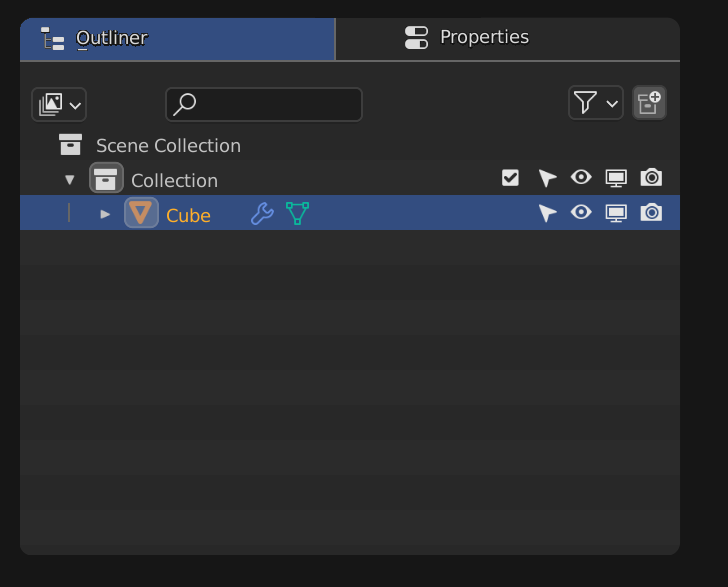
Pardon my mad ui skills it was made on paint :)
Edit: Making this optional
Great for saving screen space on laptops, for example while using the shader workspace.
Pardon my mad ui skills it was made on paint :)
9 Comments
There is some precedent to something like this: The animation editor(s) When you're using the Dope Sheet, you can press 'alt+Tab' to toggle between Dope Sheet and Curve Editor. To me, a similar proposal for Outliner/Properties could make sense without the need for any more buttons and screen real estate.
(Currently, 'alt+tab' in the Properties panel increments through each Property tab. But that's not very useful, in my humble opinion since it's quicker to just directly click the tab you want.)
Same as here: blender.community/c/rightclickselect/F3bbbc/
Oh thank you kindly for for mentioning my humble person. It was that time when I was so naive and wrote ton of text... )) thought that can change something, make things better.
-L0Lock- , dude, why you still waste your time on this place. RCS are dead , you saw this place few years ago, when good topic could gain 50+ votes in few day... (even this thing still not implemented, hahaha, 100% useless place). Today here only meaningless everyday spam that has absolute zero impact on development, no one read topics that older than few days and each day dozens come on top.
I don't expect every good idea to be developed in the nearest years nor the BF to agree on everything brought here, but there are quite a bunch of proposals that are now reality .
And with the development fund and team getting bigger as time goes by, the BF's ability to add more groes all the time. So I stay.
Screens are wide screen so making this add one more header to the editors. This wil waste space and also the headers of 3d viewport will be thicker with 2 headers (one for multiple tabs and one for the settings on header).It is so away from blenders smart logic of headers. So instead there can be other way to do it for example, when u click on editor icon, and pop up window opened; we might be able to use ''shift'' to select 2 editors. Then those 2 editors will be selected. When we double click on editor icon it will change back and forth between those 2 editors we choosed at first. This will allow us to not waste any space and u can still have that functionality
Making this optional, I didn't mean change the default settings :)
Some softwares like Unreal Engine propose such tab UI, it's not loss of space when it's usefull and made cleverly.
You don't HAVE to open several tabs in the same space. And if you don't, no need to even display a tabs UI in the first place.
Then in the case of Blender, we could easily imagine a slightly different UI where instead of having big tabs titles for each opened editor tab, we could just have the editors' selection popover button. That will also keep the UI consistent and allow to keep tabs in the same space as the already existing headers.
While I like the idea of shift selecting editors from the menu, I think the double click on an editor's icon is too much of a hidden feature to be useable as is. It could be a nice addition in a more UI-oriented solution, though. Like Blender's Alt function that is extremely useful but unknown by a large part of user because there's no way to even know about it unless someone tells you about it.
Ahh yes I know. I just reacted according to ur images, And Yes I know it is delibarely hidden functionality but that was the point so people who really need that like u can use it and other users wouldnt be bothered by extra loss of space or changes in UI.
I like the UI of blender so I dont want it to behave like other softwares however, while keeping the old UI and having that functionality can be like this:
If there is A ''plus button'' next to ''editor changing box'', u click plus another editor selection menu will show up and u choose new editor, then there is 2 editor changing boxes side by side and u can click the first editor box or second editor box that are side by side and change between the editors. : ) Now we found a middle way so both of us happy.
Absolutely we shouldn't base blender UI on other softwares!
Blender UI is superior to everything else lol, I just saw my brother working on his laptop and it seemed really frustrating to manage all screen size when shader editor is all open so I thought other people might like it :)