
Improve User Experience - Blender 2.80
In Blender 2.80, in order to be able to select any tool, while still having the Transform gizmos active, the developer have added the following checkboxes in show gizmos (highlighted in red):

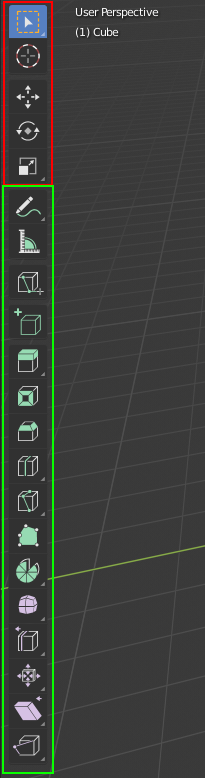
I think it could be much better if this were removed from that menu, and instead, the tools panel could be divided into two sections, like following:

So the tools that are in the top part could be activated and deactivated, independent of each other, and the tools that are in the bottom part could be activated only one at a time (and it shouldn't deactivate any tool from the top part). Here is an example:

This way, if you have the Select Box tool, the Move tool and the Rotate tool enabled, you could have the Move and Rotate tools visible in the selected object, and still drag the mouse to make any selection. Of course, if you have the Move tool selected for example, and then you choose the Extrude tool, which has it own gizmo, it could temporarily hide that move tools, until the Extrude tool is deactivated. Please let me know what you think, or if you have a better idea.
13 Comments
What the developers have done is already nice but this will make it more accessible.
* @johnpdelacruz26 * I feel like this has to be done if they want to make their software accessible, which is supposed to be a priority of 2.80. It should be easy to learn for beginners and easy to pickup for professionals coming from other software. The professional group are likely to be more put off by the active transform tools as they are now than to see these as easy to use. If the transform gizmos A) make it so that selection requires another click on the toolbar, then clicking back to the transform tool (as in the toolbar) or B) are hidden in a menu that few people will open if they can't get past the poor interactivity, blender will not be picked up by professionals.
* @dpdpforlife * I guess implementing something just to make a good start is good and improving it step by step is what they may be planning to do.
This is identical to my proposal posted earlier today. I also posted a script to make it work using shortcut keys. I’m trying to make this happen using the toolbar as well. Search before you post.
* @dpdpforlife * Please give the link, so I can vote it
* @facu.della.rosa * here it is. Check out the add on and key map. A big part of it is that click+drag with the keyboard shortcut activates the old style grab, rotate, and scale in a really intuitive way.
* @facu.della.rosa * your description is easier to follow. Anyway, I didn’t realize how bad the move, scale, and rotate active tools were until I started experimenting with this for the industry compatible key map. Hopefully I can figure out how to make the toolbar part of this work on the next few days so the workflow can be demonstrated as better than what we have now.
Not sure if you saw the edit to my original post on my proposal , but I made an addon that brings most of this behavior to blender.
Right now I haven't been able to replace the active tools, but I've made it so the Move, Rotate, and Scale gizmos have buttons in the N panel and can be assigned shortcuts. Also I changed the drag behavior of the select tool so that it moves, rotates, or scales based on what gizmo is active instead of always moving the selected object.
Check it out and let me know what you think.
* @dpdpforlife * Thank you! I will try it.
Active tools and viewport gizmos are different things and independent.
* @-L0Lock- * hence the separator space between them. i think this would be very useful.
* @Omgzdenek * You got me wrong. active tools gizmos are note viewport gizmos. Not anymore.
* @-L0Lock- * We understand that they are separate things, but only on a technical level. There is no reason from a user's perspective that they need to be so drastically separated in the UI. The transform active tools are simply less useful versions of the transform gizmos. If you want the tweak drag behavior of the active tools instead of the drag to select behavior of having a box, circle, or lasso select tool active while the transform gizmos are enabled, you can choose the "Select" tool instead. It gives the tweak behavior of the Blender 2.79 interaction model.