
Rotate edge slide
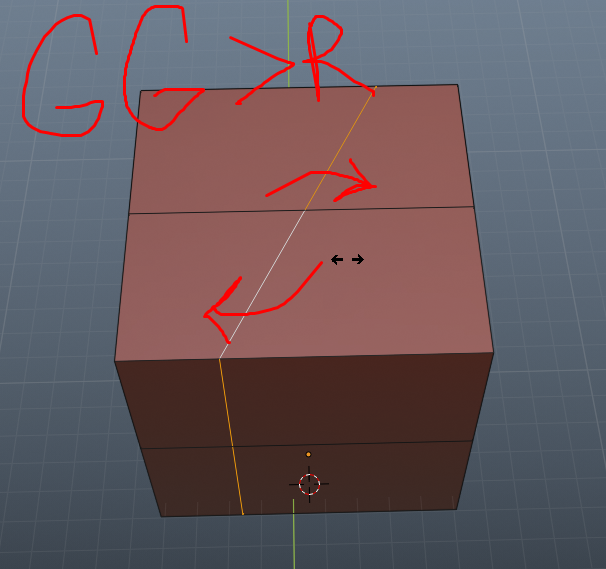
It would be great to add to the tool "edge slide" the ability to rotate the loop along the normal. It is often necessary to move the hinges, but in this case I make it through the knife, but this is a slower option. I hope that in the screenshot it is clear what I mean. For example, in the slide mode, after pressing R, it was possible to perform not movement, but rotation.
13 Comments
blender.community/c/rightclickselect/SScbbc/ vote me
With shear you can do that.
* @aldebaran798 * how exactly?
* @alexeypiyagin * In Blender 2.8 left panel has a active tool named shear in edit mode, or using search popup.
* @aldebaran798 * Shear doesn't "slide" vertices on edges, it's an arbitrary movement.
* @aldebaran798 * the shift does not allow movement along the normal immediately; after performing the operation, it is necessary to set the orientation along the normal and then twist the offset. This is not a very convenient tool for such tasks.
* @-L0Lock- * What you mean with arbitrary movement?
via GIPHY
* @aldebaran798 * giphy.com/gifs/kDfKjbKaFIwZgyFPw6/html5 This does not work if the cycle is selected and the object is expanded. Even if you switch the tool to normal mode
* @alexeypiyagin * Try to use local, normal works well only with faces in selection.
* @aldebaran798 * As a rule, I often have to work with loops. In my example, the local one will do, but if you remove the transform from the object, it will no longer work.
* @aldebaran798 * try to shear on a squashed cylinder. Shear basically makes an opposed parallel slide, it doesn't follow the geometry. What you're showing with your cube is that if your geometry has coplanar parts and if you do a shear on the same, it looks like a rotation by sliding edges. But this isn't what happens.
THANK UUUUUU i MEAN * @Badwin Arevalo Vera *
* @Badwin Arévalo Vera * thank you!