
Transformation values and states as Overlays.
In reference to:
- Improve keymap display in status bar
- Move the transform info away from the header, into the viewport.
And because there is no single criterion to display the values. Sometimes the information is in the status bar, sometimes it is in the menu bar, and sometimes it is split between the two. Check it by executing move, bevel vertex, inset faces.
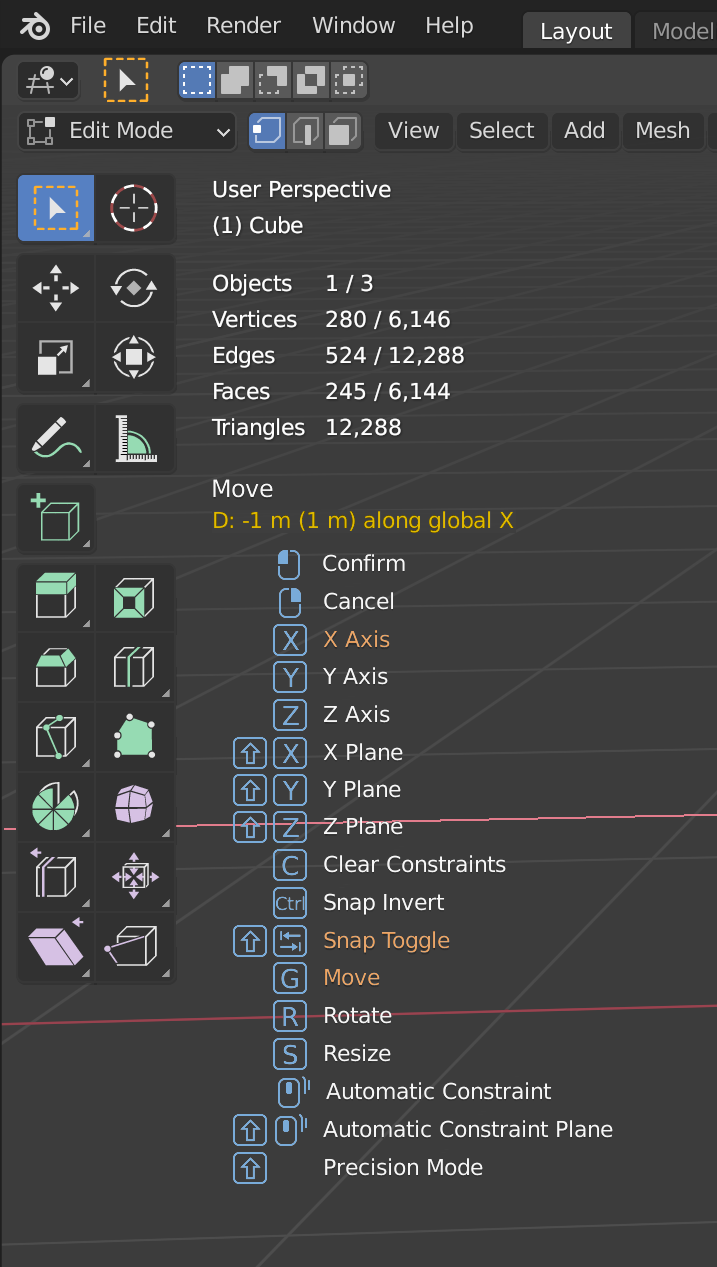
I make a proposal to move the information of the transformation of the header to put it as view overlay, and optionally add as an overlay the information, values and keyboard shortcuts of the modal tools.
The picture shows:
- Action name
- Transformation values (yellowish)
- Modal options
- Actived options (orange)
- Shortcuts (bluish)
7 Comments
{attachment Status_01png}
* @ wevon * sweet!
What about do this like panel optionaly? Counter of position for bether colab?
Maybe is bether solution than exist. But in fact in Blender exist log of actions. Maybe should exist some history of operation like in Adobe Photoshop where we can go back or forward in steps?
* @ManBlender * I made issue for this blender.community/c/rightclickselect/qhhbbc/ This can be art of this
I think a good solution would fix this even if the Overlay is toggled off; what are your thoughts in that case?
Additionally, for something like bevel, what would it look like in your mockup? There's a lot of info to display and I think it would be duplicated a bit wouldn't it? For instance, you would see "[C] Clamp Overlap" in the vertical keymap and you'd have to repeat those words again in your orange line to say "Clamp Overlap Off" or similar etc.
* @rboxman * As demonstrated when performing a bevel, all information can be displayed by default in the status bar, there is no need to have the information in the header temporarily substituting the menus.
The status bar shows the information of all the editors, and it should remain, although sometimes it does not have enough space to show all the options of the tools. The status bar should always display the information in the same way, better categorized, and highlighting the active value.
The overlay should only show the information about the editor itself in column format to improve readability.
You are right that you would have to make another mock-up to see the overlay applied in tools like bevel that have several values, I will do it shortly, you have to study it.