
NEEDED: RIGHT TO LEFT / LEFT TO RIGHT SELECTION!!!
Hi, I am currently trying to migrate to blender and like most people in the industry, my background is using autodesk's products. I know most people here get pimples just hearing this name but on the other hand, please help all of us that want to cross the line towards blender.
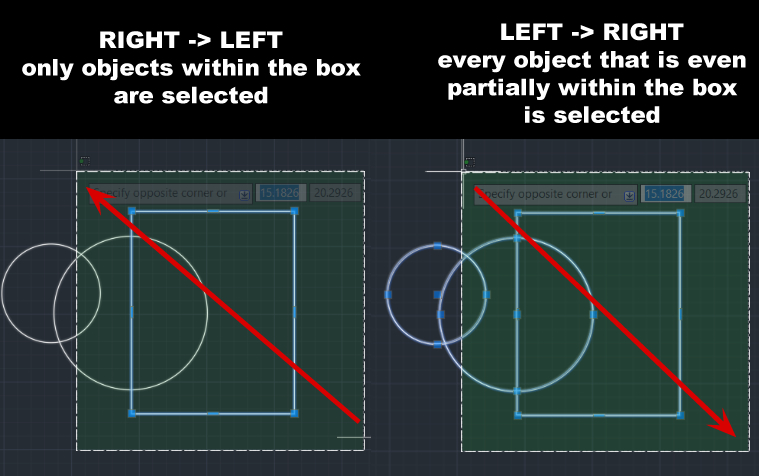
case in point: most programs have some form of left->right/ right->left selection box (when you create the selection box by dragging left to right, only the objects that are fully within the box are selected and when you drag from right to left, even the objects that are partly within the box are selected.
It is my understanding that most users that have only used Blender do not have much appreciation for this feature but for all of us that come from other applications it is very compromising to have to work without it.
Please, please, please, have it at least as an option!
I am talking as a Blender fan who tries to also become a blender full-time user. PLEASE HELP US CROSS THE LINE!
22 Comments
IMHO it should be a little more flexible thant that.
Because newbies are usually not compfortable with such thing (its not common and it looks inconsistent to raw eyes), and even advanced user not always like to have different beheviors depending the drag direction.
But it's really handy to be able to use those two selection behaviors.
So I would propose a compromise:
In 3DS, there is that toggle button, right next to the gizmos and selection modes:
{attachment 3dsmax_KfFUOVQYTppng}
It allows the user to choos between the two selection behaviors.
We could have a button like this (or an option in the user prefs), but with three states:
So everyone's happy.
* @-L0Lock- * Youre are right. Good concept. All life is about compromises. But I see that it still get only 3 votes. 1 default, 1 my, 1 give someone else ( maybe it's you ). All others ignore or maybe even give dislike ...
* @forestgumpovu4 * There are multiple possible reason as to why that is. Maybe this was posted at a time of day where most people aren't seeing it, maybe people don't think they'd use it, maybe people think its not needed, etc.
I personally don't think its a bad idea at all. If it can help benefit others who are transitioning I'm all up for it. * @-LOLock * has made this proposal very clear in my opinion. I'm not a developer so best I can do is upvote it, leave it at that and hope some developer might volunteer to make it.
At the end of the day, people will upvote / downvote what they'd personally want to see. If the reason this wast very upvoted is because people don't want it, then I guess people don't find this to be as crucial as some do.
Don't forget that if this is made, it would most likely be made by a volunteer developer. They also have to think it is important enough to take time out of their day (or more depending on the complexity of it) to develop a tool like that.
* @-L0Lock- * Personally I do not like that you have a different behavior depending on the movement of the cursor. I would rather have the option on a button as L0Lock says. It would be ideal to be able to alternate between the options momentarily as it happens with other tools, for example the magnet tool.
* @forestgumpovu4 * I actually forgot to vote. Shhh.
A bit of visualization from AutoCAD.
And I think it have to deal with
Screen Space Silhouettecoordinates data to check overlap withBox Selection. Screen space data already used for lot of shading instructions. I believe it's not so complicated task to add optionally overlap check by using such data. I may wrong of course...But come on guys - give it a chance. We talk here for a lot about newcomers Blender user experience last times - here you have request from 100% newcomer ( from I believe AutoCAD/Revit ) and he asked for OPTIONALLY feature because he feels lack of it after years working with other software.
At the other side - if it would be implemented it would be another feature " Blender also can do it ".
I'm personally not against this idea as long as it is kept optional. I know I personally wouldn't really use it but I can definitely see its usefulness.
I'm not a great dev and I don't write in C, but I imagine the check could be fairly simple to implement.
I don't actually know how it is programmed at the moment but I imagine it is with ray tracing? The solution could be something like: If you select right to left; keep as is. If left to right, same code but add another check. Maybe in this check you can look at the position of the ray traces that were hit and compare them with the position of vertices of said hit objects. If too far away from hit, don't include in the selection, etc.
I'm not a great programmer so this is just a guess / suggestion and there is probably a better approach to it.
* @MizManFryingP * here is an example where it would give a great solution to a problem which now needs a loooot of clicks to solve: blenderartists.org/t/selecting-pieces-of-exploded-object/1164785
* @anikolo * Hover over the objects you want then press L to select them. Then you can press CTRL + J to join them as you wish. If you are in edit mode, make sure you are in face mode for best results.
Of course, another option is to select with B everything including the ones you don't want then Shift L to deselect the objects you don't want included.
Just downloaded Blender for the first time. Coming from Rhino where this is the default behaviour, I did a little whimper when I realised that this wasn't a thing in Blender 😓
I completely agree with what you wrote — if Blender users aren't used to other 3D apps, I can see how you wouldn't know you were missing this feature, but it's such a huge QOL thing that I have a hard time imagining people wouldn't love it to bits if they were properly introduced.
And for the rest of us who have tried it — missing left/right selection is painful . I see I'm about 4 years late to the party, so probably no chance of this becoming a thing, but here's hoping 😢
I have the same issue... even deselecting is very difficult to undestand...
it could be done adding this entry in select box. anyone? {attachment Blender_Preferencesjpg} but this is not logical circle is selecting object by they center. and there is still a bug if you to scroll to extend the selection and confirm. but I reported 1 year ago Brecht deal it with his favorite uncompleted reports...
+1
I will love that too!
It is also implemented in Sketchup and that app is so popular among professionals and hobbyist mainly because of such simple and clever interaction "hacks", allowing you to be extremely quick and productive.
A button solution - No thanks! Even my 7 years son can easily distinguish between left and right and don't see how yet another button cluttering the interface will be better instead of this simple and elegant solution.
Oh yes please, please make it so
Guys, guys... why don't you speak???? the function is already there (at least in 2.8) left of the viewport shading icons on the top right.... (maybe I was wrong to mention it as a 'left to right/right to left' issue. The important thing was the ways of selection-partial/full)
* @anikolo * Can you add some screenshot what you mean - I take a look and I don't see any selection 'Partial/Full` switcher on top right.
If you mean
Show Whole Scene Transparent- so it allow to select ' thru ' in edit mode but it's not what you looking for.* @forestgumpovu4 * Hi, I don't see any button for attaching images (maybe because I'm new?) either way, I posted an image here: blenderartists.org/uploads/default/original/4X/2/5/5/25597c1e18f54e338db54018b03b553543567e23.jpeg
* @forestgumpovu4 * I think that's it. And yes, it only has this behavior in edit mode. In object mode, it doesn't affect the selection method.... :(
(btw: I used your gif to make an icon for the submision. I hope you don't mind :) )
* @anikolo * Because there is nothing left for me to say.
* @anikolo * AAAA... . Emmmm .... It's not what you looking for. Its just let u to select " through " and shows " face dots " for such selection.
In Autodesk example - it's like ON/OFF
Ignore Backfacesin 3D Max edit mode and have nothing with right to left or left ot right dependencys.Not 100 % sure but I feels I remember some time ago ( few month maybe) it's been suggested. Cant find it now - search not work as it have to. But if you have enough time you can try to find it -> Load More Posts, Load More Posts ...
* @forestgumpovu4 * It was here however I feel that it was very badly explained and not proposed well. I understand its a duplicate but I don't think a proposal should be damned because the first one to propose it didn't explain it well enough.
Well that's just my opinion I mean.