
Autosmooth option when clicked on "Shade smooth"
Just like any other operation, shade smooth should show recent drop-down menu so that we can change Auto-smooth angle.
Also, shade-smooth option for curves (very annoying to convert them to meshes).
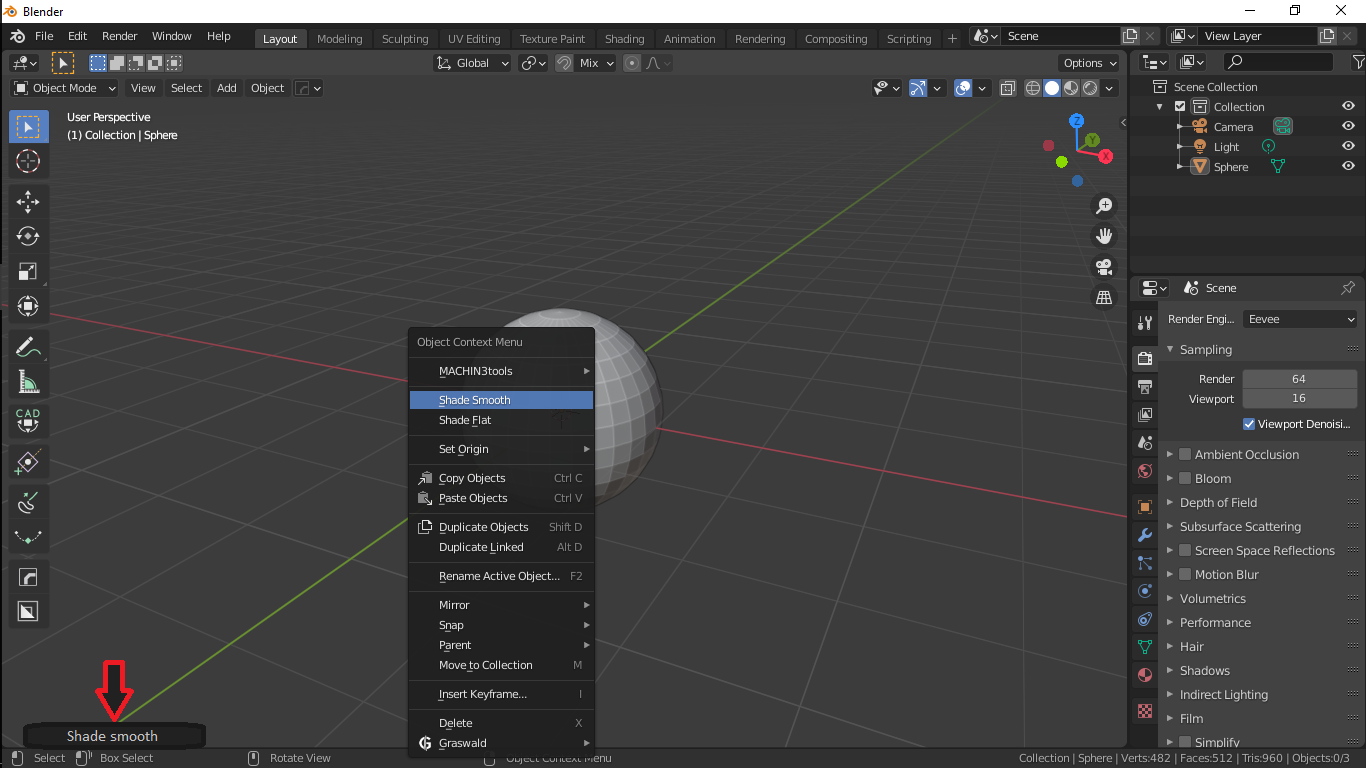
Just like any other operation, shade smooth should show recent drop-down menu so that we can change Auto-smooth angle.
Also, shade-smooth option for curves (very annoying to convert them to meshes).
13 Comments
That'd be cool, but one of the most annoying things is not being able to apply auto smooth to multiple objects at once, so you have to manually add auto smooth to each object. I wish linking object data would add auto smooth, or maybe a command could auto smooth multiple objects.
* @BlenderSplendor * Select your objects, Hold-Alt, Check the Auto Smooth Check box. Should apply to all selected objects (Works with most settings) This also works with the Auto Smooth Angle if you hold alt when you click the angle bar
Marking this as done! 🎉
I agree! Please don't forget, that this
blender.community/c/rightclickselect/6Lgbbc/
could be a other or good addition to solve that smooth and autosmooth "problem".
Agreed, its common enough to be in the context panel
Shade Smooth and Auto-Smooth are separate settings. Former is a per-face data on the mesh, latter is an option for the entire mesh datablock.
* @Stanislav Blinov * Whatever you are telling is Technically right but 90% times what we do on daily basis is right-click and select shade smooth and then goto object properties and click on auto-smooth with 30, which is quite long process. we just want context menu options for quicker workflow.
* @Stanislav Blinov * There's an option in the panel after creating a cube to blow it up into a sphere. I don't know what one has to do with the other but it's in there very conveniently.
* @thinsoldier * No, there is not. Unless you're referring to the "round cube" from an add-on, in which case, what do you know, it's round. That's not what I mean anyway. "Shade smooth" is a per-face flag. Auto-Smooth isn't. If Blender showed an auto-smooth slider together with the Shade Smooth operator, it'd provide completely unrelated UI: you shade selected faces smooth, yet also adjusting value that changes the whole mesh . That'd be like if you added a cube and then it replaced everything else in your scene with cubes if you adjusted a slider. This is why this proposal is entirely incomplete. The closer thing here would be some kind of smoothing groups analog from 3DS MAX.
* @Stanislav Blinov * my mistake. I meant in the subdivide menu. youtube.com/watch
* @thinsoldier * You subdivide and you change parameters of that subdivision. Pretty logical. This is not that.
* @Stanislav Blinov * If they are different thing then why auto-smooth need shade smooth to be enabled.
* @mrajendra2150 * Because one changes behavior of the other.
Again, "shade smooth" is a per-face flag. You can set all faces to use smooth shading (e.g. via object mode Shade Smooth or by selecting all faces in edit mode and shading them smooth), or selectively in edit mode.
The Auto-Smooth setting operates on the whole mesh , on all faces that are set to smooth shading. You can have a mix of flat and smooth shading in your mesh, but you can't have disjoint selections of faces auto-smoothed (i.e. generated hard edges for) with different angle. It makes no sense to show a mesh-global setting together with an operation of a lower granularity, because that would imply that those settings have the same granularity, which they haven't.