
Use ctrl+A to search node in blender shader
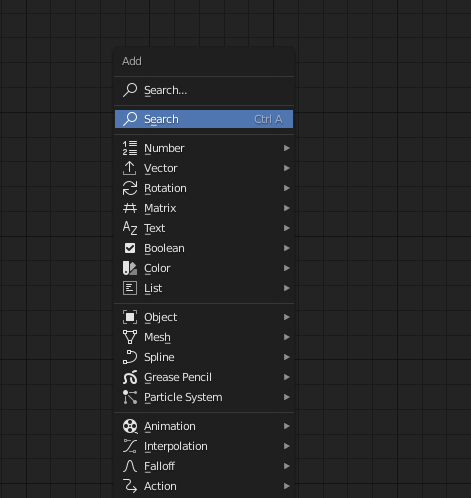
I am a frequent animation node user. The ctrl+A allows to direction search for nodes and it prevent going to long list to find node. This set up also has been done in particle nodes as well since the core developer is the same. I think it will be helpful to make a consensus of shortcut keys across the platform. Adding "ctrl+A" for search in shader node will be helpful.
8 Comments
adding a new note should automaticly set the search option so that you immidiatly after pressing ctrl+a just can start typing the name of the node you are searching and the nodes with those keywoards will be shown (works like this in Houdini and Substance Designer)
* @Mario Tovirac * Sorry, I don't understand much. Are you telling a solution or adding idea to proposal? If it's a solution, would you tell me how to add a new note(/short-cut key)?
Check this
**I moved comment to that proposal.
If I understand correctly, this is already doable with just adding a new shortcut to the node editor.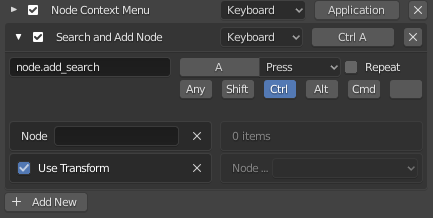
please create a ticket for that --> developer.blender.org/
* @stas * I am not sure, isn't the place for bug report? Or you mean I can make developmental proposal at that place as well? I think right-click select is the place to make proposal, although I never know if developers will see this or not. If there is more formal way to do, please tell me so that I can do next time.
* @Hoffman * This is the right place for proposals. There you will probably receive a message by a dev saying that this does not fall under "unintended behavior" and is instead a feature suggestion, then you should probably post in rightclickselect instead, and will close as "not a bug".