
Outliner - Duplicate / Duplicate Linked
The Problem
The outliner does not feature duplication in right-click context menu for objects, and annoyingly, the
Shift D
/
Alt D
hotkeys do nothing.
The Solution
To make Blender more consistent and improve the user experience, the following changes need to be made:
-
A new operator should be created specifically for managing the duplication of items in the outliner (similar to how 'delete' has a version unique to the outliner.)
-
Duplication should be added to the right click menu of the item types that support the operations.
-
The outliner should use
Shift DandAlt Das the default hotkeys for the operations.
-Details-
-
This feature should minimally include support for collections and objects.
-
Other datatypes could be included for the sake of consistency, but practically, this only seems useful in niche circumstances. In these circumstances, copy/paste is probably adequate.
-
The new operator should determine what to do if called on a selection that includes both objects and collections.
-
In this case, I can think of multiple behaviors that would make sense, but my personal favorite is:
- First, evaluate the duplication of all selected objects. Then, evaluate the duplication of each selected collection using a postorder traversal of the hierarchy.
-
In this case, I can think of multiple behaviors that would make sense, but my personal favorite is:
-
Note there is a difference between Duplicate and Copy/Paste:
- Copy then paste will move the copies to the active collection.
- Duplicate should duplicate the selected items and maintain their position in the hierarchy.
--
Current Workaround
Currently, you can keymap the object duplication operations (as shown) to enable the hotkeys for object duplication in the outliner. Then, the right-click context menu can be used if you want to duplicate collections.
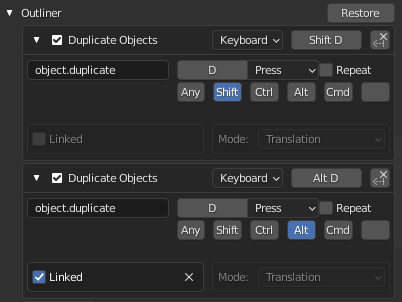
This workaround is nice, but lacks polish for these three reasons:
- The hotkeys will only work for objects and not collections.
- The object duplication operation cannot be accessed through the right-click context menu in the outliner.
- The keymap must be configured manually.
4 Comments
TThe shortcuts doesn't work in the outliner indeed but you still can make copies and instances from the outliner :
It also works with collections.
Thank you for sharing this tip. I learned something new.
Here similar Outliner - Improvement Suggestions | Posted 4month ago thought (to pin it here). Outliner really need more love, every workflows will benefit from it.
Thank you. I didn't see this in my search before I created the post.
The other post begins:
This was my exact thought at first, but after thinking about it further, I realized that there was more work to do than just adding the keymap. So, I made this post to clarify the details of what I think needs to happen.