
Text Editor : click to keep focus, click away to remove focus
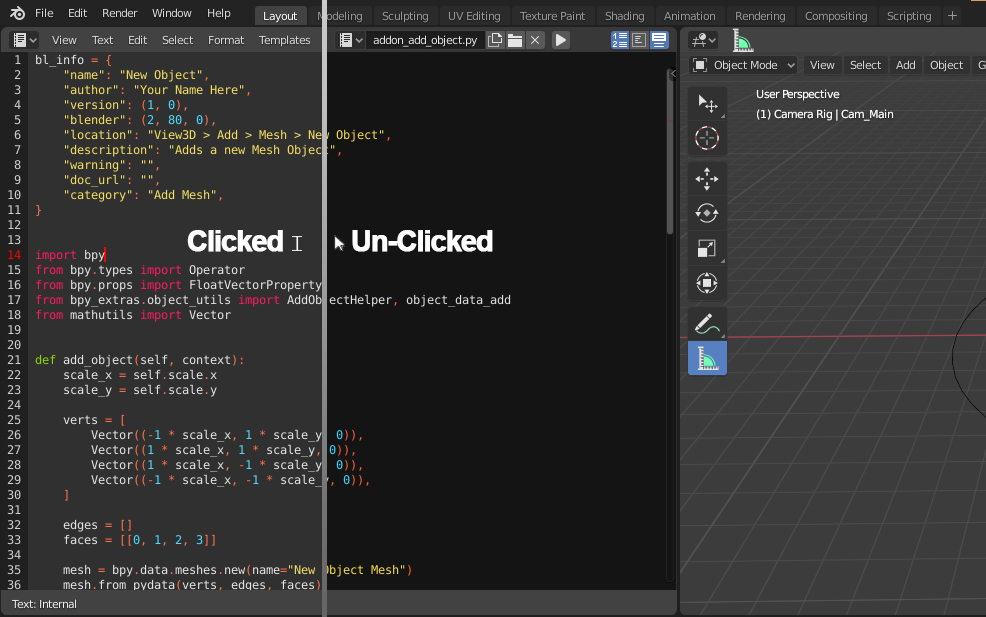
This is something that happens quite often to me : I click in the text editor to start typing something, I move the mouse ever so slightly, it ends up away from the text editor and everything I type does not appear in the text editor or worse : it triggers random changes in the 3D viewport. In my opinion, it would be more intuitive if the text editor were to behave like a regular text field. One click inside the the editor would trigger a change in the UI, showing that the editor has the keyboard focus. And the focus remains until the mouse clicks somewhere is inside the interface. Or the 'Escape' key is pressed. Visually, the way text fields work would be a good starting point. When it's unclicked that background is dark gray whereas when during edition the background is lighter
5 Comments
I think this is a wider problem with Blender. It will use the position of the mouse to determine the currently active editor. The approach that would be preferred is that the user would have to interact with (e.g. clicking) an editor before it becomes active.
I don't know what the motivations were for having this non-common approach but I vote for changing it.
* @arjo.nagelhout * Well, pretty much all the other editors are mouse based, you don't really leave the mouse when modeling, animating or shading so I don't think it would be really necessary to reimagine the whole blender behavior.
It think it would be a good Idea to do this only for the text editor, that it won't lose focus unless we click outside it.
I like the current approach. I always felt that it's really nice and intuitive, and you dont have to worry to always activate a region first and remember to click somewhere, where there is nothing. Changing this would ruin my blender experience.
Fully agreed that the lack of held focus in the Text Editor (and the Python console, for that matter) is incredibly frustrating. Changing the background to indicate clicked focus is a great idea!