
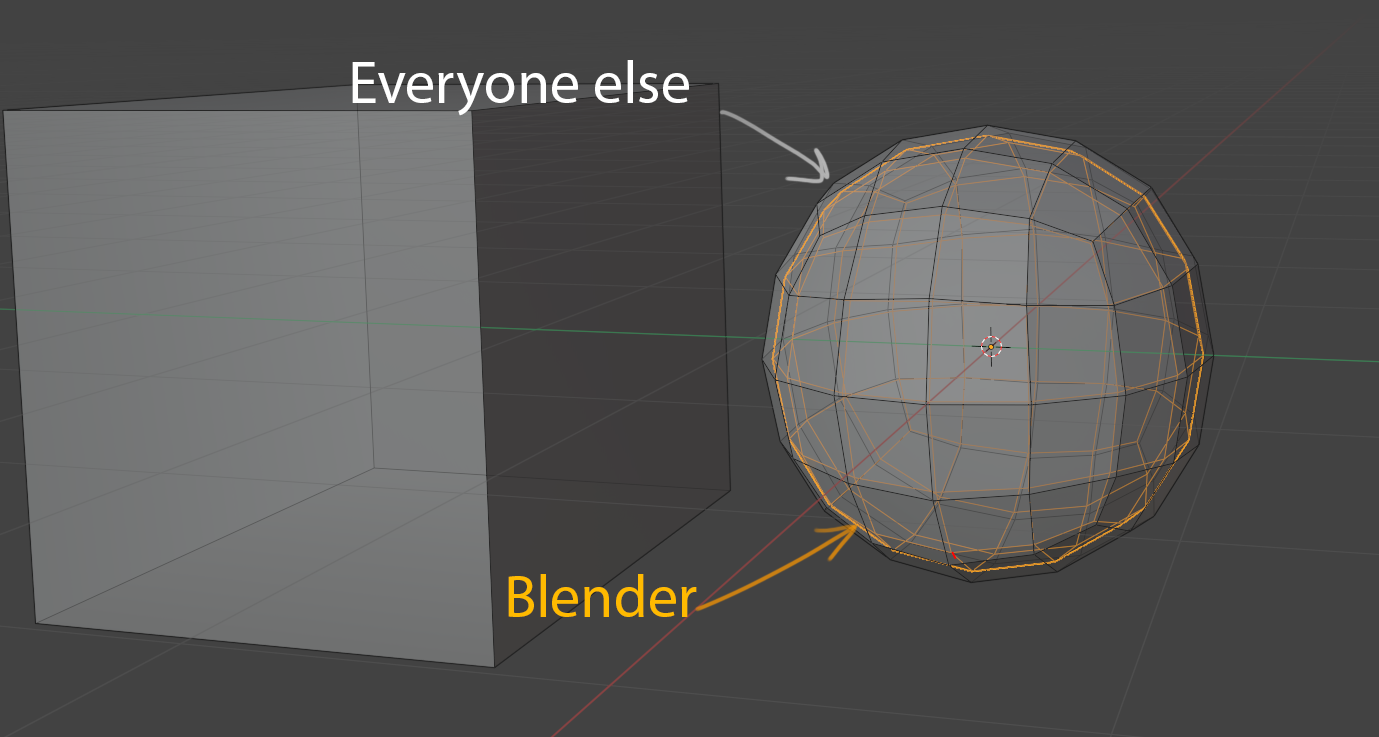
Same Subdivision algorithm as the rest of the industry
Now the Blender has its own Subdivision algorithm, which shrinks the models more strongly. If you export your model to other software, it will look different. The opposite is also true. This is especially noticeable on characters and vehicles with clear shapes.
I believe that in such things, the Blender should comply with industry standards and be "like everyone else"
It looks like the problem may be in the new "limit surface" feature in the subdivision algorithm. If it so would be nice to have this feature as an option. And disabled by default for the sake of standardization.
42 Comments
Looks like 120% bug. Here comparison with 3D Max, Blender 2.79 and current Blender ( or they " improved " subdivision too much :). Bugreport it - it's yours. on GIF same 1x1x1m box
* @IIIFGIII * Thank you for such a clear presentation
* @borschberry * So, 2.79 works fine? I never used it.
* @Siddhant Rane *Most likely it's a bug. Bug report created.
* @borschberry * link pls, I want to sub on it. Found developer.blender.org/T76457
* @borschberry * please mark topic as done. It is in the fresh build already.
* @borschberry * Option is available, so topic can be marked as «Done»
Hi! I found this issue to be concerning and opened a thread discussing the problem on devtalk. Please, guys, provide your examples and comments there, let's hear feedback from developers regarding this issue, I am very curious, I think you guys are too. devtalk.blender.org/t/subdivision-behaviour-is-different-than-in-any-other-software-causing-compatibility-issues/13032
* @Chingiz Jumagulov * Thank you
This issue deserve own topic on some popular resource/s for discuss. I will subscribe on it, because sds question is my main reason why blender is not my main 3d app. Also look at this blender.community/c/rightclickselect/Cgfbbc/
* @Eugene D * Yes indeed. I definitely want to know more about this issue. For me, as a modeler, this is a dealbreaker.
developer.blender.org/D8413
And now we got it! Thanks to Piotr Ostrowski!
* @borschberry * Mark topic as «Done» please!
* @borschberry * Open Subdivision Modifier to Industry standard marked own as done too
* @Eugene D * thanks
* @ Vyacheslav * Done)
It is done: developer.blender.org/rB53f20b940a1e520e131b8bb31cf0529ed4d30f9e developer.blender.org/rB6070f92ab94be7bd1d6729f178d71c71c4245fbb
Okay. I checked wiki.blender.org/wiki/Reference/Release_Notes/2.80/Modeling And now I clearly see the reason to have own subdivision. It gives more smooth surface, because vertices always laying on limit-surface (B-surface, I assume). But. As far, as it is vertices, and not surface, volume is smaller. So, I assume, if there will be better solution to approximate subdivided surface to B-surface, Developers will do it.
* @ Vyacheslav * It's not about better or worse. More smooth or less smooth. Even if the new algorithm works 10 times faster and gives a more “attractive” result, it doesn't matter. The industry standard is different. Infinity subdiv is fine for render, backing, and some other areas. But the whole industry doesn't use it for modeling and layout for good reason. I’ll clarify, my suggestion is not to change the subdivision algorithm once and for all, but the user should have a choice. And a standard algorithm should be present as long as the rest of the industry uses it.
* @borschberry * I agree, if industry standart is different, it should be an option, even in case if new method better.
wow didnt know this and it is aweful...{attachment cubejpg} same cube, one has 1 subdiv mod with 2 subdivisions, and the other has 2 mods with 1 ... damn :|
* @Frederico Martins * closer with other shapes.. but still {attachment cube2jpg}
* @Frederico Martins * yep :(
And I guess the same algorithm makes much nastier things in Multires Shape reconstruct:{attachment multiresPNG}
* @borschberry * My bad. I did not click the Apply Base button. If you do this, the differences are much smaller (still noticeable, though)
There is important question. Do industry standart is exatly the same Catmull-Clark? If not, is there papers for this special modification? If yes, why results are different?
* @ Vyacheslav * I think this is it: graphics.pixar.com/opensubdiv/docs/getting_started.html
at least as an example
* @ Vyacheslav * I don't know why results are different, but they are. Tested 3ds Max OpenSubdiv and Modo Catmull-Clark sds, they both are the same, but blender has a different Catmull-Clark...
* @Eugene D * XSI, Zbrush, Maya, Houdini - same, Blender - different. )
* @borschberry * So we need to be sure, what exact algorythm all other applications use, and why Blender use another one.
* @ Vyacheslav * Why - is a big question. If this is a feature, then I guess the Blender is just not supposed to be used in the pipeline with other software. If there is a bug, then I probably need to create a bug report
* @Eugene D * hm. So it should be reported as a bug if the same Catmull-Clark gives another result.
* @ Vyacheslav * I don't understand the whole prospect of this issue but if this is because of blender taking another different route in the algorithm department, I hope we start adapting to sensible, working, and already tested industry standard implementations. No need to be different all the time. I really hope the blender dev team would find a solution to this. Big respect and appreciation to all their works and ideas.
* @johnpdelacruz28 * I agree, that point is not to be different, but to have better solutions (faster or more stable). But, if it work well for Maya, that oriented to animation, it should work for Blender too.
* @ Vyacheslav * I checked real examples. Not cube to sphere. And difference isn`t noticible with naked eye and without comparation edge-to-edge. So I assume, this request have low priority for developers.
Also checked opensubdive in 2.79. It gives more artifacts with normals and look different.
About reconstruction blender use heuristics. So it work bad with cube but work very nice with real cases or even Suzanne. Here overlayed original and reconstruction: {attachment 36892125jpg}
* @ Vyacheslav * If a bug report is created for this issue, I'm sure it will be closed very quickly. Not because the issue is not real/legit, but because Blender devs will answer that it works as intended, the way it was meant to work initially.
You will be told to post it on DevTalk instead.
* @ Vyacheslav * I will disagree. At first, I found this problem visually on the character with a quite dense cage. After this, I did this test on the cube. The problem is even deeper. If you apply subdiv modifier 1 time it will shrink the model, add another one and you will get a different result to compare to subdiv with 2 levels (but not in other software). It's a big problem for precision or/and hardsurface modeling. After all Susan model is soft and smooth, and it's not a great example.
* @ Vyacheslav * tested on my model from modo in blender: selected is blender, wireframe is modo shape (all with applied sds)
* @ xan2622 * We'll see. Just created one)). I think you're right, but let's hope for the best
yes, this is a huge problem I'm having with 2.8 too.
Which version of Blender did you test? I think they have been doing some modifications to the subdivision algorithms for multires in 2.90 alpha.
* @Chris Kohl * I use the latest 2.90. I hope you are right, but a similar problem was encountered in 2.83. This is just the first time this behavior has caused problems with my model for a customer (