
Colored XYZ Keys for Dopesheet OR Colored XYZ Tracks
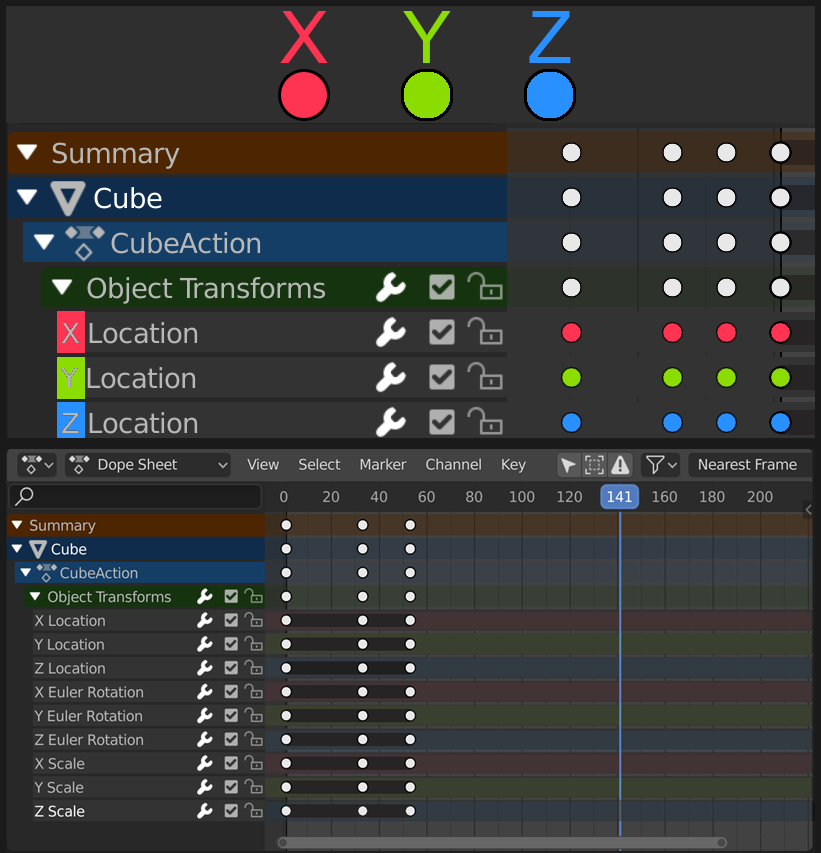
I think it would help with readability within the dopesheet if the XYZ keyframes were colored for their corresponding axis. There should also likely be a button in the top bar to enable/disable this feature, as some may not like that.
OR
The tracks themselves for the XYZ should be colored in the same manner. As well there would be a button to disable this.
22 Comments
yes, do it, please :D
The 3dsmax timeline! Will the main controller 'object transform' will have mutiple color stripes on the dot depending on what channel is keyed ?
I'd like to see a little difference between XYZ rotation and position keyframes. For rotation it could be sligltly diferent colors.
great idea, also if this could solve the Show Group colors option that is totaly unreadable at the moment... Here is my proposal based on what I saw here and there {attachment show_group_colorspng}
I was sure I already saw such proposal!
blender.community/c/rightclickselect/n9bbbc/
* @-L0Lock- * oh I missed that one. The name is a bit unspecific so I didn't get it in my search. I've been thinking though, and I think just having the tracks colored might be the way to go. Otherwise it clashes with the already color-able keyframes. But if the RGB tracks obscure the colored keyframes then it may not be a good idea at all. I'm going to mock it up and if it looks bad then actually I'm against the idea.
* @daniellapalme * Here is the mockup with colored tracks{attachment Colored_Trackspng} And here it is with colored keyframes{attachment Colored_Tracks_With_Keyspng} It's actually not too bad, but I find the "extreme" keyframe gets a bit lost, but with a toggle to turn it off maybe that's not so bad, especially if we change the color of the extreme keyframe. I do see some value in this, but I need input from everyone, what do you think of this?
* @daniellapalme * This opens up to colour coding keyframe types and their shape and adding the track data. I do think this is a good compromise.
Very nice idea!
What about LocRotScale keyframes through? Random would you use just red for Location X, Rotation X and Scale X or would there be different colours?
if they are just the channels then u got my vote,however keyframes are already color coded and i like them that way with the new Curve Extremes/Handle Interpolation modes..i am compiling a list of more improvements for Graph/Dope Editors that will make it much better for animators like me.
* @PK_GO * Ah well, honestly I'm not an animator, so I'm all ears to criticism. Maybe just the channels is best. I'll look forward to your post!
* @PK_GO * Here is just the tracks{attachment Colored_Trackspng}
No question.
Actually, question: Why didn't we think of it before?
* @Caetano Veyssières * we did:
blender.community/c/rightclickselect/n9bbbc/
Nice idea. Keeps you from getting lost. Maybe the color is just too saturated. Keeping it low in saturation might be less bright for the eye.
Colors are already used by keyframe types.
* @-L0Lock- * Wouldn't just shape of the keyframe type also help on these RGB ones? Meanwhile the rest can have their keyframe type colour coding?
* @Andres Stephens - Trinumedia * shape only isn't enough for keyframe types already, so...
* @-L0Lock- * Yes, I agree. You will need Colour Keytype + Key Shape for lead tracks and their keyframes, then only change Key Shape in Transform Axis tracks and the Transform Axis will define the colour since they are subtracks of the lead keyframe tracks.
This is a MUST! please? :)
OH yes please.....
So nice!