
Add object to local view
We need option to add object to local view, currently we should go out from local view and reselect all we want and go into local view again.
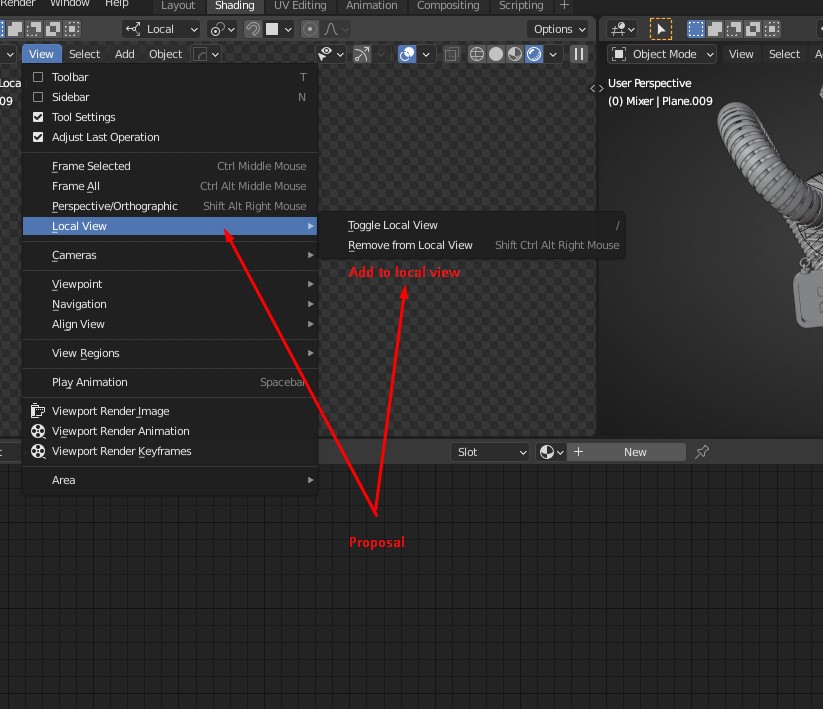
This idea was marked as a duplicate of "Add objects to local view" really needed.
7 Comments
Sooooo much needed!
Also an option would be to select a new object in outliner, click right mouse button on a view and "add to local view".
Every viewport has its own Local View, the Outliner can't really keep track of a specific viewport so right-click wouldn't work.
Drag-drop would be a better fit, but that's already taken for duplicating objects. One solution would be that when you drop an object, check if the viewport is in Local View mode, then prompt you to either
Add to Local VieworDuplicate Object.Fair enough. That would be so much better than now So I upvote for it!
Now I re-read you answer and realized that you didn't understood my original idea. What I propose is to select and item in the outliner. Then you go to the Viewport you want that object to be added. Then Right Click and got a popup to "Add to Local View".
But Drag and Drop would be more than fine too... ;)
but how would you select object from outside of local view being inside local view?
i think that there could be some connection of local with in outliner
like another row for local view in outliner like now there is for edit mode
Here's a solution: blender.stackexchange.com/q/344830/142292
Maybe it should be option in outline to sync when you select object in viewport and go local view outline should do same, show only selected objects.