
grease pencil : How to apply effect only layer?
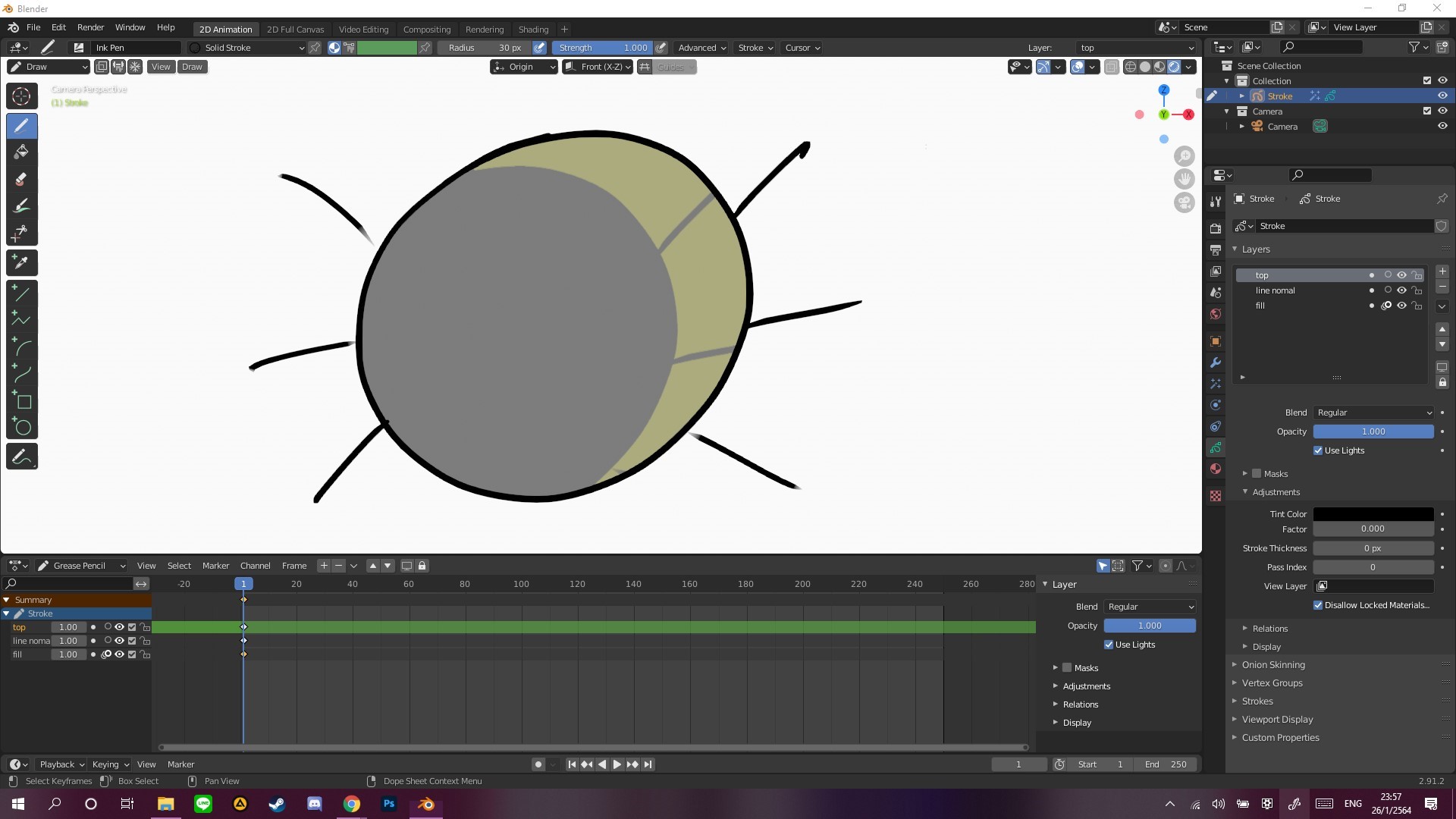
like in the title. Is there any way to apply effect only layer I have an example of my problem normally when I use to draw in grease pencil and do some effect it has no problem But when I draw something like whiskers to my another layer. with rim effect on it include my whiskers and make an ugly shadow that you see in the picture + I already and try using compositing at first it seem work right but then my background doesn't transparent and it keeps overlapping I don't know why it happens so if you guys know please help me!
This idea was marked as a duplicate of Grease Pencil: let only specific layers be affected by effects.
4 Comments
Since they're adding layer transforms into 2.93 as a way of offering a simplified workflow, I'd LOVE to see them also add the ability to use effects on single layers like you're asking. Also layer parenting...
PATH = os.path.expanduser('~/blender-3.1.2') assert os.path.isdir(PATH)
LAYERS_FOR_SHADER_FX_HACK = '''
/** Layer name HACK */ char layername[64];
'''
def patch( file, callback ): file = os.path.join(PATH, file)
def DNA_shader_fx_types__h( data ): a = [] in_struct = False for line in data.splitlines(): if line.startswith('typedef struct ShaderFxData {'): ## main base class struct, note: do not insert layer name here pass elif line.startswith('typedef struct ') and 'FxData {' in line: in_struct = True elif in_struct and line.startswith('}') and line.endswith(';'): if a and a[-1].strip().endswith('ShaderFxData_Runtime runtime;'): a.insert( len(a)-2, LAYERS_FOR_SHADER_FX_HACK ) else: a.append( LAYERS_FOR_SHADER_FX_HACK ) in_struct = False a.append(line)
patch( 'source/blender/makesdna/DNA_shader_fx_types.h', DNA_shader_fx_types__h )
RNA_LAYER_FX_HACK = ''' prop = RNA_def_property(srna, "layer", PROP_STRING, PROP_NONE); RNA_def_property_string_sdna(prop, NULL, "layername"); RNA_def_property_ui_text(prop, "Layer", "Layer name"); RNA_def_property_update(prop, NC_OBJECT | ND_SHADERFX, "rna_ShaderFx_update");
'''
def rna_shader_fx__c( data ): a = [] in_func = False for line in data.splitlines(): if line.startswith("static void rna_def_shader_fx_"): in_func = True elif in_func and line.strip()=='}': in_func = False a.insert(len(a)-2, RNA_LAYER_FX_HACK)
patch( 'source/blender/makesrna/intern/rna_shader_fx.c', rna_shader_fx__c )
RNA_GPENCIL_LAYER_FX_HACK = ''' /* Fix fx layers. */ LISTBASE_FOREACH (bGPDshader_fx *, _fx, &ptr->object->shader_fx) { if (STREQ(_fx->layername, oldname)) { BLI_strncpy(_fx->layername, gpl->info, sizeof(_fx->layername)); } }
'''
def rna_gpencil__c( data ): a = [] in_func = False ok = 0 for line in data.splitlines(): if line.startswith("static void rna_GPencilLayer_info_set(PointerRNA *ptr, const char *value)"): in_func = True ok += 1 elif in_func and line=='}': in_func = False #a.insert(len(a)-1, RNA_GPENCIL_LAYER_FX_HACK) a.append(RNA_GPENCIL_LAYER_FX_HACK) ok += 1
patch( 'source/blender/makesrna/intern/rna_gpencil.c', rna_gpencil__c )
FX_SHADER_UI_HACK = ''' uiItemR(layout, ptr, "layer", 0, NULL, ICON_NONE);
'''
def FX_shaders( data ): a = [] in_func = False ok = 0 for line in data.splitlines(): if line.startswith("static void panel_draw("): in_func = True ok += 1 elif in_func and line.strip()=='}': in_func = False a.insert(len(a)-2, FX_SHADER_UI_HACK) ok += 1
fxpath = 'source/blender/shader_fx/intern' for file in os.listdir(os.path.join(PATH, fxpath)): if 'common' in file: continue if 'util' in file: continue if file.endswith('.c'): print(file) patch( os.path.join(fxpath, file), FX_shaders )
you can make the background transparent by going to render properties - film and tick the box labeled " Transparent " but doing this via compositing gets exponentially worse to manage the more layers you have . i would also love to be able to apply grease pencil effects to single layers . just like we can already with modifiers . this is the only thing stopping me from doing soft shading on my animations if only i can make blur effect target a single layer :C
{attachment SharedScreenshot2jpg}this is my composite witch you can see in my render layer it keep the background and doesn't transparent at all