
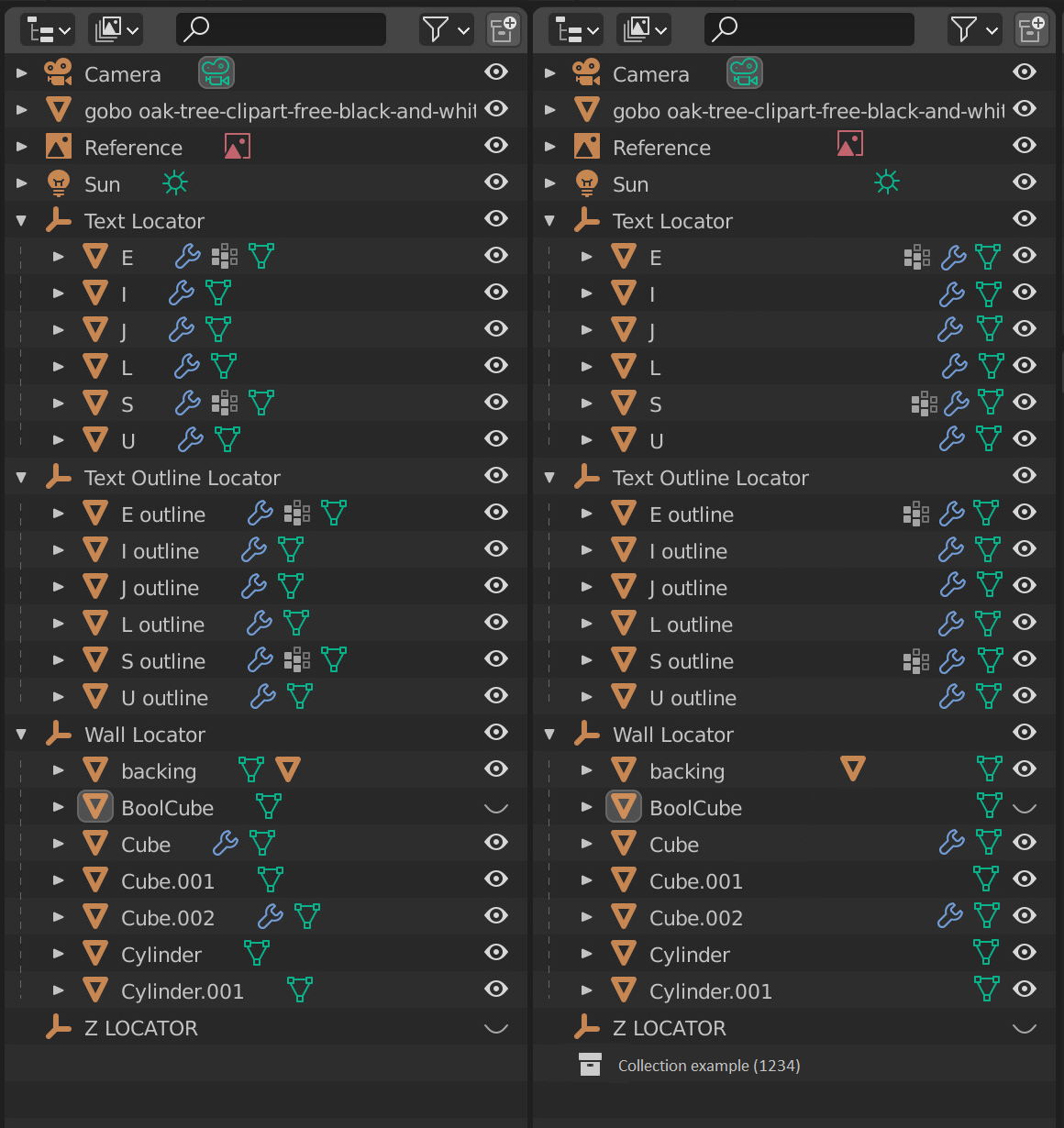
Outliner icons sorted to right side?
I used as example @thinsolider image, to show some mockup.
It's related with feature request: Outliner - more precision for statistic information
-
Trying organize icons as some
order of tablein idea that this solution can be more cognitive (like chekboxes cells, as marked if exist). - Then maybe for object we can easy turn on/of modifier from shaded/darked icons or simple add if not exist by contex menu.
-
By this way maybe we can have
Editor panelmore often hiden or turned off? - With this can be cols headers and option to filter the "icons" (funtions)?
- Icons can be hidens if someone not need
- We can have more space for counters (collections, objects)
-
We can have
No.col andIDwhich can be more usable in Python API (eg. builiding layers controles by bools, edited assheet)
Left orginal, right modified
6 Comments
Your mockup needs to show all the other icons, not just the eye.
Yes, but I used your ready saved file and was fast request.
I have no idea what you are saying. I never have any idea what you are saying. You would be easier to understand if you posted in your native language and let me paste it into Google Translate.
hehehe <3
Actually there should be a toggle to show/hide those extra options
There is. It's called "Object Contents" in the Filter popover.