
Default UV Checker in "Viewport Overlays"
It's almost 2020, can we have a default UV checker already that you just turn on and off. Why would I need to create a new material and assign a checker texture to it. Plus what if I have many objects and many materials? I don't want to loose those. I can use TexTools to assign a checker quickly but it still overwrites my existing material. I just want to preview the UVs in the resolution that I like that's it.
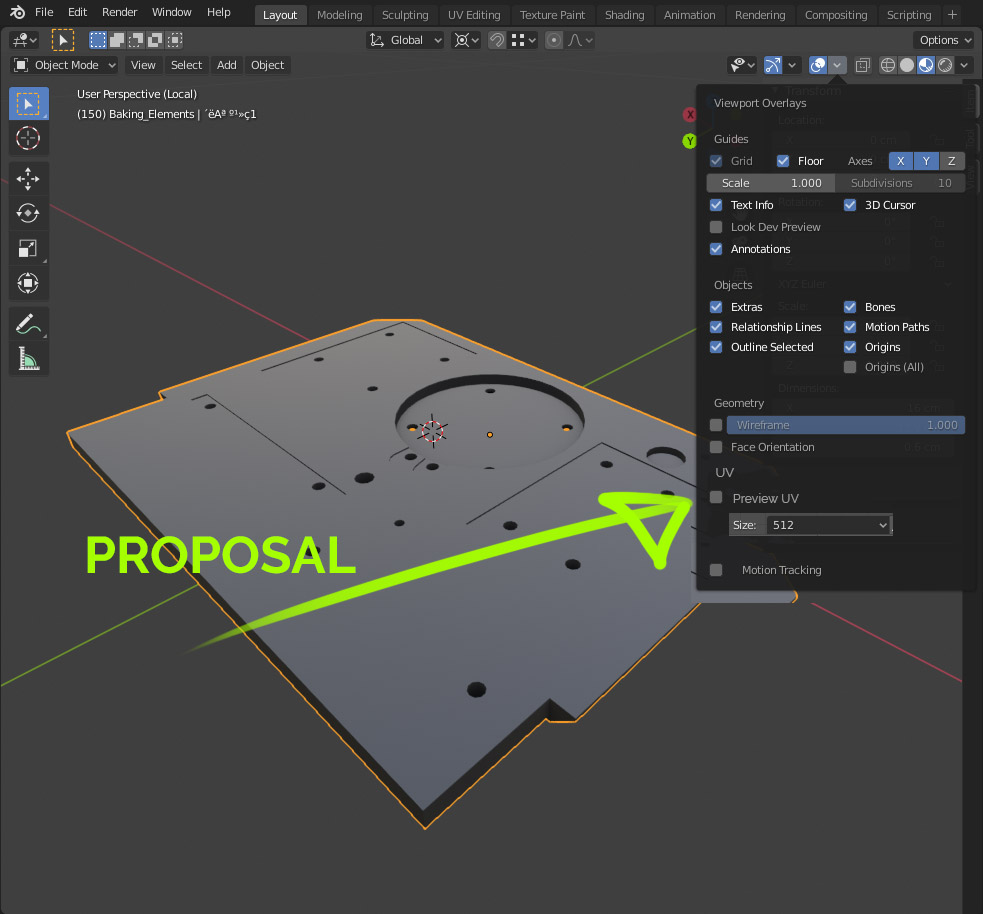
Can we just add a checker texture with resolution to the "Viewport Overlays" Tab? PLEASE! See my proposal below:
5 Comments
There's similar and better proposal, more advanced and in TOP10 of most requested features blender.community/c/rightclickselect/Dpcbbc/
* @matt881 * Thanks, it's great, but doesnt have a resolution slider. Only scale. I think seeing uv grid on an object in exact resolution (128, 256, 512, 1K, 2K, 4K, 8K) if far more important.
It's 2026 now. Would love to see this :)
My student is attempting to solve this issue by writing an addon as a part of his bachelor's thesis. Check out the git page, or you can download the addon for free on gumroad.
gitlab.fi.muni.cz/xbilek2/visual-uv
werecat.gumroad.com/l/ezkqi
Another advantage is that it should also work with other render engines such as LuxCore