
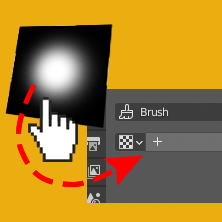
Drag and Drop open Textures from the file Browser
One of the still slowest aspects of sculpting with brush alphas for me is the way that textures need to be set up so painstaikingly slow. Other dedicated sculpting and painting apps usually try to make creating ans switching brush alphas rather fast as it's something you might have to do often. Especially since Blender saves brushes in the .blend files and not disconnected with the editor (meaning: brushes always need to be loaded into a file somehow instead of just being there once they are created).

So to improve the workflow it would be cool to have drag and drop functionality for textures, somehow. Right now the workflow needs these steps:
- Create new texture
- Open new file
- Navigate in separate file browser to the location (maybe even set browser to thumbnails first)
- Go to brush menu
- select newly loaded texture.
This action alone spans three separate editor windows including one popup for the file browser. A much needed speed up for this might be simply a way to drag and drop a texture from a file browser window into a corresponding slot.

Fastest way would even be to simply drag it into the N-Panel of the brush in Sculpt mode directly, though. :)
(Also - it may be that the upcoming asset-browser might remedy a few of these processes, but it's still a good idea to push the idea while the features are still in development. Might very well be that this kind of workflow speedup is so far still overlooked by the devs. :) )
3 Comments
Exactly. Blender is full of such cumbersome usability flaws. Thanks to the developrs the underneath software is so amazing you learn to live with it's wearing UI.
I marked it as a duplicate of Sculpt Mode - Improved workflow for alpha textures used for sculpt brushes because both are aiming at the same feature. There are still some good suggestions in this post too.
Yes! Very nice proposal. Loading a texture shouldn't be so tedious...