
Sculpt Mode - Improved workflow for alpha textures used for sculpt brushes
Improve the workflow for sculpting with textured brushes (alphas), by removing the need to manually import these textures in the .blend file prior to using them, and by letting the user manage his alpha textures library outside of Blender.
PROBLEM
Sculpting, sometimes requires the use of textured brushes called alphas (black and white values for height information) to create specific details (on organic models for example). In such cases, we need to have at our disposal a quick access to different alpha brushes and be able to switch quickly between them. But in Blender, the use of an alpha brush is a cumbersome process. First, we have to load an alpha from the Texture tab of the Properties Editor, then load it in the Active Tool tab > Texture panel. And repeat the process for every brush we intend to use. This results in a constant workflow interruption.
The other workaround, if we wished to have such a collection of readily available alpha brushes, is to make them part of the start up file by saving them with the 'Fake user' button. But that solution is not optimal at all because it clutters the .blend file with too much data.
PROPOSAL
The idea is the following:
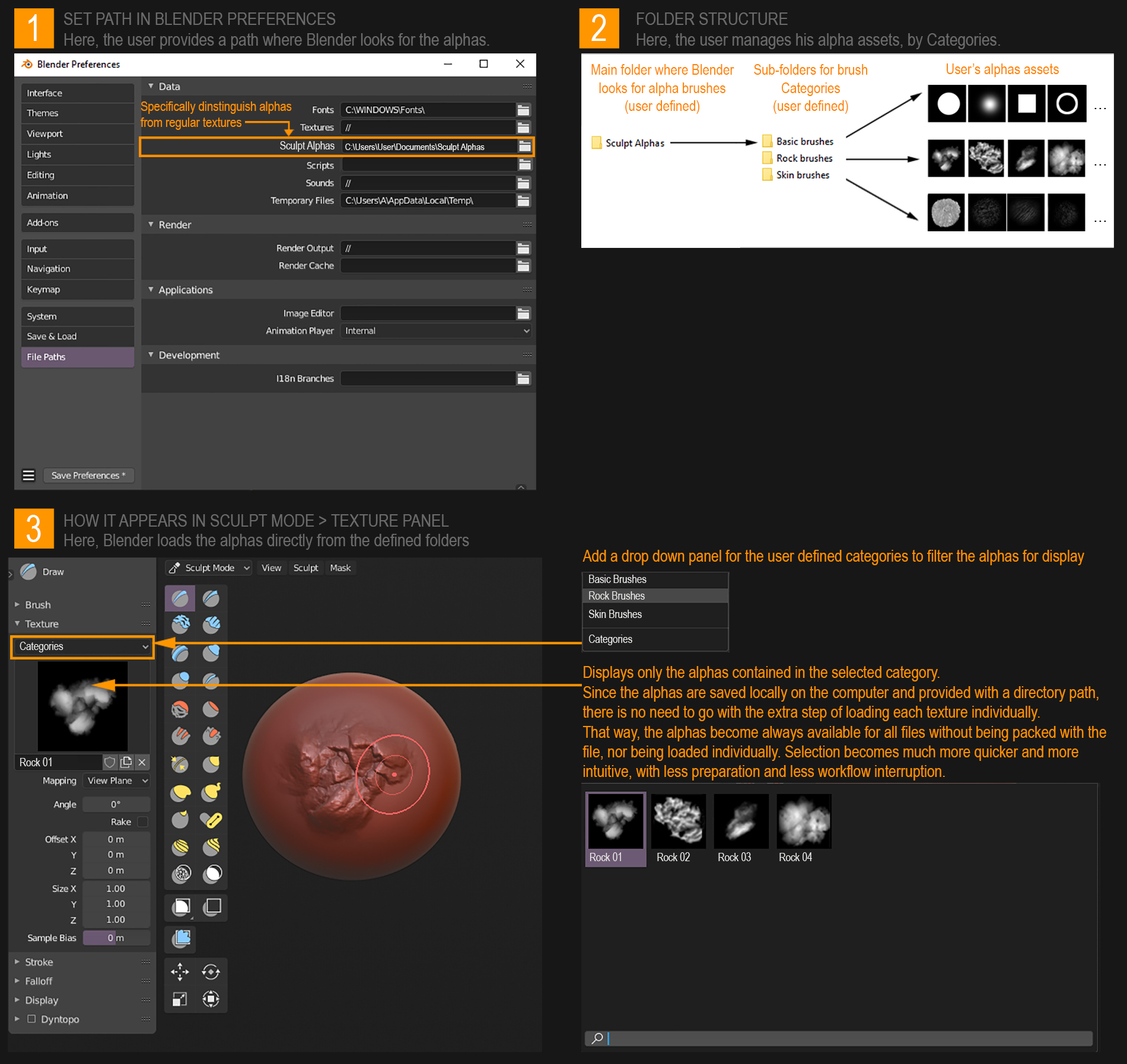
- In Blender Preferences, we assign the Main Folder where Blender will look for these alphas.
- We let the user organize his library of alpha brushes as he pleases outside of Blender, following a specific folder structure.
- When in Sculpt Mode, under the Texture panel, the alphas appear by categories according to how the user has setup and named his sub-folders (they serve as filters for cases where there are too much alphas, not to mix alphas with different purposes, keeping things neat and organized). In case the user stores his alphas directly in the Main folder, the Category drop down menu is left blank.
The user has now a preview of thumbnails that are exactly the same as the .jpegs or .png files that the brushes are stored in the library, in that category, which he can directly summon from there, without having to preload it in the .blend file first. When he chooses one alpha to sculpt with, it gets added temporarily to the .blend file as per usual (no fake user needed).
BENEFITS
- We remove the need to load the alphas one by one or to pack them with the .blend file.
- Alpha texture management is done outside of Blender. The user could download his alphas from the net and store / organize them in his library without even opening Blender, knowing they will be automatically indexed the next time he opens Blender.
- We have an instant overview of the brushes already available at our disposal.
- Less workflow interruptions: we spend less time switching menus for setting up brushes and more time creating.
Final note: The same concept could also be applied for "Paint alphas", where we could use the same process for a quick alpha texture setup and library management. I deliberately distinguish "Sculpt alphas" and "Paint alphas" because they do not serve the same purpose and might be different in shapes.
11 Comments
I believe this all gets solved when Asset Manager rolls out
* @testure * I hope it does, but the Asset Manager seems pretty stagnant for the moment. We don't hear much from it. And I'm not really convinced it will consider the alpha brushes like assets. I think it will probably handle things like models, materials, hdris, sounds, etc. as assets to drop in the scene but here it is about assets to be used in a specific part of the UI…
* @testure * it will.
Just discover this Addon today (late I know) . Thank you, this is awesome.
I've never really been satisfied with alpha/brush management in any program so I'd totally be down to do it myself via a folder structure. +1
As someone taking a Zbrush course while trying to do everything inside Blender this is a life saver. Thank you so much and I hope devs take some time to give us some much needed improvements on the sculpting UI. The last couple of UI changes done to the Sculpting Mode have been atrocious. This addon helps a lot!
Great Addon!
This is such a good concept! huge thanks for making the add-on!
I marked this as 'In Development' because this is a goal for the Asset project. Users will be able to mark textures as assets, which will then make them accessible from any .blend file.
This is amazing, have my upvote
This is very necessary for me. Please make this function please.