
Subdivision modifier Shortcut - Inconsistency
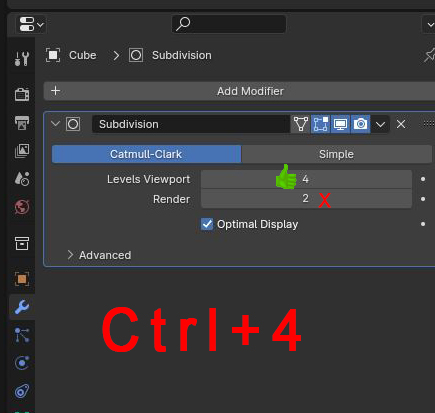
When you add a subdivision modifier through the shortcut (Ctrl+"number of subdivision"), the render level doesn't match the shortcut, it always set the level to 2.
Here's an example where I add a subd modifier level 4:
3 Comments
Agree.
It used to make sense 10+ years ago, when most people would most often set up a level 1 subdiv with ⎈ Ctrl 1 and have a level 2 or higher level for rendering. It made sense to make rendering with higher subdiv levels an effort to avoid wasteful crashes on rendertime.
But now that machines are stronger, and that we have things like Simplify and GPU subdiv, the need to pre-emptively force lower subdiv is IMHO not as needed, and requiring the user to ask for the same thing twice is inefficient and user-unfriendly.
Thanks for the write up.
I made a To-Do task and there's already a PR for it. projects.blender.org/blender/blender/issues/133309
Hopefully it can make it to Blender 4.4
Agree with @-L0Lock-. Blender needs to be WYSIWYG. There are many old settings which made sense in the era of ancient PCs but on today's machines don't make sense :
Look at these: 68 upvotes. only 1 downvote. 2-4 years old, and nothin': blender.community/c/rightclickselect/cZgbbc/ blender.community/c/rightclickselect/7Kdbbc/
What's bad with these is wasted Renders waste a lot of time and energy.