
Improvements in the Asset Browser
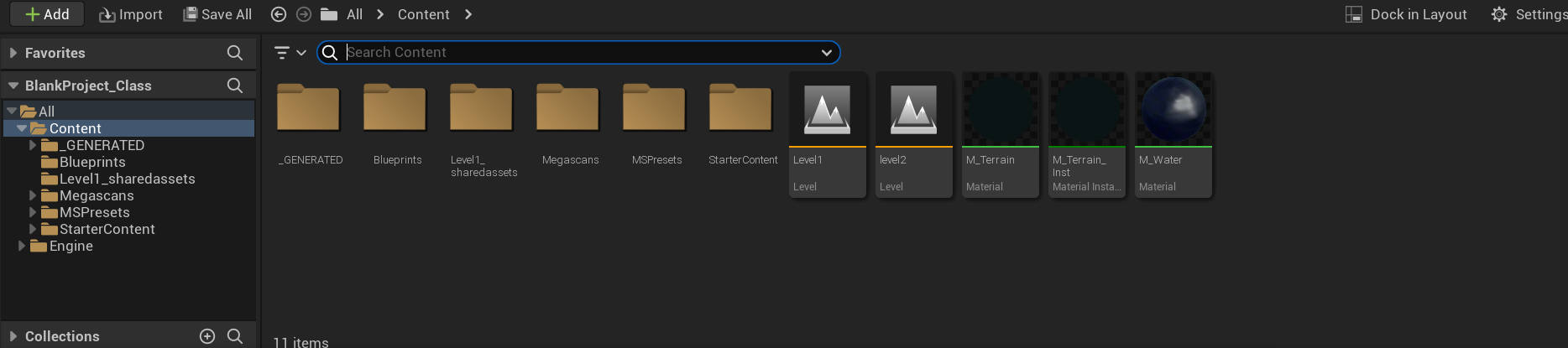
Nowadays, the asset browser is good, but it could be better. In my opinion, it would be beneficial to use a folder system since it's more intuitive and cleaner, just like in Unreal Engine.
In Unreal Engine, you have folders on the left side, and in the main panel, you can also add folders. This could make the asset browser more organized and efficient.
Also, in the case folders are added, there should be an option to change the color of the folder, for better visibility and organization (just like the collections of blender) and the possibility of organizing the folders in the hierarchy that you want (being able to put folders inside other folders).
Adding folders could lead to a more used Asset browser in the blender community, since nowadays is limited, in my opinion, just for not being able to add folders and also because adding assets is a little bit complicated for what it really is, and should be more intuitive.
What about an option called "import assets", and when you import you get a question of "For this file or for all files". If you select "for this file" the assets will only be in that proyect and if you select "for all files", the assets will stay in the "main" asset browser for another sessions (so in every file you will have that assets).
Also, I don't know if the search bar should swap positions with "Follow preferences" since the search bar it's more use it ?Or maybe below the option"All"? I just know it doesn't feel too right to have it there.
Thanks for reading and happy weekend.

7 Comments
I'm upvoting for this part. Usually you only see the left-most part of the panel, which is the 'Follow Preferences' dropdown you'll rarely use. Yet the Search box you'll use all the time is hidden on the right, so you constantly have to drag the panel wider to get access to this box, then drag it back to get your viewport space back. Better just to swap the two.
As for your 'folder' suggestions, sorry, I don't really follow what you're suggesting there. Unclear.
Thanks for the feedback. Yes, especially because Blender, since version 4.0, is moving in the direction of searching a lot (with modifiers, textures, etc.) because it's quicker. Regarding the folder part, I changed it a little. Is the idea clearer now?
It's just a typical system folder, similar to Windows: on the left, you have "Documents," "Images," "Music," etc., and inside these folders, you can have more folders or whatever you want.
I don't think you need folders for those types, since version 4 lets you filter by type (actions, collections, materials, objects, nodes) so that solves it for me.
Personally I don't see the need for folders : You say adding assets is complicated. I think it's incredibly easy. You just put the files in a directory you've added to the assets file path, and all the assets in those files are suddenly there. Just like that. You can search by asset name, or part of the name. You don't even need to know the original file name. Just make sure the name is unique and has enough key words that it's easy to search.
To me that's a strong plus for the asset browser system: You don't need to know the file name, or even the folder path. Only the name of the asset you need.
If you don't have a lot of assets, this may work, but if you have a lot like me, it's painful. Every software that exists has solved this correctly with folders: Unreal, Unity, Adobe software, 3D Maya, NUKE, etc. All of them did it for a reason.
Adding assets is easy, but if you don't watch a tutorial the first time, you wouldn't know how to do it. And, in my opinion, it can be much easier.
If we are striving for an intuitive software, an 'option of importing assets' should be the way to go (it's more intuitive and quicker). Not having to mark objects as assets, going to the folder of your assets, and putting the blend file there, etc. – which is more difficult for the user.
Of course, this is only my opinion based on what I can see in other packages in terms of efficiency and intuitive options.
I'll call out Blender when they get it wrong but honestly I think the Asset Manager while different is quite good - a "library" paradigm rather than an "import the assets" paradigm. That "library" paradigm lets you grab a single item out of a file (say just one material in a large material library - instead of having to bring in everything), lets you reorganize how you store them without breaking your links, and spares you synchronization problems of the "import the assets" paradigm forces with you. Plus the "library" paradigm is now how asset libraries are distributed - search for 'assets essentials' on blendermarket: You won't convince people to change away from that.
But if you prefer files, there's a pretty easy alternative for you: Just ignore the Asset Browser (which really just a search mechanism built on top of the old library linking system) and use that instead: File -> Link or Append.
Appending is not the same :/
Maybe I didn't explain well. For example, Substance Painter has two methods (if you ask me, in Substance, it's perfect). You can go ahead and put the materials inside the materials folder (similar to how you would in the assets browser in Blender) OR If you want to speed things up, you can click on "Import" => "Select Archive" and choose whether you want it for the current project, the current session, or to stay in the asset materials for every project. It's essentially the same without having to mark assets or navigate to a folder to put them there (it would be done automatically, aka faster). Those who prefer to do it manually can still do so! And for those who don't like folders, you wouldn't have to add them either. However, for people who want folders, or want to import this way, they could. It's just another functionality (that all the other softwares have).
Hey @pol. Yeah, sorry. I know Substance's Import system, but I don't see the advantage in making Blender like that. Perhaps just comes down to personal preferences.
Current session doesn't really Apply to Blender.
For Current Project, that's like File -> Append or Link.
You say "Appending is not the same :/". But why? Asset Browser is just a layer on top of File -> Append/Link anyway, so in the end, that's what you end up doing anyway.
For me, being able to mark assets is worth its weight in gold. This was the problem with the old Asset Browserless Blender... You'd open up a file to Append/Link, see lots and lots of objects (parts used to make the main model), and not be sure which one you want to import to get the main model. Being able to mark assets makes clear 'hey, user! this is the one you want to import'.
For Every Project, well that's the Asset Browser as it is.
Is that what you want to do? Be able to add a Blend file to the asset DB without needing to mark assets? You could easily make an AddOn to do that without needing to alter Blender's source code. Can help you if that's what you want...
Asset Browser is just a lookup database. It has no concept of folders to search. I'm not sure how folders could be added to it, or that you'd even want to. If I can find my large green sofa by typing 'large green sofa', why do I want to also have to type a filepath? But you can use the Asset Browser Tags for a similar kind of search function. e.g. 'Furniture'
I quite like asset browser, though you're not alone in not groking it. Perhaps the import procedure needs to be made clearer. See blender.community/c/rightclickselect/myV0/ esp -L0Lock-'s comments.