
Origin switch in transform tools
This little switch can make life a lot easier. Just with a click you can move, rotate, or even snap origin as easy as an object.

Maya example by @zertux:

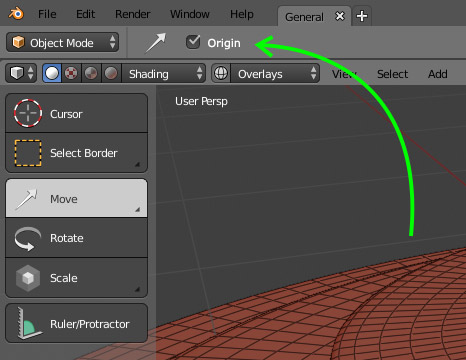
This little switch can make life a lot easier. Just with a click you can move, rotate, or even snap origin as easy as an object.
Maya example by @zertux:
8 Comments
Here is how it looks in Maya. Hold a hotkey and you're working with the origin. You can hold another hotkey to snap it to edges, faces etc. Simple and easy:

I also made some similar proposals a while ago. blender.community/c/rightclickselect/jBbbbc/
YES. You could do this in Softimage, it was VERY useful.
Yes! This is so important to have. I think it would fit good in the 2.8 release because it's also about improving workflow and ease of use. Also - from a non-developer perspective - it seems like this would be rather easy to implement but I might be wrong here.
Almost exactly what you asked for but even better : youtu.be/fCxnrwbsdlw?t=200
To interactively move the Pivot would be a big improvement. I would rather make it its own tool with its own icon.Also new users and people with very little 3d experience could immediately see that this function exists and what it. Otherwise it will be hidden for new users again. I made a proposal for an interactive way to manipulate the pivot a year ago: blender.community/c/rightclickselect/vqbbbc/ . But the new tool system opens a completely new view on it.
Being able to rotate the origin independent of the mesh simply would be amazing.
I've used this addon to set the origin to selected vert/whatever for as long as I can remember, one of the first things I looked for when moving to Blender. Can't imagine working without it.
Select, hit hotkey, done.
ghigiblend.wordpress.com/2011/11/25/script-set-origin-to-selected-blender-2-6x/
Ideally wouldn't need an addon to automate moving the cursor to selected, then origin to cursor, would just set origin to selected as a built in tool.
@billyjonsmith: Blender has that function no need to use an addon. You can assign a shortcut and it does the same thing. I have it in a pie menu