
Return the VIEWPORT colour=DIFFUSE material color (Display objects solid with GLSL material)
To have it simple, EEVEE on Mac OS is like a hungry muscle car engine on city streets. No NVIDIA ->no EEVEE No EEVEE -> no quick and "free" way to check colours on the scene No easy way to check colours and do some modelling -> turn on Cycles preview Turn on Cycles preview -> hear and watch the computer suffer + wait
Back in the day we had: Display objects solid with GLSL material => MAGIC by Blender DEV team
One push of a button and quick adjustments could be made => then push RENDER
Now we push EEVEE, wait, move, wait, click, wait
So if this workflow cannot come back: Display objects solid with GLSL material
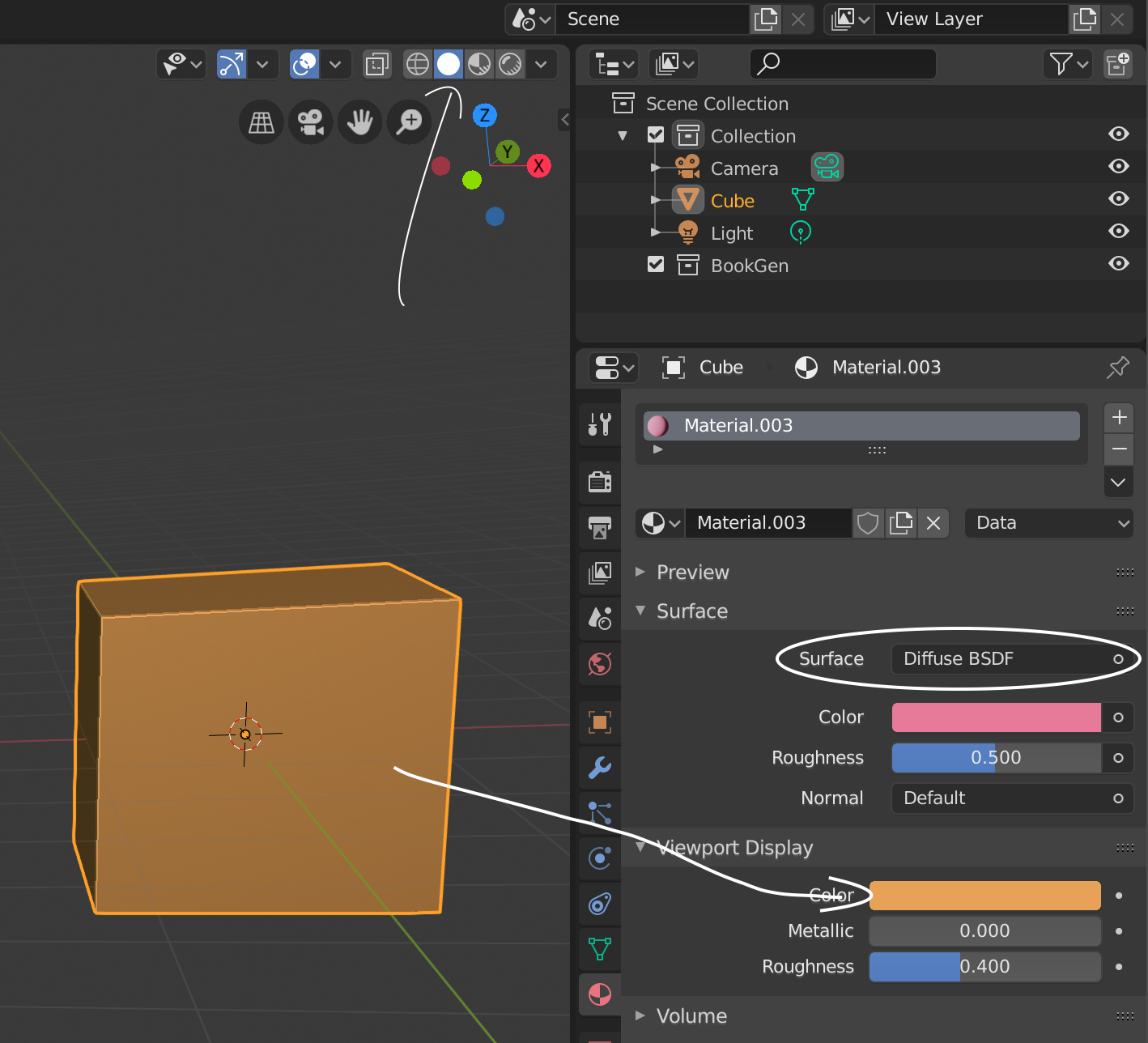
Why not make the PREVIEW Colour of Solid be the same as the DIFFUSE Colour of Solid? (by default)
(in my image I put the material pink, yet the objects remains the old colour that I previosly had, which is mustard. the changement is never dynamic, but manual. Also there is no transparency)
2 Comments
Check this
thank you. so still not a fix :( * @IIIFGIII *