
Texture paint - Consistent brush projection behaviour + better performance

Limitations of the current Texture Paint:
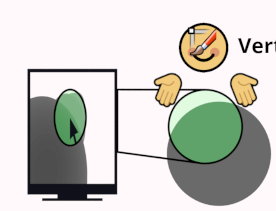
Unlike Vertex paint or Sculpt mode, which by default paint on a Sphere around the surface point your cursor is on, Texture paint always does a 2d projection from the screen onto everything under the brush. This has severe limitations:
1 - Performance. In order to avoid painting faces that are behind the ones you're painting, Texture paint uses "Occlude", which does an obscene amount of depth calculations if you have occluding faces under the brush. It can be very slow, freezing Blender completely even for minutes. Imagine you're painting a character's scalp from above, it will test anything under the brush (nose, mouth, chest, belly, crotch, knees, feet) just to decide NOT to paint on these parts, all despite the fact that what you want to paint is right there in front of you. Very wasteful.
(There are workarounds, but they're far from ideal. Like disabling "Occlude", but it will paint all the faces; Or you can use Face Masking or hide faces with H key, but this is cumbersome, it should be used to hide parts so you can paint hard to reach places, not so you can paint easy to reach places with better performance; And finally, you can be careful, but if you accidentally paint from the wrong angle... BAM! you get seconds of slowdown from one brush stroke)
2 - Accidental painting. Since Texture paint uses a 2d frustrum projected from the screen to infinity, even if the brush is on a surface nearby, it will paint all the faces that are under the brush in 2d, but far away in 3d if one were to consider the sphere of the brush for the maximum depth. If you use Occlude, it won't affect faces that you can't see (it will be very slow though) but there's nothing to avoid painting faces that you CAN see that are just far away, creating artifacts that look like masks or shadows of geometry in front. Fingers for example. This doesn't happen in Sculpt mode or Vertex Paint.
Proposal:
1- Disabled Occlude by default. Maybe with a warning about performance. In the future its performance could be improved for when people want to use it, but by not being the default there will be a performance improvement for most other cases. You can keep the current behaviour if you choose, if you combine it with Projected Falloff.
2- Sphere falloff. Limit painting by the 3D radius of the brush by default. Like in Vertex Paint mode or Sculpt mode . Avoids calculating faces outside that radius, improving performance and also wont paint things far away from the brush.
3- Implement Front Faces Only, Front Face Falloff Angle, and Projected Falloff. These are brush settings from Vertex paint mode, not global options. They can help you on other cases where you want to paint certain parts and not others. They more or less substitute Backface Culling, Normal falloff and the current projection painting frustrum respectively.
4 Optional- Use GPU acceleration for even better performance. Currently it uses the CPU, I'm not technical to know how possible this is under the hood, but I see no reason why this wouldn't be possible (ArmorPaint, I'm looking at you 👀) I don't think Cuda or OpenCL are needed either, just old GL.
History
Back in the day, Blender's texture paint mode would only paint in UV space. Even in the 3D view. Your brush would change relative size and look deformed. You couldn't even paint across seams. But then Projection painting was added, and things improved a lot. It was great and I thank the developers for that. However, time has passed, Projection painting has served us well but it's time to improve it.
Edited post to make it more clear and in line with the new terminology of 2.9
4 Comments
What an awesome and well done proposal. I couldn't agree more with everything you said. Blender texture painting is a PITA most of the times (I can't count the number of times I had to fix something I accidentally painted due to this infinite projection thingy), so all improvements are welcome.
Love your art, btw!
@thebigheadone: Thank you
I don't understand how I could paint in blender when painting is inconsistent from different angles. Where the brush is a dot, yet almost never paints as a dot unless at the perfect angle. I signed up just to upvote this, ArmorPaint and Mixer can do it but I want to use Blender because others are buggy and lacking in basic features (like brush jitter and undo).
I've had issues painting with the brush mapping set to "3d" in the Texture menu. This is specially annoying when you are using a brush with alpha and it distorts the imagine making it unusable.