
Camera Resolution Override
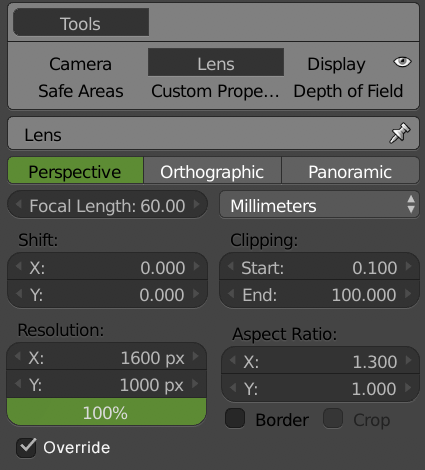
Hey guys, I was wondering if this has been already mentioned but it would be great that we could have a different resolution for each camera. Right now if you have a photoshoot you have to change the global resolution every time. Having an option in the camera to override the global frame resolution would be amazing. Let me know if I am missing any other easy way to do that, please.
This idea was marked as a duplicate of Overwrite global camera resolution.
11 Comments
I second this proposal, this would be very handy in ArchVis productions. The current alternatives are rather clumsy at best.
@tom1: In case you are interested here we got an addon that supports having cameras with different resolutions. :) blenderartists.org/t/photographer-camera-exposure-white-balance-and-autofocus/1101721/109
* @luisburdallo * (Late reply, I know :p ) Yup, I found that one too and have integrated it into the workflow of my job. Though I did ask our more code-savvy colleague to remove everything except the resolution override function to keep things a bit more simple. I do love this function though and have used it in every project since then.
How would this affect the feature where you can make any object act as a camera? Would that just revert back to the global render size?
@Jason van Gumster: Not entirely sure what you mean. The idea is having a different resolution ratio for each real camera. Why would you use objects as cameras when you can just use real cameras to render? I am asking out of ignorance because I never had to use an object as the camera. But in that case, the resolution won't be overridden and it will use the global resolution as the override is per real camera only as shown on the above menu.
@luisburdallo: One example would be lights. It's pretty convenient to temporarily set a camera as your active camera and go into camera view to aim it directly at your subject.
@Jason van Gumster: I get what you mean. The idea behind my suggestion has nothing to do with that type of usage. Imagine you have a product and you got 4-5 cameras at different angles and at different resolutions. For me, it's super useful knowing how the shot frame ratio would look in the end instead of creating all shots in the same resolution and having to cut them later on or even worse having to change the aspect ratio each time I want to render a different camera. I think the only way now would be using different scenes but my suggestion would be much more straightforward.
@luisburdallo: I understand the value of what you're suggesting. I'm just trying to think through how all of the rest of Blender's features would be affected by such a change. I think if non-camera objects were treated as cameras, it'd have to revert to a global render size value.
Of course, if the objects as cameras feature didn't exist, then there really would be no need for a global render size. That would just be something set with each camera. That, then, raises the question: what other render properties would be interesting/suitable to have as camera-specific?
@Jason van Gumster: This idea is pretty simple. You don't want to override the global resolution you just never check the override feature in the camera settings. So you won't be affected if you don't need or understand the feature. For objects you don't need this feature so again, you won't be affected. It's like questioning why there are certain features in other Blender sections that I never use in my workflow. I already explained my workflow and not just me but I am sure there are other people and even more, people could get to use it more often if such feature was available.
@luisburdallo: I'm getting the impression that you think that I'm disagreeing or not in favor of this idea. That's not the case. It's just triggered some other thoughts that are related, so I've been extrapolating from there.
For instance, if render size could be overridden, then Aspect Ratio would also have to be included. It may also be interesting to have per-camera settings for frame range and file output. For Blender 2.8, it may even be nice to dictate a specific renderer for different cameras. Of course, those last two are probably out of scope for your proposal, but still interesting to think about.
@Jason van Gumster: You are right, I thought you just thought the proposal was of little use. That's a good point because even tho I have never used the aspect ratio yet and I see it has some specific uses that if you ever need to fix the aspect ratio you would probably need it for each camera, not entirely sure. The ratio could be placed right next to the dimension options. Will try to update the mockup now. Thanks for your input mate and sorry if I sounded harsh at any time as it was not my intention.