
Prevent Unhelpful Undo History Caused by Repeatable Operations
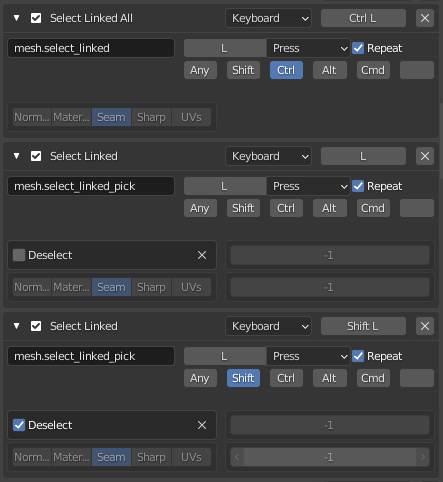
The attached image simply shows a few example Operations that make use of the 'Repeat' ability AND have this problem.
• The problem is:
When a repeatable operation is occurring, the undo stack rapidly fills up with history that has no changes.
*
For example:
* I occasionally hold 'L' and pass my mouse over geometry in order select a bunch of not-attached geometry. This causes the operation to be called many times per second. Most of those calls result in no change to my selection AND all of those calls produce undo history.
• Solution 1: Detect if the operation has caused a change THEN create an undo entry accordingly.
• Solution 2 • My preference: An undo entry should have been created prior to pressing an operation's key. No undo entries shall be created while holding that operation's key. An undo entry should be created when I release the key.
22 Comments
Wow, this can quickly push all other precious operations out of small Undo buffer! {attachment repeated_operations_undo_listjpg}
* @ErminOS * Thank you for this. This screenshot accurately shows what is happening.
This could be a bug, IMO
Who ever thought that recording Select in the Undo history is a good idea...?
* @jaroslav.zaruba * Selection change by itself is a good thing to have in undo history, IMHO. But the problem here is - too many (unsuccessful) Select Linked operations recorded/undoable.
* @ErminOS * I disagree, also I believe it is not the expected behavior. (Like so many things in Blender it had to be somehow "special" while making things worse.) But having this as a checkbox in Settings would be the ideal solution.
* @jaroslav.zaruba * Usually I support user's right to fine tune every aspect of program / tool. But in Blender the selection state of objects are something more than just volatile select/deselect. It's saved in .blend file and it's also retained for Edit Mode (when you enter it - the last selected vertices/edges/faces will be still selected - which is very nice feature, it have helped me many times).
* @ErminOS * It is something that has no impact on what is the whole purpose of the application. (Same with Toggle Edit Mode IMO. Those should be collapsed into one history entry.) Meanwhile camera movement, which has crucial impact on a final render, is not saved in the history.
* @jaroslav.zaruba * Viewpoint (viewing direction for a 3D Viewport) are not saved, but Camera movements are saved to history and can be animated by frames. docs.blender.org/manual/en/latest/editors/3dview/navigate/camera_view.html
* @ErminOS * I am not talking about animation. I do static visualisation as a hobby (not enough CPU power for animations), and whenever I move a camera accidentally, I am effed. :) Yes, I could lock it from all transform axxes but that's merely a workaround. Moving your camera affects the final result (that's what I meant by purpose of the app, badly phrased), yet it is not undoable. Select does not affect the render, yet it is undoable. One of many inconsistencies in Blender. :( Anyways, I am merely repeating myself at this point. Cheers, have a nice one
* @jaroslav.zaruba * You can make camera unselectable or even invisible , that way you can't accidentally move it :)
* @jaroslav.zaruba * Also, if you don't like cameras at all, you can delete them, and enable the plugin Stored Views (ships with Blender)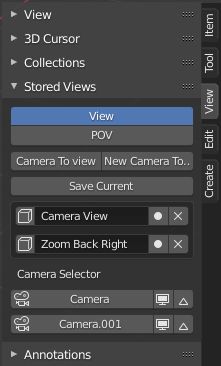
* @ErminOS * I want to use them.
* @ErminOS * I don't want to delete them.
I know of a better workaround, I already mentioned it before, but that's besides the point. The point is Blender gives you an Undo for something that has zero impact while not giving you one for something that has tons of impact.
* @jaroslav.zaruba * If by using camera you mean - seeing through it, you can still switch to unselectable / invisible active camera (by pressing Numpad-0) and see your scene :)
* @jaroslav.zaruba * I very often use undo to revert to a previous selection.
Camera movement IS undoable.
* @LilacDogoo * How please?
* @ErminOS * Not sure how is that related to the topic. 1) As I said twice already I know of a workadound. 2) None of what you suggested prevents accidentally moving the camera - you switch to it, you move the view, voilá, you have moved your camera because you have it locked to view. And before you go and suggest I don't lock it to a view, let me go ahead and say I need/love that functionality.
Camera movement should be included in the Undo history.
* @LilacDogoo * You are saying camera movement is undoable yet there is topic with 42 votes asking exactly for that. How is that possible? :D
blender.community/c/rightclickselect/nJfbbc/
* @jaroslav.zaruba * For me it's easy - I've assigned the plain V-key to Lock camera to view and I switch this option as often as needed for certain situation :) So, I've learned not to "move" camera accidentally.
* @jaroslav.zaruba * ctrl+z
* @jaroslav.zaruba * If people would get their terminology strait, there would be less confusion. The thread you linked is actually about the View Port's "View". Not a camera. Camera's are objects placed with a scene.
The title of that thread should be changed.