
Text Shadow Setting for Video Seq.
I couldn't see a way to adjust the shadow (edge sharpness, offset) on the Text in the Video Sequencer. All I see is a way to turn the shadow on/off, color and opacity. That's it.
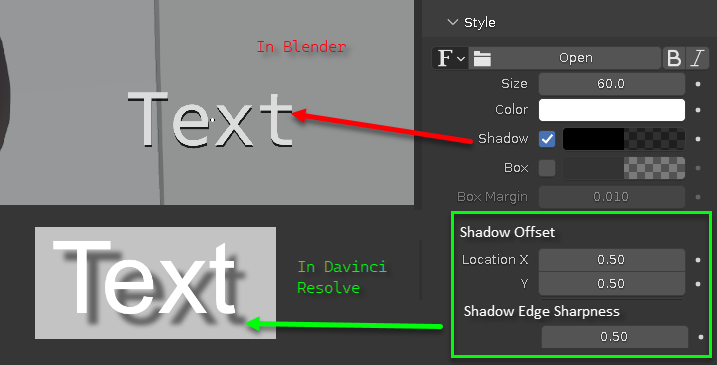
I would like to suggest that an option to set the "offset" and the "edge sharpness" (blurriness) be added to the N-Panel on the video sequencer editor like attached image. (See the green square on bottom right)
This shadow is so old school, (back 10+ years) that isn't very useful graphically in most cases. Way to sharp, small and basic.
Notice on my attached image the way it looks in most videos/vector programs that offer text shadows.
This is the only reason I don't use the Video Sequencer in Blender. I use Davinci Resolve instead. But, I would use Blender's video editor if it had better text settings. I like the fact that I can use a 3D model directly in the editor, but 3D is not doable with the free Davinci Resolve version, you have to make your animation in Blender, export it and then import it into DR to add it to your videos.
Thanks for your consideration.
1 Comment
That is the solution I would recommend.