
Alt+Click to isolate visibility in Outliner and Graph Editor
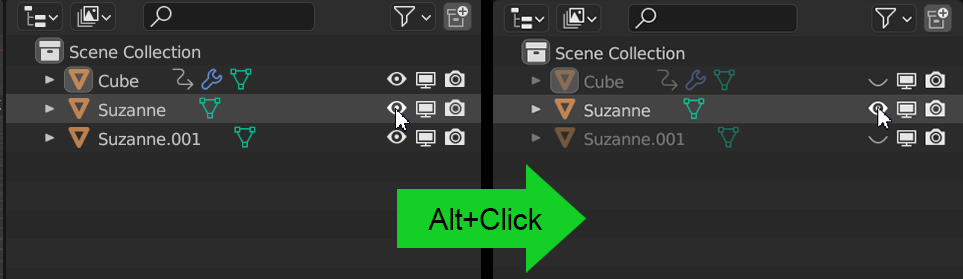
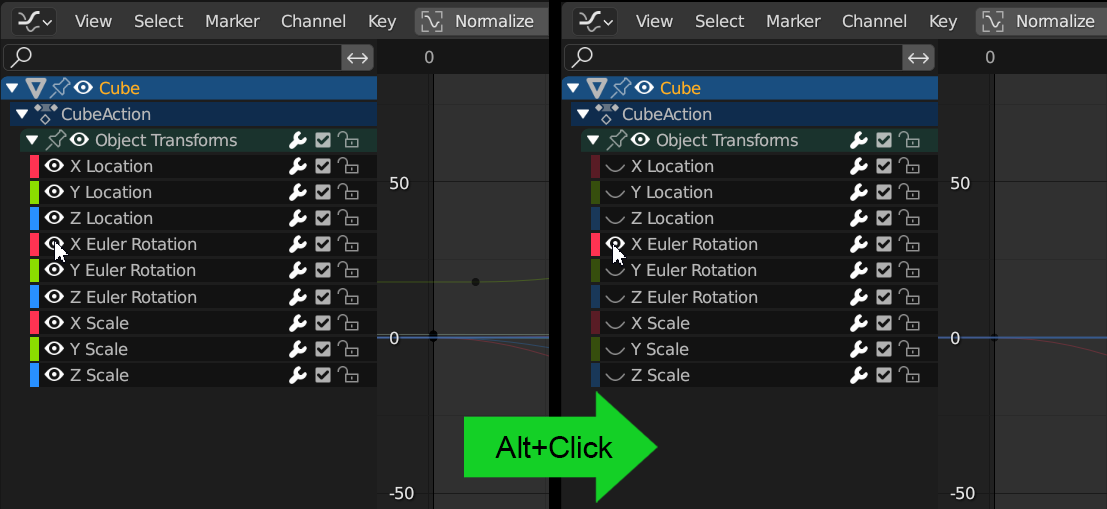
Like in many 2D apps, I think it would be useful to be able to Alt+Click to isolate the visibility of an object/channel.
In the case of the Outliner, this should work with every restriction toggle (hide, disable in viewport/render, holdout, etc.).
While we have indeed the Shift+H shortcut to do the same, it's a 2-step process where we need to first select and then press the buttons, with this it would be just one: hover with the mouse on the icon, Alt+Click to isolate. Shift+Alt+Click on other items to extend it. To bring back everything, Alt+Click again.
Outliner
 Graph Editor
2 Comments
Nice! This could be a good one for a community contributor. Made a "Good First Issue" task for the Graph Editor: projects.blender.org/blender/blender/issues/143068
The outliner objects one might be more involved, will check with the devs.
Thank you so much for your interest Pablo!
If I can take advantage of this ahaha, there are other 2 requests I made, related to the Outliner, that I'm craving from years (especially the first one). Hopefully they also can be considered GFI:
blender.community/c/rightclickselect/LJmW/
blender.community/c/rightclickselect/t1gbbc/