
User Interface: Adding Principled material color automatically adds the Viewport Display color
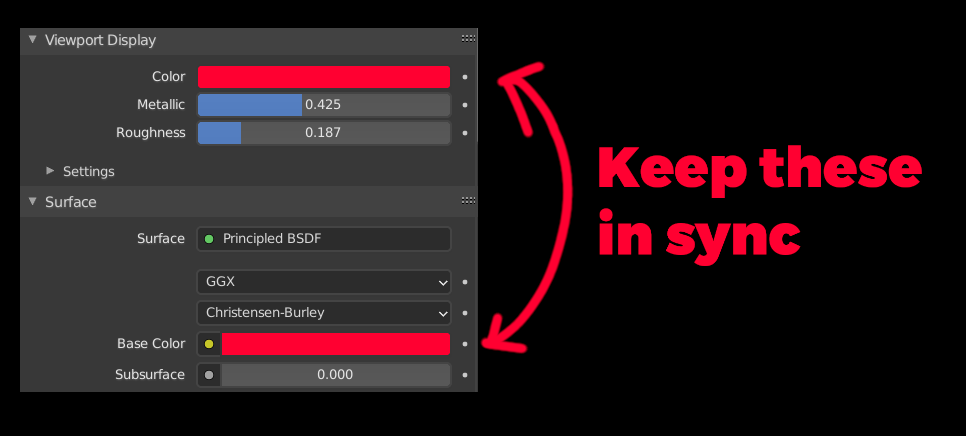
I am always annoyed that you need to put the color to two slots instead of one. This could be only about a Principled BSDF and a Diffuse material maybe also.
So, when you put a new material to an object and change the Principled BSDF color in the Surface panel, the Viewport Display color should automatically change to what you defined for Surface panel. If you change it in the Surface panel, it should change to the Viewport Display color also.
BUT, if you really want to change the Viewport Display color (very rarely needed), you could, this would break the connection between the Surface color and Viewport Display color.
All these things add up when you use Blender a lot, it should be streamlined in everywhere possible in my mind.
Thank you.
5 Comments
I desagree, I like the way it is so just change the viewport color when I want to do it. But maybe can be a preference for that so ypu can change the default behavior to one method (linked) or the other (unlinked)?
Not every material uses the Principled BSDF. If you use a different shader or direct color output (shader to RGB, EEVEE) the whole thing becomes unintuitive as there is a whole array of possible nodes that can be connected to the output. Even if we limit this to the principled shader, driving color, roughness or metallic using nodes or textures would already break this functionality.
I disagree that it's connected like that. Perhaps instead a checkbox to "use shader color" or something. Which yes, could be on by default. But I like to SEE that it's a separate function.
Oh yes this has bothered me quite a lot as well.
26 Jul 2019 Link Material Viewport Display color to actual material color
PS. Use search, it's helpful.