
Expose the Color Stop's position as inputs
Currently, Blender allows adjusting a Color Ramp's Color Stop position either by dragging the slider or manually entering a value. While this works for most cases, it becomes limiting when the position needs to be driven by a variable or logic within the shader editor.
The current workaround—adding a driver manually—is cumbersome, especially as the shader complexity grows. Exposing the Color Stop position as a node input would greatly improve flexibility, enabling dynamic control and faster iteration in shader development.
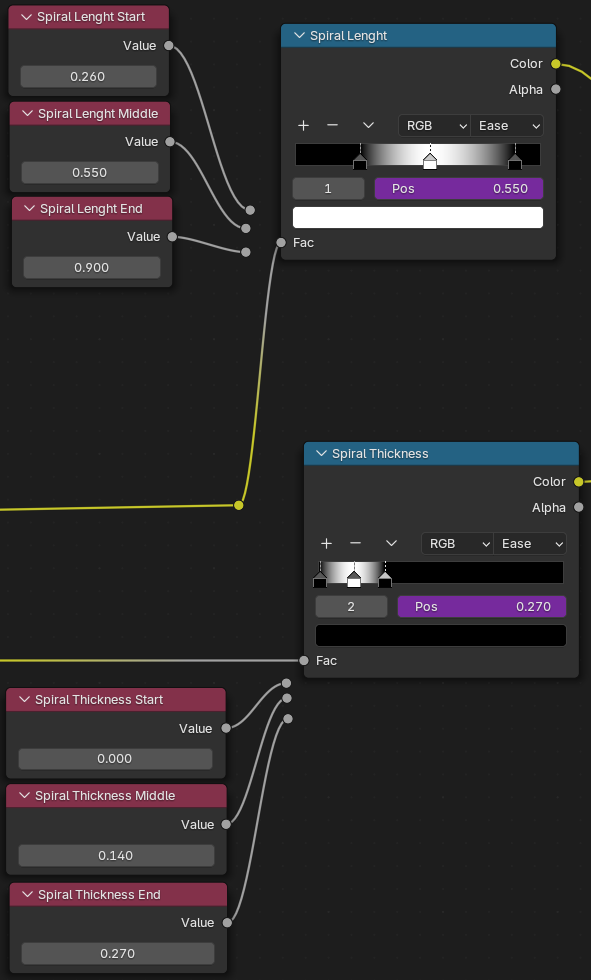
This idea was marked as a duplicate of Inputs for color-ramps.
4 Comments
It's been requested multiple times already, please prefer upvoting and commenting on existing proposals to make them more visible in the list instead of adding yet another proposal in the list that dilutes the topic's visibility.
And mark this as duplicate of one of them
I guess that wont be implemented soon.
Meanwhile: Another workaround would be making it as node group with Mix nodes instead of texture ramp.
Eg. Your simple case would be something like that: video:
imgur.com/a/PYMs6Zy
video:
imgur.com/a/PYMs6Zy
Advantage over color ramp is that wont suffer from texture limitation, so those color and position parameters can be beyond 0-1 range. But disadvantage is performance and complexity of that node (and maintaining order of inputs)[but for 3 points it will probably be better for performance than remap node].
Interesting setup. Thanks !